.jpeg)

Pro Gear Advisers
•866-498-7882
Beat-Making on the Akai Professional MPC Sample with DIBIA$E
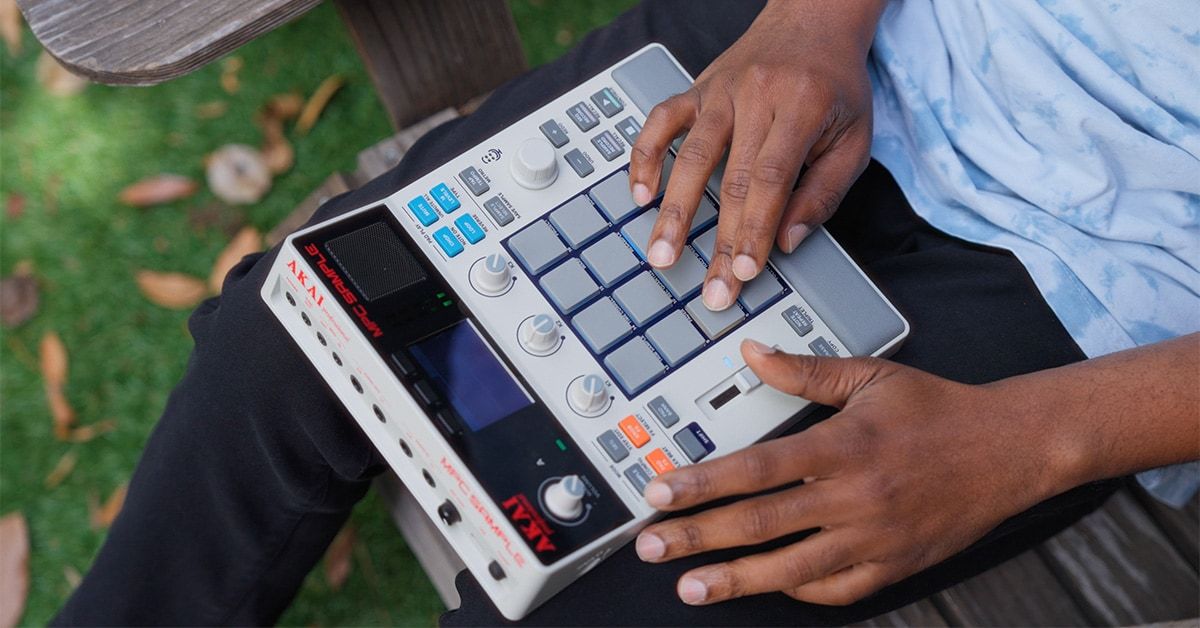
The Akai Professional MPC Sample brings the iconic MPC workflow to beatmakers and creators of all styles and skill levels. It’s an easy-to-use workstation that combines sampling, sequencing and effects processing in a portable, battery-powered package that also includes a built-in microphone and onboard speaker. You could literally produce music sitting atop a mountain, lounging by a pool or hanging out at your favorite park.
Renowned producer and lo-fi beatmaker DIBIA$E—who purchased his very first MPC at Guitar Center in 1997—offered to share some of his favorite features and production techniques on the MPC Sample.
Akai Professional MPC Sample Key Features
- 16 RGB backlit MPC Pads with poly aftertouch
- 2.4" full color display
- Onboard sequencer
- microSD card storage for user samples
- Built-in speaker
- Internal disk-streaming sample engine
- Onboard effects
- Built-in microphone
- USB-C connectivity

Shop Now: Akai Professional MPC Sample
DIBIA$E On Using the MPC Sample's Effects
“The MPC Sample gives you 16 different pad effects, from delays, flangers, phasers and reverb to cassette and vinyl saturation and lo-fi. I will usually latch something like lo-fi to add some texture to the beat. When I latch the effect to a pad, it stays on even if I release the pad, so I don’t need to hold it down. You can also latch multiple effects together. You can get some real good dirty textures with this MPC Sample.”
DIBIA$E on Why the MPC Sample Sidechain Compressor Is a Cool Tool
“One of my favorite features on the MPC Sample is sidechain compression—or ducking—which you can assign to any one of the pads. The reason I like to use sidechain compression is it gives a sample more space. It ducks down a sample in volume whenever the kick drum is hitting and that adds a vibe to me. So, if you don’t want your bass line occupying the kick drum’s space, the sidechain compression ducks the bass, giving more space to the kick. For the style of music I make, sidechain compression is a cool thing.”
DIBIA$E On How Easy the MPC Sample Is To Use
“If you come from the MPC ecosystem, you're going to catch on to the MPC Sample real quick. It's not a crazy learning curve—it's going to make sense instantly for you. But even if you have no experience making beats at all, it's pretty easy. There’s not too much menu diving—just the shift button—and the effects are very fun.”
DIBIA$E On "Undercover" Beat Making
“The MPC Sample fits in a pouch, so it's like you can be real incognito with it. It runs off batteries for five hours. You could be on a train or a plane. There are so many ways to sample into it, too. You have the option of sampling with the line inputs—where you could plug in a turntable or Walkman or anything. Or, you have a built-in microphone and USB-C for plugging directly into your iPad or iPhone and dragging and dropping folders directly to the MPC Sample. It’s going to be a Swiss Army Knife—you don't even need to go to your computer.”
Continue On Your MPC Journey
Written By: Michael Molenda
Michael Molenda is a content strategist, editor and writer for Guitar Center, where he has worked since 2022. He is the longest-serving Editor in Chief of Guitar Player (1997-2018), and former Editorial Director of Bass Player, EQ, Keyboard, Electronic Musician, Gig and Modern Drummer. A guitarist, drummer, bassist and producer, Mike co-owned three pro recording studios in San Francisco, and performs with Surf Monster and The Trouble With Monkeys.
Be the first to know about exclusive offers, tips and more.

866-498-7882 English
877-687-5402 Español