.jpeg)

Pro Gear Advisers
•866-498-7882
5 Standalone Music Production Devices That Can Free You From Computers

If you need a break from your laptop, you’re not alone. Computers are incredible music-making tools, but they also come with a whole extra layer of “computer stuff”—updates, notifications, file management, plug-in rabbit holes and occasionally that weird feeling that you’re doing work instead of making music. Sometimes you want something that feels more like picking up an instrument than opening a session folder and clicking through menus. That’s where standalone production devices come in.
Standalone production gear helps you capture ideas fast and turn them into finished tracks—without a laptop as your liaison. Below are five options that span beatmaking, sampling, synth-driven production and full-band recording and mixing—all approachable starting points if you’ve been flirting with the idea of going “DAW-less.”
Top 5 Standalone Music Production Devices
Akai Professional MPC Live III
Why We Picked It: If you want a full-fledged studio hub that doubles as an iconic sampler, and you’d love to be untethered from power cables, this is the one.
Key Features
- Standalone workflow with onboard battery, speakers and mic
- Deep MIDI and CV control for running external gear from one central brain
- Built to cover the full process: sampling, sequencing and arranging

Shop Now: Akai Professional MPC Live III Standalone Music Production Center
While its legendary status is forever enshrined in hip-hop and electronic music, it can be a secret weapon for any type of musician across genres. Like you would in any style of music, you start with a groove, add a bass part, layer chords or riffs, then carve out sections—a workflow the MPC has famously made easy. The MPC Live III is a great middle ground between the tiny MPC Sample and the flagship MPC XL, as it’s got both the portability factor and a DAW-like experience with its touchscreen and expansive plug-in ecosystem. If you’ve got other hardware (MIDI keyboards, drum machines, modular synths), Live III’s MIDI/CV makes it a very capable centerpiece that can pull a whole rig together.
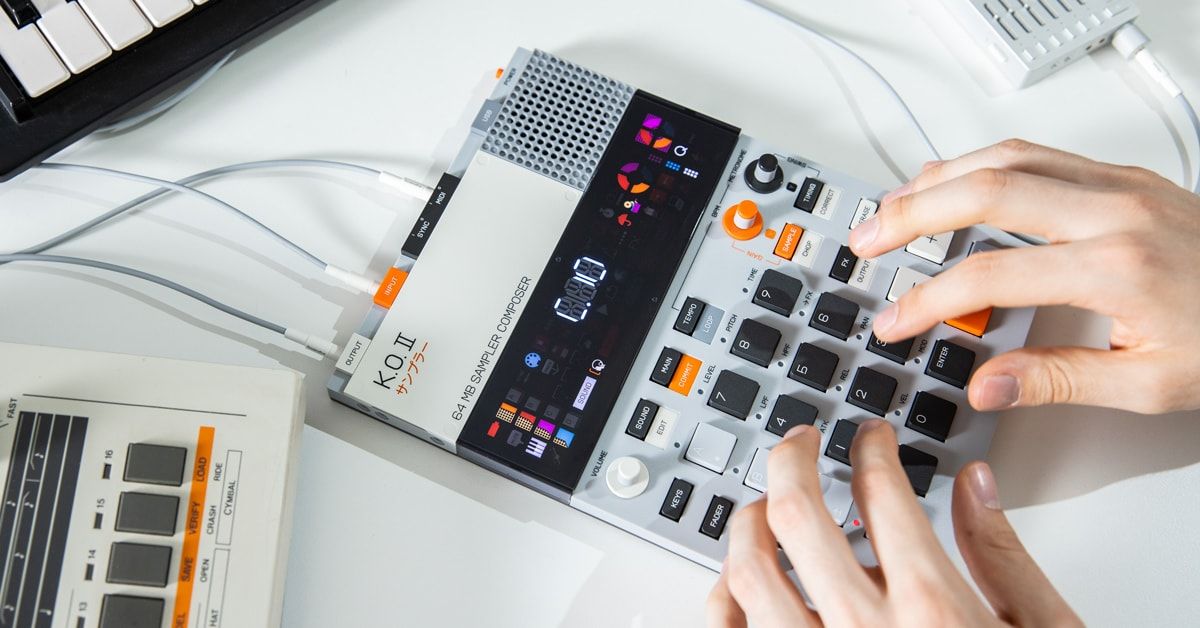
teenage engineering EP–133 K.O. II
Why We Picked It: If you love the idea of making beats anywhere—the EP–133 is an addictively entertaining alternative to the laptop.
Key Features
- Compact sampler and sequencer
- Built-in mic and speaker
- Sidechain compression

Shop Now: teenage engineering EP-133 K.O. II Sampler and Composer (128MB)
With its funky control symbols (like an umbrella for undo, a rabbit for tempo and a boxer for swing) and the EP–133 K.O. II is arguably the most quirky and whimsical groovebox available today—which is especially great when you want to stay in the creative zone. You can build a drum groove, drop in a few one-shots or chops, then start arranging variations without overthinking it. If you’ve been craving a setup that feels immediate and playful (but still capable of turning a spark into a full idea), the EP–133 makes going DAW-less fun and easy.
Roland SP-404MKII
Why We Picked It: It’s a fast, affordable way to get to something personal sounding, especially if you like texture, grit and happy accidents.
Key Features
- Up to five hours of battery life
- Built-in speakers
- Resampling workflow lets you quickly turn effected and layered sounds into new samples

Shop Now: Roland SP-404MKII Creative Sampler and Effector
The magic of the SP-404MKII is the way it nudges you toward committing. Instead of endlessly tweaking a chain, you can print the vibe—grab a riff, a drum loop, a vocal chop, run it through effects, resample it and suddenly you’ve got something uniquely yours. That print-and-go mentality can be incredibly freeing if you’re used to infinite undo. And for guitarists especially, it’s a fun way to turn raw parts into a full production without staring at waveforms all night.
Roland FANTOM-0 Series
Why We Picked It: You get keys under your hands, faders and knobs within reach, plus an audio interface with generous I/O.
Key Features
- Built-in 4x32 USB interface for expansive audio and MIDI connectivity
- Clip-based sequencing lets you build tracks in sections
- Available in FANTOM-06, FANTOM-07 and FANTOM-08 formats

Shop Now: Roland FANTOM-08 Synthesizer Keyboard
Roland’s FANTOM-0 series of workstations earns its place here with its seamless ability to create songs from start to finish. Its performance-first, clip-based approach makes it fun to build multiple sections quickly, then stitch them into a full arrangement without breaking your flow. And while the goal is to get away from computer-centric workflows, that USB audio interface is still a big quality-of-life win—saving you from extra boxes and complex routing schemes.
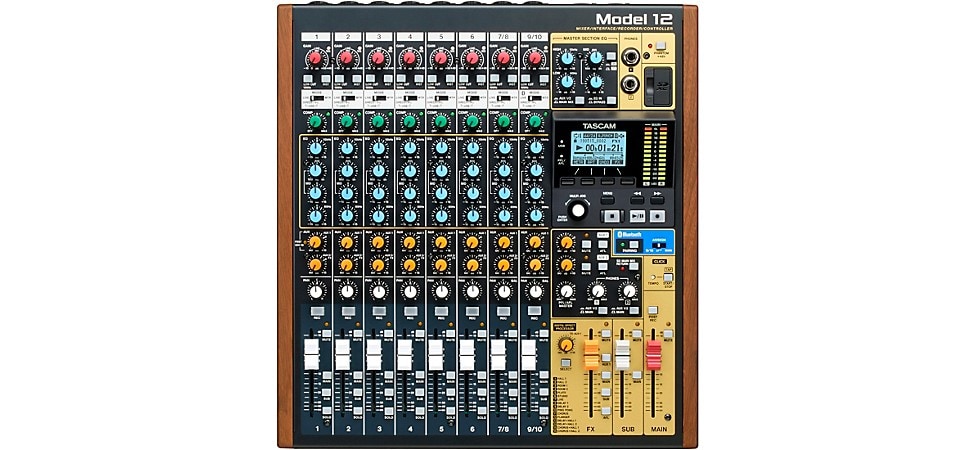
TASCAM Model 12
Why We Picked It: Model 12 is for the musician who wants to hit record, ride a fader and feel like they’re making a record instead of clicking their way through one.
Key Features
- Standalone workflow with onboard battery, speakers and mic
- Deep MIDI and CV control for running external gear from one central brain
- Built to cover the full process: sampling, sequencing and arranging inside the unit
Shop Now: TASCAM Model 12 12-Channel All-in-One Production Mixer
Whether you’re recording vocals, guitar, keys or a whole band, there’s something intrinsically motivating about having a dedicated box where the only item on the agenda is capturing the take. No windows, notifications or other distractions—just levels, straight-forward sound shaping and creative momentum. Model 12 is also a great bridge for people who still want the option to integrate a computer later on, while keeping the core experience grounded in a tactile, mixer-first workflow.
Go DAW-Less: How to Choose a Standalone Music Production Device
If this is your first time shopping the standalone realm, the easiest way to choose is to follow your natural instincts as a musician. Pursuing the gear of your musical heroes is great, but your North Star ultimately should be picking the device that suits your creative style—then keeping your setup simple enough that you’ll be enticed use it every day.
Of course, there’s no better way to find out which standalone device is best for your needs than checking them out in person at your local Guitar Center store. Otherwise, our Gear Advisers are always at the ready to help narrow down your search based on your wants and needs.
People Also Ask …
What is a standalone music production device?
A standalone production device is hardware that can create, arrange and often record music without needing a computer. Many include sequencing, sampling, onboard sounds, effects and hands-on controls so you can build full ideas directly on the unit.
Can you produce full songs without a computer?
Yes—many artists build full tracks DAW-less. The key is choosing a device that matches your workflow (pattern-based, sampling-based or workstation-style) and committing to a simple song structure early (verse/bridge/chorus, A/B sections, etc.).
What’s the best standalone device for beginners?
The “best” standalone device depends on what kind of musician you are. A velocity-sensitive-pad production center like MPC is great if you want one box to take you from idea to song, while a sequencing-forward option like SP-404MKII is perfect if you want rhythm and texture to lead. A workstation like Roland’s FANTOM-0 or Yamaha’s MODX series fits players who feel at home on a keybed.
Is going DAW-less better than using a DAW?
Not better—different. DAWs are incredible for recording, editing and mixing. Standalone devices can feel more immediate, musical and distraction-free for writing and early production. A lot of musicians use both, depending on the phase of the project.
Do standalone devices still work with computers if I want that later?
Most do. Many offer USB audio/MIDI connectivity so you can integrate them into a larger setup when needed, without having to start on a computer every time.
Written By: Drew Beaupré
Drew Beaupré is a multi-instrumentalist, audio engineer and writer. With a bachelor’s in psychology from Purdue and background as a gigging guitarist and drummer, he began his audio career at the world-famous Westlake Recording Studios, before venturing into live sound engineering for clients such as KCRW, Santa Monica College, CSULA and Nyjah Huston—eventually becoming studio manager at Guordan Banks’ Bank On It Studios in downtown L.A. He also has worked extensively with the industrial band Ministry, as an engineer at Al Jourgensen’s studio, as well as domestic and international touring stage tech for DJ Swamp and Joey Jordison. Prior to writing with Guitar Center, Drew has written for Fender and various music blogs.
Recently Added to Buying Guides
Be the first to know about exclusive offers, tips and more.

866-498-7882 English
877-687-5402 Español