
DigitalPianistSynths


Pro Gear Advisers
•866-498-7882
Guitars
Guitars
Amps & Effects
Amps & Effects
Used & Vintage
Keyboards & MIDI
Keyboards & MIDI
Drums
Drums
DJ Equipment
DJ Equipment
Basses
Basses
Recording
Recording
Live Sound
Live Sound
Accessories
Accessories
Mics & Wireless
Mics & Wireless
Music Software
Music Software
Lighting
Lighting
- Popular Brands
Band & Orchestra
Band & Orchestra
Platinum Gear
Deals
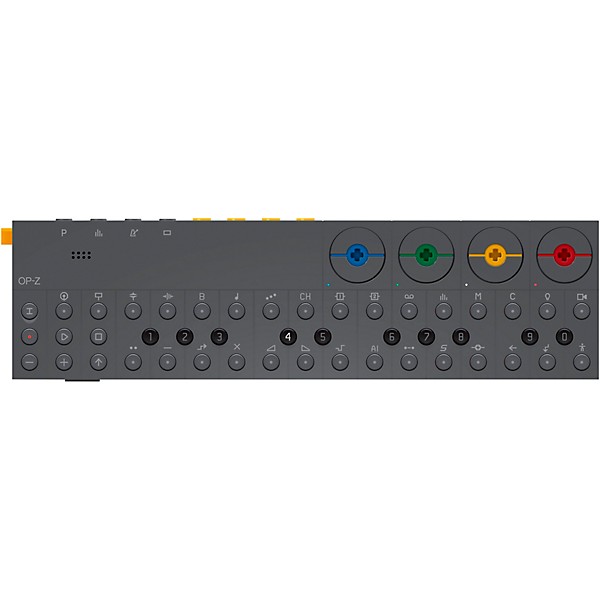
teenage engineering OP-Z Portable Synthesizer and Sequencer
$429.00

Need Help?
Videos (2)
View All
OP-Z introduction

OP–Z video in photomatic
Description
After over six years since its initial release, the follow up to Teenage Engineering's acclaimed OP-1 synthesizer is here. What was initially written off as a toy, the OP-1 has gone on to become one of the most unique and iconic synthesizers in the industry. Now the OP-Z pushes the boundaries of this iconic synth even further. Coming in at about half the size, with even more DSP than the OP-1, the OP-Z consumes less energy than its older brother, allowing you the ability to sequence songs across 16 tracks, just about anywhere you want to take it without the risk of running out of power.
Still, OP-Z is about a lot more than just composing music. the Z stands for the third dimension, the depth, the creativity involved in making music. Imagine animated art and videos that accompany your live show, or sequenced lighting, all the way down to composing your own interactive software. some people would call a device like this a dream machine. Teenage Engineering calls it the OP-Z.
16-Track Sequencer with Step Components
Centered around an advanced 16-track sequencer where all tracks run independently, OP-Z makes individual track speed and track length possible. In addition, you also have the ability to add unique step behaviors to every one of the 16 steps to create greater depth and complexity to your sequences. Think of this as dual layer sequencing where the first layer is a traditional 16 step sequencer, while the second layer adds variation per cycle, note variation, micro sequencing, direction, parameter changes, re-trig's and much more, all on just one single step
All 14 components have 10 values and behavior programs. The product of all this is that you have 140 ways to alter just one single step and to make step composing really intuitive and super-fast, all keys are backlit with multi-color LEDs with instant machine feedback, a must-have for poorly lit club gigs and late-night-in-bed composing. Actually, the print on the unit itself is made with a special glow-in-the dark-paint.
Bring Your Own Screen
OP-Z is a completely stand-alone synthesizer and composer, ready to be used at anytime and anywhere, but for those of you who need that extra injection of vibrant graphics, interactive user interface and awesome synced animations to feel inspired, the team at Teenage Engineering has introduced the concept of BYOS - bring your own screen.
Just download the OP-Z app on your phone or tablet, pair the two devices and you are all set. Add cellular connectivity, Wi-Fi and powerful graphics processing to that and the concept certainly makes sense. All this tech when connected to the OP-Z adds several unique features, like using the phone's camera, snapping a series of photos and arranging them to a beat, creating a synchronized music video.
Full Unity 3D Integration
Teenage Engineering have worked closely with Keijiro Takahashi and the Unity Tokyo studio to fully integrate OP-Z with the Unity Game Engine. as Keijiro-san is both a full-time software evangelist at Unity and a renowned VJ at night, the Teenage Engineering team has had access to a selection of Keijiro-san's personally developed tools which deliver stunning 3D graphics that run at full speed on iPhone or iPad. Keijiro-san's tool-set and real life experience in performances with motion graphics have been invaluable in making OP-Z an inspiring live tool for moving images in sync with music. One of the biggest challenges for a VJ has always been the creation of content. By exposing the inner control data of the OP-Z and linking it to Unity, users can create anything within Unity, build the project and just put the build into a Dropbox folder. Customizing every single polygon in a performance.
It You Don't Have Tape, It's Not OP
The tape feature is probably one of the coolest sonic features of the OP-Z. Imagine a short snippet of tape secretly recording everything that is programmed in the sequencer – all in real time. And with its own dedicated track it's possible to sequence the tape, trig the in-point, length and speed. OP-Z comes with a range of tape reels with unique character and functions scrub, scratch, wind-up and mess-up!
Still, OP-Z is about a lot more than just composing music. the Z stands for the third dimension, the depth, the creativity involved in making music. Imagine animated art and videos that accompany your live show, or sequenced lighting, all the way down to composing your own interactive software. some people would call a device like this a dream machine. Teenage Engineering calls it the OP-Z.
16-Track Sequencer with Step Components
Centered around an advanced 16-track sequencer where all tracks run independently, OP-Z makes individual track speed and track length possible. In addition, you also have the ability to add unique step behaviors to every one of the 16 steps to create greater depth and complexity to your sequences. Think of this as dual layer sequencing where the first layer is a traditional 16 step sequencer, while the second layer adds variation per cycle, note variation, micro sequencing, direction, parameter changes, re-trig's and much more, all on just one single step
All 14 components have 10 values and behavior programs. The product of all this is that you have 140 ways to alter just one single step and to make step composing really intuitive and super-fast, all keys are backlit with multi-color LEDs with instant machine feedback, a must-have for poorly lit club gigs and late-night-in-bed composing. Actually, the print on the unit itself is made with a special glow-in-the dark-paint.
Bring Your Own Screen
OP-Z is a completely stand-alone synthesizer and composer, ready to be used at anytime and anywhere, but for those of you who need that extra injection of vibrant graphics, interactive user interface and awesome synced animations to feel inspired, the team at Teenage Engineering has introduced the concept of BYOS - bring your own screen.
Just download the OP-Z app on your phone or tablet, pair the two devices and you are all set. Add cellular connectivity, Wi-Fi and powerful graphics processing to that and the concept certainly makes sense. All this tech when connected to the OP-Z adds several unique features, like using the phone's camera, snapping a series of photos and arranging them to a beat, creating a synchronized music video.
Full Unity 3D Integration
Teenage Engineering have worked closely with Keijiro Takahashi and the Unity Tokyo studio to fully integrate OP-Z with the Unity Game Engine. as Keijiro-san is both a full-time software evangelist at Unity and a renowned VJ at night, the Teenage Engineering team has had access to a selection of Keijiro-san's personally developed tools which deliver stunning 3D graphics that run at full speed on iPhone or iPad. Keijiro-san's tool-set and real life experience in performances with motion graphics have been invaluable in making OP-Z an inspiring live tool for moving images in sync with music. One of the biggest challenges for a VJ has always been the creation of content. By exposing the inner control data of the OP-Z and linking it to Unity, users can create anything within Unity, build the project and just put the build into a Dropbox folder. Customizing every single polygon in a performance.
It You Don't Have Tape, It's Not OP
The tape feature is probably one of the coolest sonic features of the OP-Z. Imagine a short snippet of tape secretly recording everything that is programmed in the sequencer – all in real time. And with its own dedicated track it's possible to sequence the tape, trig the in-point, length and speed. OP-Z comes with a range of tape reels with unique character and functions scrub, scratch, wind-up and mess-up!
Features
- Advanced multi-speed 16-track sequencer
- 14 multi-program step components for advanced step sequencing
- 160 user programmable patterns, endless patterns chaining
- Dual domain synthesis for extreme low latency performance
- 6-axis motion sensor (g-force) assignable to any synthesizer parameter
- Upgradeable modular effects architecture, includes reverb, delay and more
- Free OP-Z iOS app acts as additional remote with extended features
Reviews
3.67
3 Reviews
67%
of respondents would recommend this to a friend
Filters
Best Uses
- Accompaniment1
- Electronic Music1
- Learning1
- MIDI1
- Travel1
Cons
- Difficult to Use2
Describe Yourself
- Professional Musician2
- Experienced1
Pros
- Portable2
- Easy to Use1
- Pre-programmed music1
- Responsive / Good Action1
Reviewed by 3 customers
Powerful, fun, compact sequencing
submitted4 years ago
byChristopher, A
fromDallas Texas
Such a fun way to make music, using your phone as a screen can help at first but once you have a handle on the controls it's easy to quickly put together sequence based music along with being able to sample it's a very powerful tool if you know how to use it.
no
submitted5 years ago
byd
fromseattle, wa
One of the worst companies I have ever worked with
Incredibly powerful sequencer but not a perfect product
Verified Buyer
submitted5 years ago
byBill P
fromChicago IL
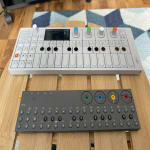
This is a really powerful sequencer that's very easy to get into at first but takes a little bit of work to get the full experience from. I mostly make guitar driven grunge type music and some experimental noise rock so I'm not exactly a synth person and have limited experience with sequencers (only the Korg Volca series and my OP-1). I didn't know what to expect from the OP-Z because it looks like a small OP-1 without a screen and how people use it varies wildly. Having it now for a month or two I can say that this takes the best core parts of the OP-1 synth engines and sampler and puts them into a sequencer that works great for live performance or for just creating full tracks. This thing has a lot of tricks but the focus here is on the sequencing. The step components and spark components allow you to vary any sequence in 14 different ways. The simplest and best feature of the sequencer is the step component that lets you choose a step and tell the sequencer to ignore it every so many steps. So you can create drum fills on a pattern that only get triggered every 4th bar for instance. The sampler is basically the same as the OP-1 but I've not used it much because the design of the unit just doesn't really call me to sample on it. I prefer recording samples elsewhere and using my computer to transfer them to the OP-Z then either chop them on the OP-Z or make other minor edits to the ADSR or something. I actually like using the OP-1 to sample synths and drums that I can then transfer to the OP-Z. The MIDI support on this thing is incredible. You can use it as a host, as a controller, or have it sequence other MIDI devices. I don't have the OPLab module and really don't feel the need for it if you already have another USB host or an audio interface with MIDI support. I love my Volcas for their sound and I use my OP-1 and OP-Z to actually sequence them. My only issue with the OP-Z is that it tends to slightly bow in the middle due to the material it's made of
- Previous
- 1
- Next
Q&A
Have a question about this product? Our expert Gear Advisers have the answers.
submitted7 years ago
asked byDevin
fromOR
Is this real..? TE hasn't announced any price info on this product yet...
We're sorry – we no longer carry this item
Be the first to know about exclusive offers, tips and more.

866-498-7882 English
877-687-5402 Español