


StudioMonitorsMixing


Pro Gear Advisers
•866-498-7882
Guitars
Guitars
Amps & Effects
Amps & Effects
Used & Vintage
Keyboards & MIDI
Keyboards & MIDI
Drums
Drums
DJ Equipment
DJ Equipment
Basses
Basses
Recording
Recording
Live Sound
Live Sound
Accessories
Accessories
Mics & Wireless
Mics & Wireless
Music Software
Music Software
Lighting
Lighting
- Popular Brands
Band & Orchestra
Band & Orchestra
Platinum Gear
Deals
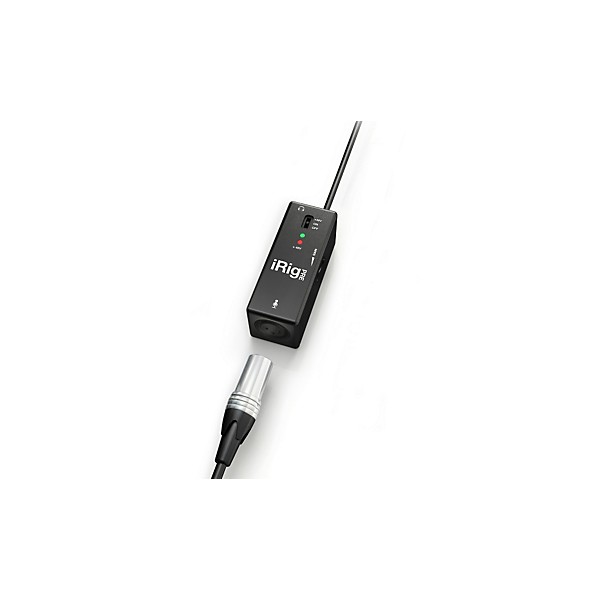
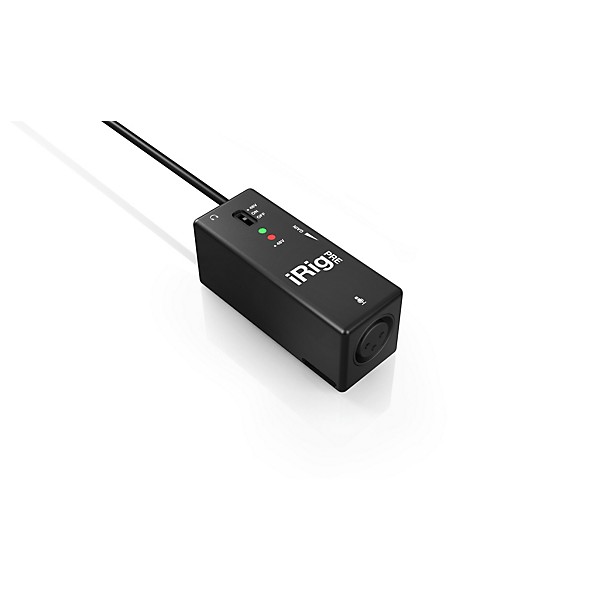
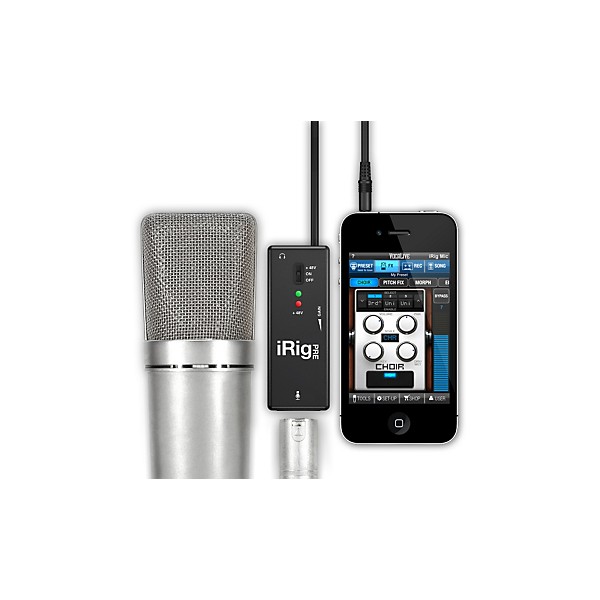
IK Multimedia iRig PRE Mic Pre for iOS Devices
$39.99
6-month special financing^ + $1 back in Rewards** Limited time Learn More

Protect your gearLearn more
Cover drops, spills or cracks with Pro Coverage

Need Help?
Videos (1)
View All
View Video

Description
IK Multimedia has created a solution for integrating any type of microphone with any iOS device, and that solution is the iRig PRE. The iRig PRE gives you ultimate flexibility in mobile recording with your iPhone, iPod touch, or iPad, allowing you to connect any type of microphone from regular stage dynamic types, to professional studio-quality condensers, giving you an extremely wide range of options.
iRig PRE is the first high-quality microphone preamp designed specifically for iOS devices that allows musicians to use their favorite high-quality stage or studio mics with their iOS device. You simply plug-in your favorite microphone directly into the standard XLR connector of iRig PRE with no need for extra cables or adapters.
Its adjustable thumbwheel gain control allows the user to easily make precise level settings. The onboard 9V battery provides the necessary voltage for phantom-powered studio condenser microphones allowing up to 15 hours of continuous use. The 3.5mm (1/8") standard stereo headphone output allows monitoring while recording, and the lightweight housing sports a convenient cable for iOS device connection. The iRig PRE also includes a Velcro strip slot for easy mounting on a mic stand or other stage locations.
Like all other IK Multimedia microphones, it includes 2 free apps: iRig Recorder (an easy-to-use recording/editing app) and VocaLive (an effects processing app for singers). And like the entire range of iRig accessories, it's highly portable thanks to its pocket-sized form factor for recording anywhere.
iRig PRE is the first high-quality microphone preamp designed specifically for iOS devices that allows musicians to use their favorite high-quality stage or studio mics with their iOS device. You simply plug-in your favorite microphone directly into the standard XLR connector of iRig PRE with no need for extra cables or adapters.
Its adjustable thumbwheel gain control allows the user to easily make precise level settings. The onboard 9V battery provides the necessary voltage for phantom-powered studio condenser microphones allowing up to 15 hours of continuous use. The 3.5mm (1/8") standard stereo headphone output allows monitoring while recording, and the lightweight housing sports a convenient cable for iOS device connection. The iRig PRE also includes a Velcro strip slot for easy mounting on a mic stand or other stage locations.
Like all other IK Multimedia microphones, it includes 2 free apps: iRig Recorder (an easy-to-use recording/editing app) and VocaLive (an effects processing app for singers). And like the entire range of iRig accessories, it's highly portable thanks to its pocket-sized form factor for recording anywhere.
What do I need to get started streaming?
If you are streaming stereo audio from a mixer, DJ set-up or anything with line-level output, the iRig Stream is an excellent option for your streams. This will allow for your signal to be sent into its RCA input and monitored through its onboard 3.5 mm headphone port. This headphone port will also allow a headset (CTIA/AHJ wiring standard) for narrating your performances.
For sending two balanced sources into iOS, like two XLR cables, check out iRig Pro Duo I/O. This powerful tool allows for two combo jack inputs (XLR and 1/4") for almost any kind of input to be sent to Mac/PC, iOS or Android.
If you're looking to simply stream your voice and no other signal, check out the iRig Mic HD 2 or iRig Mic Studio. These digital USB microphones will send a crystal-clear audio signal into an iOS, Mac/PC or Android device. If you use your own microphone, but just need a way to send your signal into your iOS, Mac/PC, or Android device, check out the iRig Pre HD.
Can I stream to Facebook Live, Instagram Live or other services using my iRig?
Yes. Apps such as Instagram, YouTube, Snapchat, Zoom Meeting and Facebook Live allow you to record/stream using both digital and analog iRig devices. Analog iRig devices use a direct connection to your mobile device's headphone port. This is usually through a 3.5 mm TRS connection. Digital iRig devices use a direct connection to the mobile device's USB-C, Lightning or Micro-USB port.
Note: Some apps will require you to start the video recording to activate your microphone. Not all apps will offer external audio input for every video capture option. In Instagram, the "Story" feature will not allow external devices.
Important: On iOS (iPhone/iPad/iPod), due to the nature of Facebook and Instagram Live and how they capture audio, the below workaround can be used with iRig audio interfaces (such as iRig Stream, iRig Pro DUO I/O or iRig HD 2) to allow for an uninterrupted audio input source.
- Download and launch iRig Recorder 3 LE from the Apple App Store. This is a free app.
- Go to the Menu in the upper right hand corner and then go to Settings. Inside here, enable the Background audio option.
- Use the COG WHEEL in the main page to select your input source. Keep in mind this is only an option for multi-input devices, so if you see a greyed out "Mono" option, this is because your device only offers this kind of input signal.
- Launch Facebook or Instagram and go to the Live video function. The audio input will now be routed to these apps
Important: Android users must have a device which allows digital audio or external audio input from CTIA/AHJ wiring standard devices to allow for the iRig to work properly.
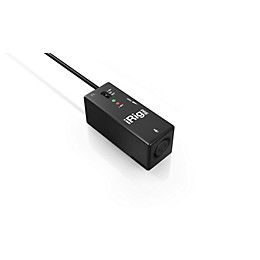
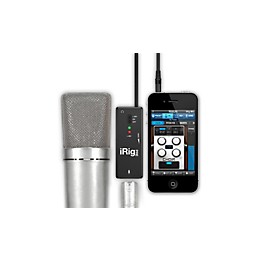
Features
- 40 cm (15.75") TRRS cable to connect to any iOS device headset jack
- XLR input connector for microphones
- Gain control
- +48 V phantom power
- Headphone output
- On/Off switch
- Power/Phantom Power provided by 9V battery
- Battery life is approximately 40 hours with dynamic microphones and 15 hours with phantom powered condenser studio microphones
- Includes 2 free apps: iRig Recorder, an easy-to-use voice recording/editing app, and VocaLive, a multi-effects processing app for singers.
- Compatible with iPhone/iPod touch/iPad.
Specs
- iRig PRE is compatible with iPhone 4S, iPhone 4, iPhone 3GS, iPhone 3G, iPod touch (4th, 3rd and 2nd generation), iPad 3rd generation, iPad 2 and iPad. They all require iOS 3.1.3 or later.
- iRig PRE does not support 1st generation iPod touch models, due to their lack of a mic input.
Warranty
7) LIMITED WARRANTY
IK Multimedia warrants to the original purchaser of the computer software product, for a period of ninety (90) days following the date of original purchase, that under normal use, the software program and the user documentation are free from defects that will materially interfere with the operation of the program as described in the enclosed user documentation.
8) WARRANTY CLAIMS
To make a warranty claim under the above limited warranty, please return the product to the point of purchase, accompanied by proof of purchase, your name, your return address and a statement of the defect, or send the CD(s) to us at the below address within ninety (90) days of purchase. Include a copy of the dated purchase receipt, your name, your return address and a statement of the defect. IK Multimedia or its authorized dealer will use reasonable commercial efforts to repair or replace the product and return it to you (postage prepaid) or issue to you a credit equal to the purchase price, at its option.
9) LIMITATIONS ON WARRANTY
IK Multimedia warrants only that the program will perform as described in the user documentation. No other advertising, description or representation, whether made by a IK Multimedia dealer, distributor, agent or employee, shall be binding upon IK Multimedia or shall change the terms of this warranty.
EXCEPT AS STATED ABOVE, IK MULTIMEDIA MAKES NO OTHER WARRANTY, EXPRESSED OR IMPLIED, REGARDING THIS PRODUCT. IK MULTIMEDIA DISCLAIMS ANY WARRANTY THAT THE SOFTWARE IS FIT FOR A PARTICULAR PURPOSE, AND ANY IMPLIED WARRANTY OF MERCHANTABILITY SHALL BE LIMITED TO A NINETY (90) DAY DURATION OF THIS LIMITED EXPRESS WARRANTY AND IS OTHERWISE EXPRESSLY AND SPECIFICALLY DISCLAIMED. IK MULTIMEDIA SHALL NOT BE LIABLE FOR SPECIAL, INCIDENTAL, CONSEQUENTIAL OR OTHER DAMAGES, EVEN IF IK MULTIMEDIA IS ADVISED OF OR AWARE OF THE POSSIBILITY OF SUCH DAMAGES. THIS MEANS THAT IK MULTIMEDIA PRODUCTION SRL SHALL NOT BE RESPONSIBLE OR LIABLE FOR THE LOSS OF PROFITS OR REVENUES, OR FOR DAMAGES OR COSTS AS A RESULT OF LOSS OF TIME, DATA OR USE OF THE SOFTWARE, OR FROM ANY OTHER CAUSE EXCEPT THE ACTUAL COST OF THE PRODUCT. IN NO EVENT SHALL IK MULTIMEDIA LIABILITY EXCEED THE PURCHASE PRICE OF THIS PRODUCT.
IK Multimedia warrants to the original purchaser of the computer software product, for a period of ninety (90) days following the date of original purchase, that under normal use, the software program and the user documentation are free from defects that will materially interfere with the operation of the program as described in the enclosed user documentation.
8) WARRANTY CLAIMS
To make a warranty claim under the above limited warranty, please return the product to the point of purchase, accompanied by proof of purchase, your name, your return address and a statement of the defect, or send the CD(s) to us at the below address within ninety (90) days of purchase. Include a copy of the dated purchase receipt, your name, your return address and a statement of the defect. IK Multimedia or its authorized dealer will use reasonable commercial efforts to repair or replace the product and return it to you (postage prepaid) or issue to you a credit equal to the purchase price, at its option.
9) LIMITATIONS ON WARRANTY
IK Multimedia warrants only that the program will perform as described in the user documentation. No other advertising, description or representation, whether made by a IK Multimedia dealer, distributor, agent or employee, shall be binding upon IK Multimedia or shall change the terms of this warranty.
EXCEPT AS STATED ABOVE, IK MULTIMEDIA MAKES NO OTHER WARRANTY, EXPRESSED OR IMPLIED, REGARDING THIS PRODUCT. IK MULTIMEDIA DISCLAIMS ANY WARRANTY THAT THE SOFTWARE IS FIT FOR A PARTICULAR PURPOSE, AND ANY IMPLIED WARRANTY OF MERCHANTABILITY SHALL BE LIMITED TO A NINETY (90) DAY DURATION OF THIS LIMITED EXPRESS WARRANTY AND IS OTHERWISE EXPRESSLY AND SPECIFICALLY DISCLAIMED. IK MULTIMEDIA SHALL NOT BE LIABLE FOR SPECIAL, INCIDENTAL, CONSEQUENTIAL OR OTHER DAMAGES, EVEN IF IK MULTIMEDIA IS ADVISED OF OR AWARE OF THE POSSIBILITY OF SUCH DAMAGES. THIS MEANS THAT IK MULTIMEDIA PRODUCTION SRL SHALL NOT BE RESPONSIBLE OR LIABLE FOR THE LOSS OF PROFITS OR REVENUES, OR FOR DAMAGES OR COSTS AS A RESULT OF LOSS OF TIME, DATA OR USE OF THE SOFTWARE, OR FROM ANY OTHER CAUSE EXCEPT THE ACTUAL COST OF THE PRODUCT. IN NO EVENT SHALL IK MULTIMEDIA LIABILITY EXCEED THE PURCHASE PRICE OF THIS PRODUCT.
Featured Articles
Reviews
4.08
13 Reviews
73%
of respondents would recommend this to a friend
Most Liked Positive Review
5
Best accessory from IK Multimedia!
I purchased the iRig Mic when it released and have used it sporadically mostly due to the ambient noise it pics up during a live setting. I've been waiting for the pre forever! I used it last week in a live worship setting using the standard SM58, and true to advertising worked FLAWLESSLY! Ambient noise was cut down drastically due to the cardioid shape of the SM58. Thanks IKM for making such a great product, and thanks GC for selling it!
VS
Most Liked Negative Review
2
Works As Designed but Has a Major Flaw
I wanted to love this product. Sonically, I performed as advertised. HOWEVER, the fly wheel that controls the gain is the epitome of poor design. There's no way to see where the sweet spot is. The Irig PRO seems to have a better design; however, I chose to go with Saramonic - same great performance WITH a wheel that I can see my ideal settings.
Filters
Best Uses
- Amateur Recording6
- Home Studio5
- Professional Recording3
- Outdoor Events / Games2
- Performances2
Cons
- Not Durable1
- Some crackling, especially with dynamic mic. Wor1
- Unreliable1
- Clicking sound after a few uses1
- Poor Design1
Describe Yourself
- Experienced8
- Professional Musician3
Pros
- Compact10
- Easy To Use9
- Good Audio8
- Lightweight6
- Versatile4
Reviewed by 13 customers
Works well for doing videos using my iphone
Verified Buyer
submitted5 years ago
byMaddstixx
fromMiramar, FL
It works well to create my own videos using my iphone.
Great for livestreaming concerts through an ipad
submitted5 years ago
byJoel R
fromWichita KS
Used to livestream COVID concerts from our bar, to help bridge the social distance. Worked with a variety of dynamic and condenser mics. Most commonly an Azden shotgun mic, & a Tascam TM 88. The AT2020 worked great on it only when battery was fresh. Listen in to Artichoke Sandwichbar for Life Streamed concert series on Facebook.
Yes, Good but not great.
submitted6 years ago
byBagfed1
fromRandleman, NC
Connect to iPad.
I'm don't by this product again.
submitted7 years ago
byVladimir
fromNJ
I'm returned this item.
Good product
submitted7 years ago
byKaz
fromFairfax, VA
I bought this at a local Guitar Center and I really like it. I brought my condenser microphone to the store to really test the product before deciding to buy it. They let me try it by opening the box for me. I wanted to make sure that a) it sounds better than the internal mic of my iPad and b) it does not increase the noise level. This product passed both tests. I needed this to let my condenser mic to connect to my iPad. The price is also not overwhelming and the setup is very simple. It supplies a phantom power for a condenser microphone. I can adjust the volume with it too. The iPad mic is not bad but the sound is a bit thin. I can use my own condenser mic which I know can capture the thickness of sounds and this product really helps.
An Excellent Tool to have.
submitted7 years ago
byDss
fromOkla. City, Ok.
A great buy ! I'm using this as a mic interface to record guitars on my iPad. Works flawlessly for GarageBand, just plug it in and that's it, you are on. Make sure you keep the volume/input turned down low or it will distort.
Q&A
Have a question about this product? Our expert Gear Advisers have the answers.
submitted6 years ago
asked byS
fromHouston
Would this work with a dynamic microphone?
Yes it will.submitted7 years ago
asked byBradford
fromTX
Does this work without phantom power and on android?
No, this is for iOS devicessubmitted7 years ago
asked byJosh
fromBay Area,Ca
Do you plug this into the Irig or directly into the iPhone? I have an irig 2 and need to be able to lay vocals down via vocal live app, Just curious on the "pathway". Thanks
It goes into the Irig.
Be the first to know about exclusive offers, tips and more.

866-498-7882 English
877-687-5402 Español