
Gear SpecialistBundlingMusician
.jpeg)

Pro Gear Advisers
•866-498-7882
Guitars
Guitars
Amps & Effects
Amps & Effects
Used & Vintage
Keyboards & MIDI
Keyboards & MIDI
Drums
Drums
DJ Equipment
DJ Equipment
Basses
Basses
Recording
Recording
Live Sound
Live Sound
Accessories
Accessories
Mics & Wireless
Mics & Wireless
Music Software
Music Software
Lighting
Lighting
- Popular Brands
Band & Orchestra
Band & Orchestra
Platinum Gear
Deals
New Arrivals
Antares Auto-Tune Access Plug-in (Software Download)
$49.00

Save on orders $199+ and get expert advice from a Gear Adviser
Need Help?
Videos (2)
View All
Introducing Auto-Tune Access 10 | Designed For The Beginner

Auto Tune Access 10 | Tutorial with Wavy Wayne

Description
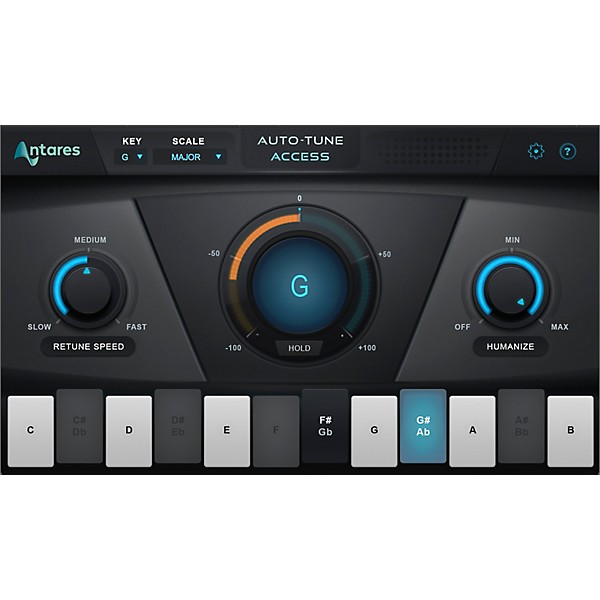
The Antares Auto-Tune Access plug-in is the easiest and most affordable way to start using Auto-Tune. It delivers the core Auto-Tune features with a simple and intuitive interface. Its light CPU footprint and professional-quality processing also make it a convenient option for more advanced users working with larger projects.
Three-position Retune Speed and Humanize knobs allow for a variety of tuning applications, from subtle and natural-sounding pitch correction to the most extreme Auto-Tune Effect. Low-latency processing lets you perform through Auto-Tune Access in real time on stage or in the studio, without worrying about distracting delay.
Compatibility with Auto-Key (sold separately) means never having to worry about finding the key of your music before tuning. Auto-Key detects the key and scale and sends that information to Auto-Tune Access with a single click.
Three-position Retune Speed and Humanize knobs allow for a variety of tuning applications, from subtle and natural-sounding pitch correction to the most extreme Auto-Tune Effect. Low-latency processing lets you perform through Auto-Tune Access in real time on stage or in the studio, without worrying about distracting delay.
Compatibility with Auto-Key (sold separately) means never having to worry about finding the key of your music before tuning. Auto-Key detects the key and scale and sends that information to Auto-Tune Access with a single click.
Pitch Correction and Auto-Tune Effect
Auto-Tune Access delivers the same core Auto-Tune technology that professional artists and producers have relied on for years, in a more affordable and easy-to-use package. Retune Speed and Humanize controls allow you to choose the desired effect for your track. Turn up Humanize for a more natural sound, or crank the Retune Speed for the full Auto-Tune Effect.Low Latency
Thanks to its low-latency processing you can sing or play through Auto-Tune Access and listen to your tuned performance in real time, without distracting delay.Auto-Key Compatibility
Choosing the correct key and scale for your music is an essential part of effective pitch correction. Auto-Tune Access works with the Auto-Key plug-in (sold separately) to make this quick and easy. Just place Auto-Key on an instrumental or master track, and it will determine the correct key and scale. Then send that information to Auto-Tune Access with a single click.
Specs
Mac System Requirements
- AAX Native (64-bit only)
- Pro Tools 12.4 or later
- Mac OS 10.11 to 10.15 as required by your version of Pro Tools
- VST3 (64-bit only)
- A compatible VST host program that supports VST3 format
- Mac OS 10.11 to 10.15 as required by your host
- VST2 (64-bit only)
- A compatible VST host program that supports VST2 format
- Mac OS 10.11 to 10.15 as required by your host
- Audio Units (64-bit only)
- A compatible host program that supports the AU format
- Mac OS 10.11 to 10.15 as required by your host
- AAX Native (64-bit only)
- Pro Tools 12.4 or later
- Windows 8.1 to Windows 10 as required by your version of Pro Tools
- VST3 (64-bit only)
- A compatible host program that supports the VST3 format
- Windows 8.1 to Windows 10 as required by your host
- VST2 (64-bit only)
- A compatible host program that supports the VST3 format
- Windows 8.1 to Windows 10 as required by your host
Reviews
1
2 Reviews
0%
of respondents would recommend this to a friend
Filters
Cons
- Difficult to Navigate1
- Freezes or Crashes1
Primary use
- Personal1
Reviewed by 2 customers
SCAM, keeps saying "no license found" support didnt help
submitteda year ago
byjadyn
fromutah
Keeps giving me an error message after i purchased this. cant even use it after buying it and i waisted my money........ DO NOT BUY THIS IS A SCAM!!!!! so many people are online talking about how people buy this and cant even use it because of this scam........ DO NOT BUY
I bought this product two days ago and Still dont have it
submitted2 years ago
bycarmen
fromIllinois Chicago
Im sure the product is great, what is not great is the service and the management of the page and delivering a purchase which is downloadable in a two days frame
- Previous
- 1
- Next
Q&A
Have a question about this product? Our expert Gear Advisers have the answers.
submitted2 years ago
asked byJim
fromSanta Fe, New Mexico
Does it require an iLok?
Thank you for your question. I will have a product specialist contact you.submitted2 years ago
asked byEAZY
fromundisclosed
does anatres auto only work with pro tools or can it be used in any DAW
I’m sorry, I don’t know that Antares Auto-Tune Access will work with "any DAW". Perhaps an inquiry to Antares.
Be the first to know about exclusive offers, tips and more.

866-498-7882 English
877-687-5402 Español