
Gear SpecialistBundlingMusician


Pro Gear Advisers
•866-498-7882
Guitars
Guitars
Amps & Effects
Amps & Effects
Used & Vintage
Keyboards & MIDI
Keyboards & MIDI
Drums
Drums
DJ Equipment
DJ Equipment
Basses
Basses
Recording
Recording
Live Sound
Live Sound
Accessories
Accessories
Mics & Wireless
Mics & Wireless
Music Software
Music Software
Lighting
Lighting
- Popular Brands
Band & Orchestra
Band & Orchestra
Platinum Gear
Deals
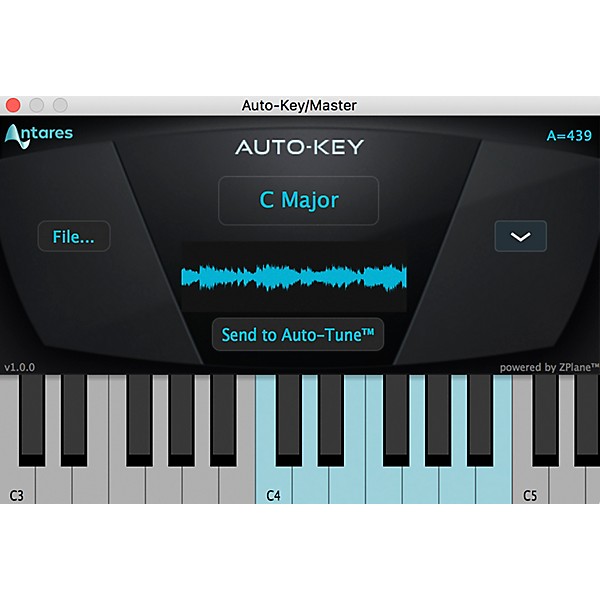
Antares Auto-Key (Download)
$49.00

Save on orders $199+ and get expert advice from a Gear Adviser
Need Help?

Description
Auto-Key is an automatic key and scale detection plug-in, designed to enhance your Auto-Tune workflow and save valuable time in the studio.
Choosing the correct key and scale for your music is an essential part of effective pitch correction, and Auto-Key makes this quick and easy. It’s also useful for choosing samples and loops that match the key of your project.
Place Auto-Key on a track to analyze your music in real time, or upload an audio file for faster than real-time analysis. Auto-Key automatically detects and displays the key and scale of your music, as well as the tuning reference frequency. The onscreen keyboard also lights up to show detected pitches.
Click the “Send to Auto-Tune” button, and compatible versions of Auto-Tune are automatically updated with the correct key and scale settings.
Even if you already know the key and scale of your music, Auto-Key will streamline your workflow by allowing you to conveniently set the key and scale for multiple instances of Auto-Tune with a single click.
Auto-Key will analyze the audio in real time and display the key and scale after a few seconds of playback analysis. You can also upload an audio file to analyze an entire song in seconds.
In addition to key and scale, Auto-Key also tells you the reference frequency of your music. Most modern music is tuned so that A is equal to 440 Hz, but this is not always the case. If your music or samples are tuned to a different reference frequency, Auto-Key will show you what it is, so you can make the necessary adjustments when applying pitch correction or selecting samples.
Choosing the correct key and scale for your music is an essential part of effective pitch correction, and Auto-Key makes this quick and easy. It’s also useful for choosing samples and loops that match the key of your project.
Place Auto-Key on a track to analyze your music in real time, or upload an audio file for faster than real-time analysis. Auto-Key automatically detects and displays the key and scale of your music, as well as the tuning reference frequency. The onscreen keyboard also lights up to show detected pitches.
Click the “Send to Auto-Tune” button, and compatible versions of Auto-Tune are automatically updated with the correct key and scale settings.
Even if you already know the key and scale of your music, Auto-Key will streamline your workflow by allowing you to conveniently set the key and scale for multiple instances of Auto-Tune with a single click.
Key and Scale Detection
Auto-Key makes it quick and easy to find the key and scale of your music. Just place it on an instrument track or master bus and begin playback.Auto-Key will analyze the audio in real time and display the key and scale after a few seconds of playback analysis. You can also upload an audio file to analyze an entire song in seconds.
In addition to key and scale, Auto-Key also tells you the reference frequency of your music. Most modern music is tuned so that A is equal to 440 Hz, but this is not always the case. If your music or samples are tuned to a different reference frequency, Auto-Key will show you what it is, so you can make the necessary adjustments when applying pitch correction or selecting samples.
Specs
Mac System Requirements
- AAX Native (64-bit only)
- Pro Tools 12.4 or later.
- Mac OS 10.11 to 10.15 as required by your version of Pro Tools.
- VST3 (64-bit only)
- A compatible VST host program that supports VST3 format.
- Mac OS 10.11 to 10.15 as required by your host.
- VST2 (64-bit only)
- A compatible VST host program that supports VST2 format.
- Mac OS 10.11 to 10.15 as required by your host.
- Audio Units (64-bit only)
- A compatible host program that supports the AU format.
- Mac OS 10.11 to 10.15 as required by your host.
- AAX Native (64-bit only)
- Pro Tools 12.4 or later.
- Windows 8.1 to Windows 10 as required by your version of Pro Tools.
- VST3 (64-bit only)
- A compatible host program that supports the VST3 format.
- Windows 8.1 to Windows 10 as required by your host.
- VST2 (64-bit only)
- A compatible host program that supports the VST3 format.
- Windows 8.1 to Windows 10 as required by your host.
Reviews
5
1 Reviews
100%
of respondents would recommend this to a friend
Filters
Computer Platform
- Mac1
Primary use
- Personal1
Pros
- Easy To Collaborate Across Programs1
- Easy to Navigate1
- Versatile1
Reviewed by 1 customers
Love it!
Verified Buyer
submitted4 years ago
byJose
fromFort Myers, FL
Very useful when choosing what key you are singing in to send to auto tune!
- Previous
- 1
- Next
Q&A
Have a question about this product? Our expert Gear Advisers have the answers.
No results but…
You can be the first to ask a new question.
It may be Answered within 48 hours.
Be the first to know about exclusive offers, tips and more.

866-498-7882 English
877-687-5402 Español