

Pro Gear Advisers
•866-498-7882
Positive Grid Spark PEDAL Developer Q&A | Amp Modeling, Effects and Design Secrets
The “guitar rig in a gig bag” concept has already been well explored by many manufacturers. But as technology continues to advance at warp speed, rig miniaturization is getting even wilder and more beneficial for guitarists and bassists.
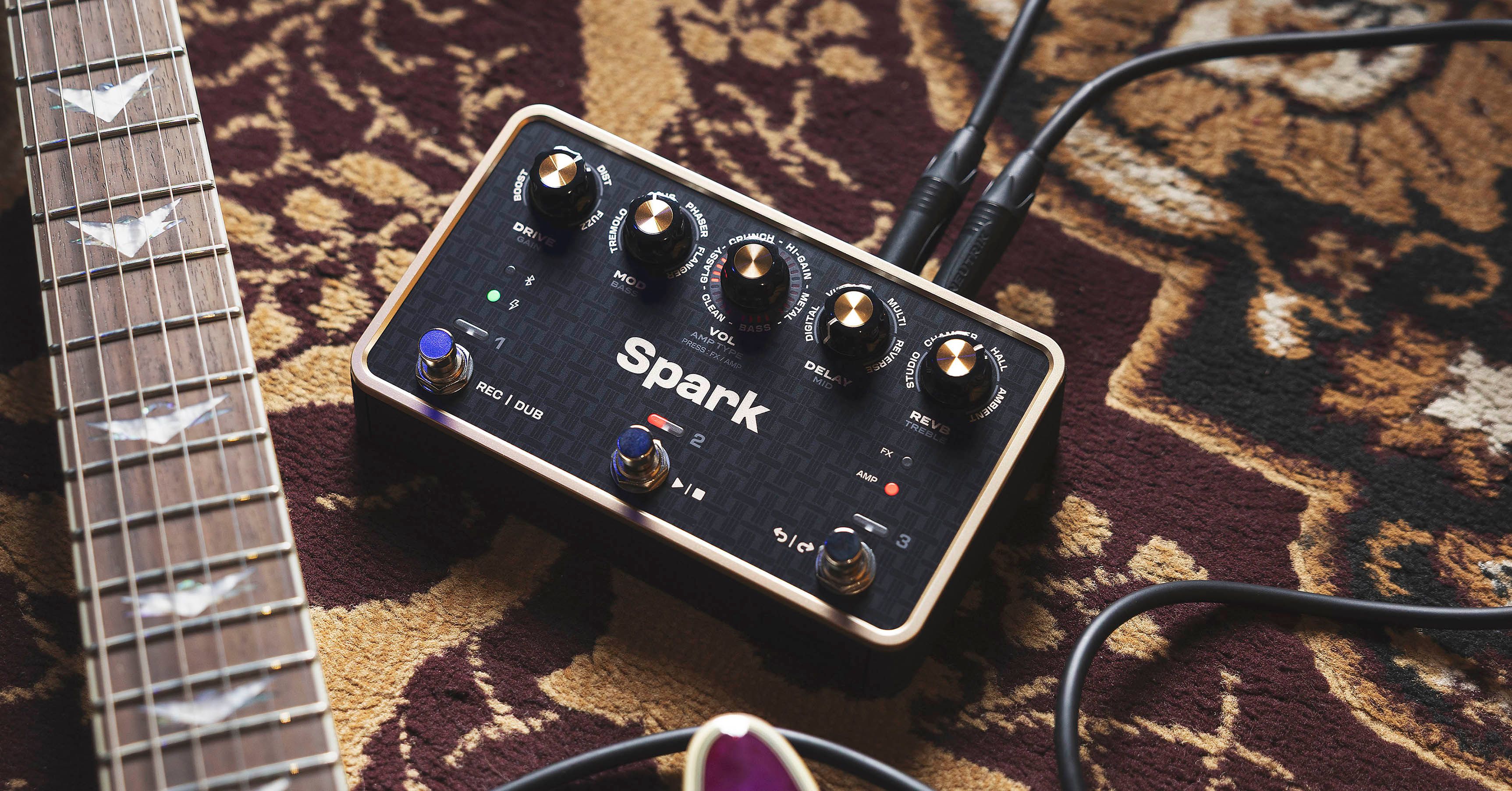
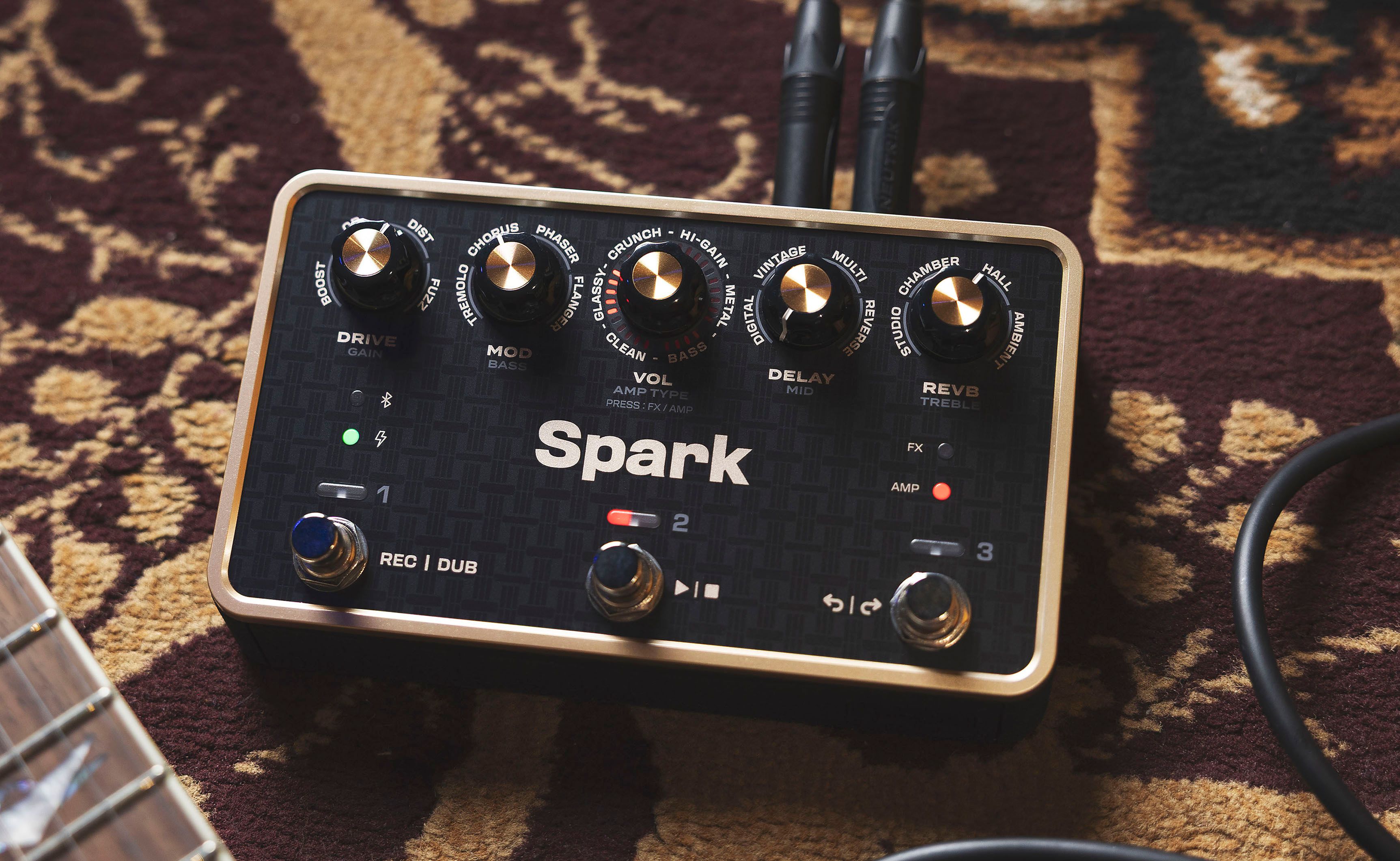
For example, the Positive Grid Spark PEDAL offers 33 amp models, 43 effects and an onboard looper in a 4.1" x 2.16" x 6.89" footprint that could fit in some of the larger carrying cases for the teeny Nintendo Switch 2. That’s a tiny titan with mind-blowing sonic power.
Spark PEDAL is a portable tone solution for all. It certainly works as a trusted travel rig for pros who want their sound intact when they fly to perform at television studios, award shows and promotional events. But Spark PEDAL is also a savior for anyone who shows up at a backlined gig and an amp looking like it barely survived a firefight in Call of Duty is onstage. And let’s not forget about how many small and large venues are transitioning to silent stages. Spark PEDAL pretty much ensures a more manageable outcome to all of these nail-biting scenarios. Furthermore, productive, inspirational and fun tone tools for everyone from beginners to seasoned players include the free Spark app, Spark AI and Smart Jam.
In this exclusive chat with the development team at Positive Grid, you’ll learn how the Spark PEDAL was designed to become a definitive solution for solitary practicing, rehearsing, creating tracks at recording sessions and performing live gigs.
Much of the tech in the Spark PEDAL appears in other Spark products. Were there any evolutions or challenges in developing features to accommodate floor pedal operation?
Positive Grid: Spark PEDAL runs on the same HD Tone Engine as Spark 2, so the sound carried over directly. The real challenge was many of the design goals pulled in opposite directions, and the team went through a lot of iterations to find the right balance. Size and weight are a good example. We wanted a rechargeable battery, enough knobs and footswitches, I/O players need and clear visual feedback, while still keeping Spark PEDAL light and compact enough to throw into a gig bag.
What was the thinking behind the rechargeable battery as opposed to allowing pedalboard power or other AC power options?
Our goal was a full multi-effects pedal that’s easy to carry, easy to use and ready for almost any situation. A rechargeable battery with up to seven hours of play and a battery level indicator gives players a lot more confidence taking it anywhere than traditional 9-volt batteries, where it’s hard to know how much power you have left. USB chargers are also everywhere, and you can play while it’s charging, so longer gigs aren’t a problem. A pedalboard is one of the places Spark PEDAL can live, but not the only one, so we chose a rechargeable battery plus USB-C as the best fit for how we expect many players to use it, which also includes home practice and recording.

For home studio recording and rehearsals, reliance on the Spark app for deep tone sculpting is not a problem at all. But for live gigs, it may be a challenge for real-time adjustments on the bandstand. Are there any recommendations for managing quick onstage tweaks?
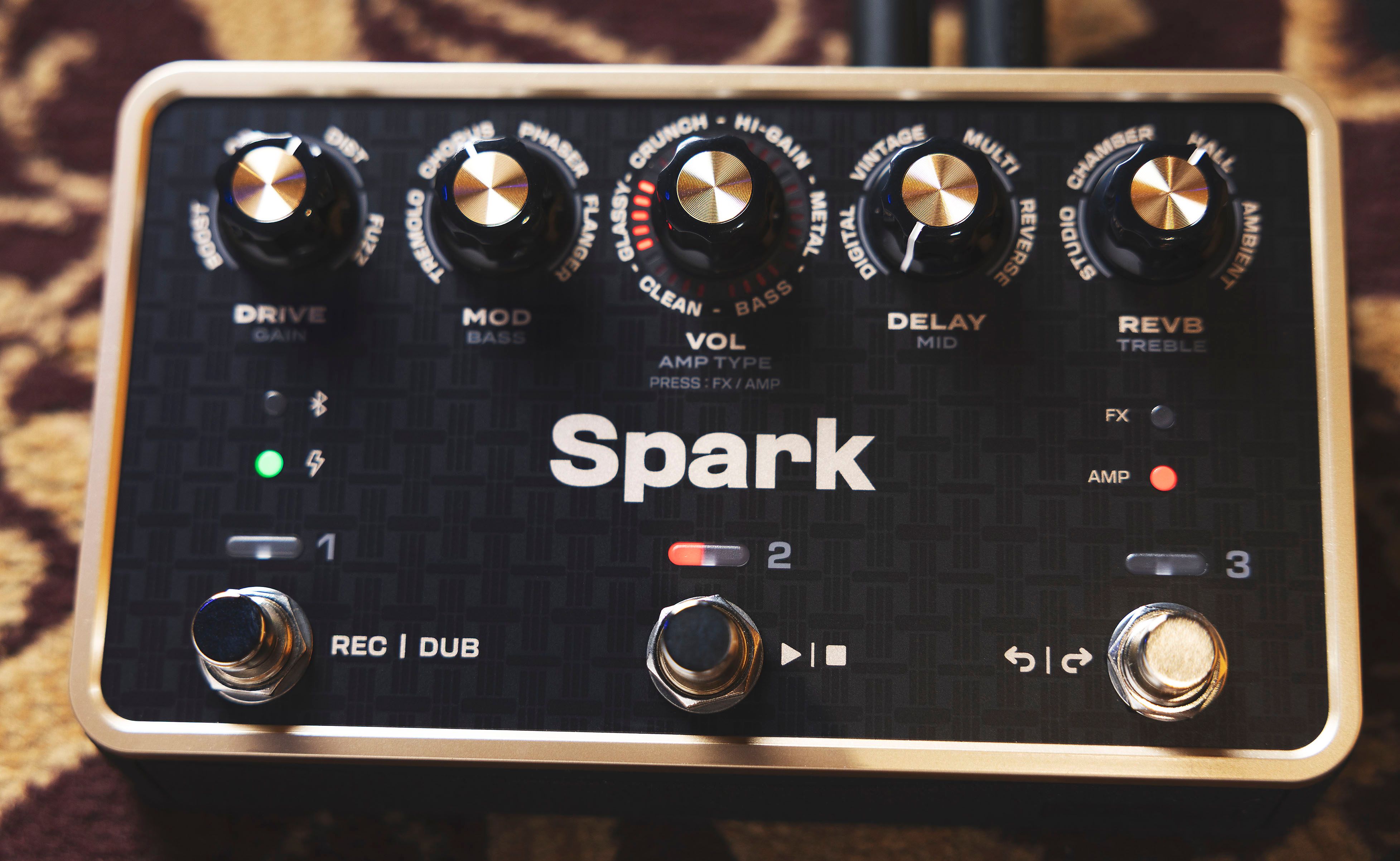
The most common sound adjustments don’t need the app. In Amp Mode, the knobs control amp type, gain, bass, mid and treble. In FX Mode, each knob covers drive, modulation, delay or reverb. Our recommendation is to do deep tone sculpting in the app before the gig and save your sounds to the six onboard presets. Then, you can switch presets and fine-tune with the knobs on stage. You can also connect an expression pedal or control it via MIDI from an existing MIDI controller.
As a mobile rig without the need for any additional gear, is there a recommended methodology for running Spark PEDAL through the house system and monitoring onstage—especially if a guitarist is less than thrilled about hearing their guitar tone through conventional wedges? In other words, is it savvy to adjust tones for this kind of use, or are there other options?
The stereo, 1/4" line outputs send a full, cab-emulated signal, so you can go straight into the PA or a DI without needing a mic or an amp. The headphone out works at the same time as the line outs, so you can feed the PA and listen through in-ear monitors instead of a wedge.
If you’d rather hear yourself through a speaker onstage, a full-range, flat-response (FRFR) cabinet such as the Spark CAB lets you hear the exact same tone that’s going to the PA. Spark CAB also has a line out, so you can pass the signal on to the PA from there.
Either way, what you hear is the same tone the audience hears, so your presets carry over as they are, with no need to retune them for the stage.
As a multi-use pedal, were all venues (practice, recording, gigging, etc.) considered equally, or did the designers favor one use case slightly over the others to align with player demographics or technical development?
Every scenario was considered in the design. Rather than favoring one, the goal was a full multi-effects pedal that’s easy to carry, so it naturally fits wherever you play—practice, recording, rehearsal or a gig.
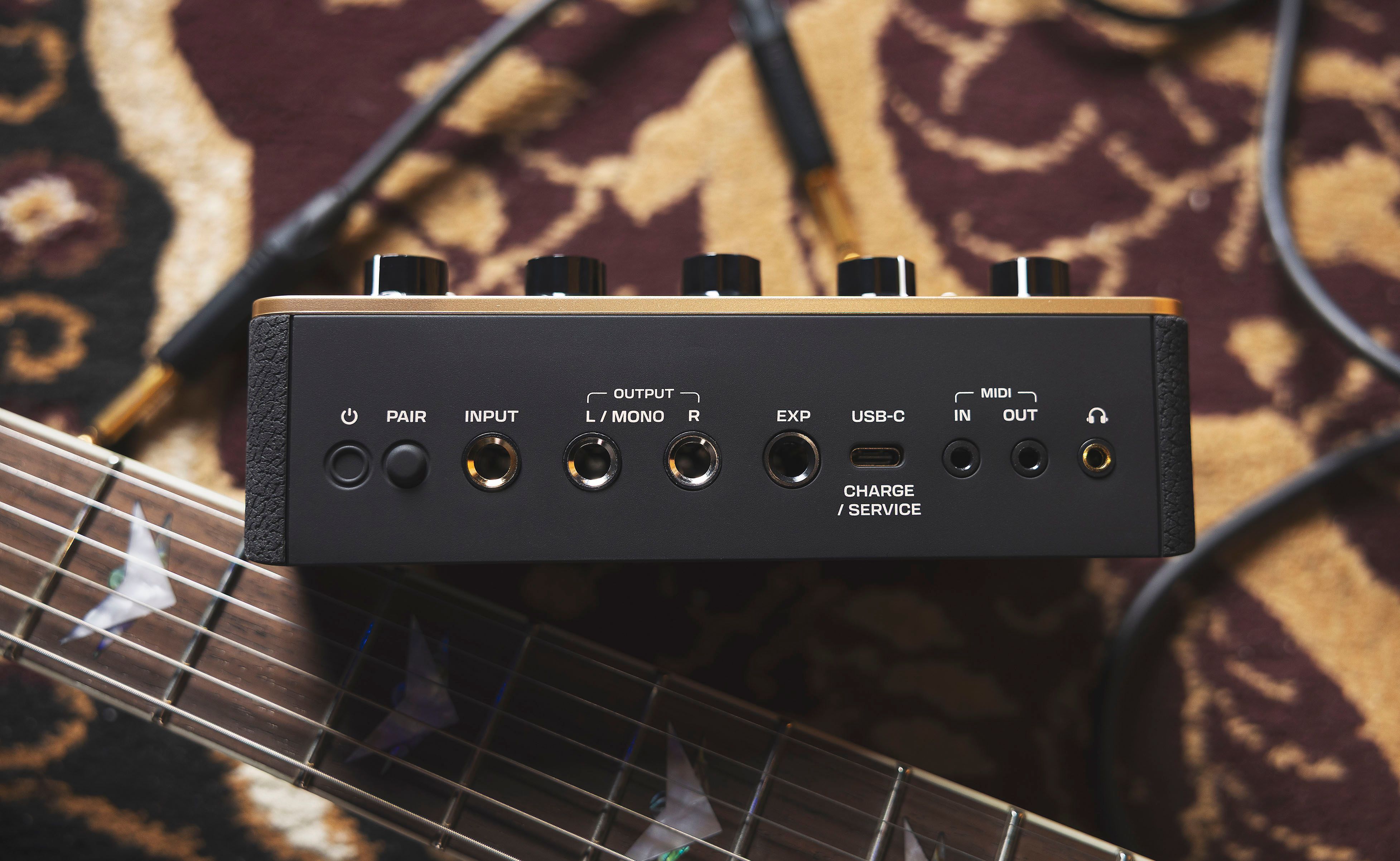
What was the most significant challenge to develop the tech for Spark PEDAL?
There are a lot of features and functions in this pedal, along with knobs and footswitches, so creating intuitive functionality and labeling them all could make the top panel cluttered and hard to read. We decided to keep the main functions on the top panel for easy access and try something new by printing some additional features on the bottom of Spark PEDAL as a “cheat sheet” that’s always there when you need it.
Spark AI seems extremely useful when crafting tones at home with the app—such as, “I need a Cream-era Marshall sound, a jangly Beatles sound and a Van Halen sound for a cover gig”—but is there a good use for the AI feature while on the bandstand or during short set breaks?
Spark AI works best when you’re building tones before the show, but it’s also useful for “saving the gig” when the unexpected happens. If for any reason you need to change your setlist or swap out songs unexpectedly just before—or during—a gig, you could take a set break and describe the sound you need using the app. Once it’s generated, you can save it to a preset right then and there.
Is there a power-user tip I may have forgotten to mention?
We built Spark PEDAL to be extremely useful and versatile. You can use it with electric guitar, acoustic guitar or bass for performance, practice and recording. In addition to running Spark PEDAL through a PA, you can also turn off its cab sim and use it with your current amp or any of our Spark series amps.
Dive into the Spark Universe
Positive Grid has Spark options for almost any use case, so if you’re looking for an amp—or even a headphone amp—rather than a pedal, check out the complete Spark Collection.
You can also read more about the Spark ecosystem and technology in our article, “Ignite Your Playing | Positive Grid Spark Mini”.
Written By: Michael Molenda
Michael Molenda is a content strategist, editor and writer for Guitar Center, where he has worked since 2022. He is the longest-serving Editor in Chief of Guitar Player (1997-2018), and former Editorial Director of Bass Player, EQ, Keyboard, Electronic Musician, Gig and Modern Drummer. A guitarist, drummer, bassist and producer, Mike co-owned three pro recording studios in San Francisco, and performs with Surf Monster and The Trouble With Monkeys.
Recently Added to Interviews
Be the first to know about exclusive offers, tips and more.

866-498-7882 English
877-687-5402 Español