




Gear SpecialistBundlingMusician
.jpeg)

Pro Gear Advisers
•866-498-7882
Guitars
Guitars
Amps & Effects
Amps & Effects
Used & Vintage
Keyboards & MIDI
Keyboards & MIDI
Drums
Drums
DJ Equipment
DJ Equipment
Basses
Basses
Recording
Recording
Live Sound
Live Sound
Accessories
Accessories
Mics & Wireless
Mics & Wireless
Music Software
Music Software
Lighting
Lighting
- Popular Brands
Band & Orchestra
Band & Orchestra
Platinum Gear
Deals
Deals
New Arrivals
Description
The Ravenscroft 275 virtual instrument is a stunning recreation of arguably one of the best pianos in the world. The Ravenscroft Model 275 has unparalleled dynamic response and tone that will handle a wide variety of applications, such as jazz, pop and classical, and just about anything else you can imagine.
The technology behind the Ravenscroft Model 275 virtual instrument is similar to the technology behind VI Labs' True Keys Piano Suite with a few exceptions and tweaks. More samples, an extra microphone position, extra velocity layers, and new features, such as Silent Strikes and Muted Notes, elevate the Ravenscroft Model 275 to a whole new level. The Ravenscroft virtual instrument features four discrete phase-aligned microphone positions. A new "Room" microphone position has been added to give users access to additional depth and character. It works well for music production as well as composition.
Microphone Positions
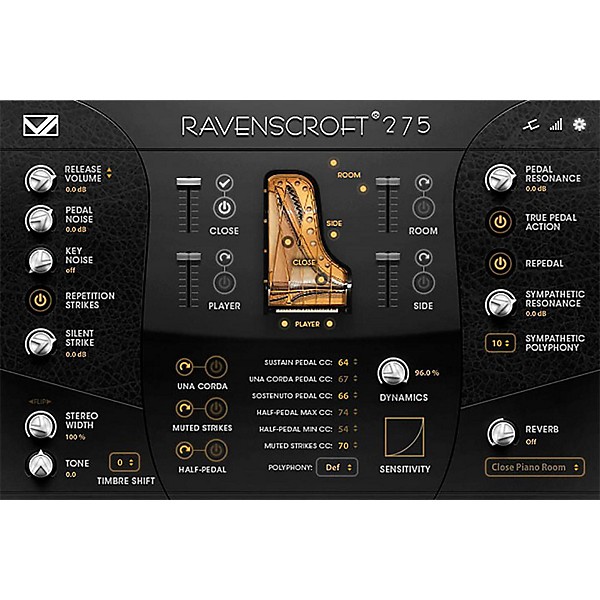
Four mic setups are included with the Ravenscroft 275 VI and were chosen to meet a variety of tonal choices and are able to mix well together. The Full patch loads the Close mics by default. You can load the additional mic samples by clicking the Load/Unload button, and once loaded, each sample group can be turned on and off with the On/Off button without having to load or unload the samples. The volume slider allows for mic mixing. The graphic gives a good indication of the physical location of the mics during sampling.
Advanced Settings
The Ravenscroft 275 virtual instrument was designed to bring you the sound of one of the finest grand pianos in the world. It features an easy to use interface that gives you deep control over many mechanical aspects of the real piano as well as microphone selection and mixing plus MIDI responses. The library contains five patches: a full patch in which all samples and mic setups can be loaded, and four separate single mic patches for quicker loading. Once a patch is loaded, click on the Preferences button at the top right corner to open the main interface.
Complete Sound Control
The bottom corners of the interface contain the Stereo Width and Channel Flip functions, Tone control and Timbre Shift on the left with Reverb level and selection on the right.
Controllers
The section below mic mixing allows additional samples to be loaded as well as adjustments to pedal setup, polyphony and dynamics controls. This is where you enable pedal features like una corda, half pedaling and, sostenuto and the mute strikes.
Pedal Action and Resonance
On the right portion of the interface, you’ll find controls for the Pedal and Sympathetic Resonances as well as True Pedal Action and Repedal functions.
MIDI and Tuning
There are two extra panels that let you control the MIDI response as well as the tuning.
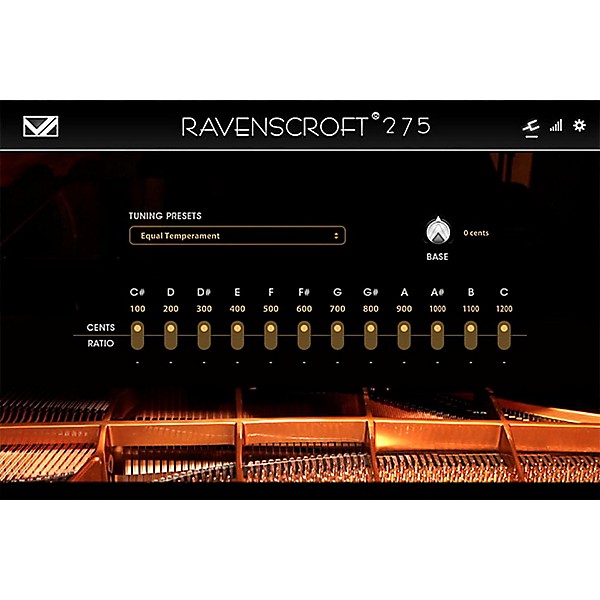
To customize the MIDI response from your controller, click on the "Open MIDI Panel" button at the top right next to the Preference Panel button. This brings up the MIDI panel which is a powerful tool to customize how the Ravenscroft 275 responds to your MIDI input. You can also customize the tuning of the piano and apply microtunings or simply tuning presets.
Presets
To save your own presets, UVI creates a snapshot of the entire Workstation and all your settings as a UVI Multi file with .uviws file extension. You must first enter the Multi view by clicking the Multi view button in the top center of the UVI Workstation. Look for the wrench icon on the far left and choose "Save Multi" to save your preset. You can then load this file at a later time with all your settings intact. Choose "Load Multi" to load your preset, or double-click one of these files on your computer hard drive, and UVI Workstation will launch and load the Multi automatically. Keep in mind that if you save a Multi with many sample groups loaded, it may take some time to fully load the library with your settings.
The technology behind the Ravenscroft Model 275 virtual instrument is similar to the technology behind VI Labs' True Keys Piano Suite with a few exceptions and tweaks. More samples, an extra microphone position, extra velocity layers, and new features, such as Silent Strikes and Muted Notes, elevate the Ravenscroft Model 275 to a whole new level. The Ravenscroft virtual instrument features four discrete phase-aligned microphone positions. A new "Room" microphone position has been added to give users access to additional depth and character. It works well for music production as well as composition.
Microphone Positions
Four mic setups are included with the Ravenscroft 275 VI and were chosen to meet a variety of tonal choices and are able to mix well together. The Full patch loads the Close mics by default. You can load the additional mic samples by clicking the Load/Unload button, and once loaded, each sample group can be turned on and off with the On/Off button without having to load or unload the samples. The volume slider allows for mic mixing. The graphic gives a good indication of the physical location of the mics during sampling.
Advanced Settings
The Ravenscroft 275 virtual instrument was designed to bring you the sound of one of the finest grand pianos in the world. It features an easy to use interface that gives you deep control over many mechanical aspects of the real piano as well as microphone selection and mixing plus MIDI responses. The library contains five patches: a full patch in which all samples and mic setups can be loaded, and four separate single mic patches for quicker loading. Once a patch is loaded, click on the Preferences button at the top right corner to open the main interface.
Complete Sound Control
The bottom corners of the interface contain the Stereo Width and Channel Flip functions, Tone control and Timbre Shift on the left with Reverb level and selection on the right.
Controllers
The section below mic mixing allows additional samples to be loaded as well as adjustments to pedal setup, polyphony and dynamics controls. This is where you enable pedal features like una corda, half pedaling and, sostenuto and the mute strikes.
Pedal Action and Resonance
On the right portion of the interface, you’ll find controls for the Pedal and Sympathetic Resonances as well as True Pedal Action and Repedal functions.
MIDI and Tuning
There are two extra panels that let you control the MIDI response as well as the tuning.
To customize the MIDI response from your controller, click on the "Open MIDI Panel" button at the top right next to the Preference Panel button. This brings up the MIDI panel which is a powerful tool to customize how the Ravenscroft 275 responds to your MIDI input. You can also customize the tuning of the piano and apply microtunings or simply tuning presets.
Presets
To save your own presets, UVI creates a snapshot of the entire Workstation and all your settings as a UVI Multi file with .uviws file extension. You must first enter the Multi view by clicking the Multi view button in the top center of the UVI Workstation. Look for the wrench icon on the far left and choose "Save Multi" to save your preset. You can then load this file at a later time with all your settings intact. Choose "Load Multi" to load your preset, or double-click one of these files on your computer hard drive, and UVI Workstation will launch and load the Multi automatically. Keep in mind that if you save a Multi with many sample groups loaded, it may take some time to fully load the library with your settings.

Features
- Download Version Is Slightly under 6GB
- 6Gb installed in lossless flac format (35Gb uncompressed).
- Mac OSX 10.7 (intel) or greater or Windows XP or higher
- UVI Workstation 2.5.8 or greater (Download Free) or MachFive 3.2.1
- Minimum system requirements: Intel Core 2 Duo System
- 7200rpm drive (SSD is preferred for best performance)
- 4GB of RAM Suggested
- Supports VST, AAX and AU Plug-in formats
- Tone Control & Convolution Reverb built-in
- Standalone or plug-in operation modes
- Full mix control of 4 stereo microphone positions
- Full samples, no loops
Reviews
4.33
6 Reviews
80%
of respondents would recommend this to a friend
Filters
Best Uses
- Multimedia1
Computer Platform
- Mac2
- PC2
Primary use
- Personal4
Pros
- Easy To Collaborate Across Programs1
- Versatile1
- great sound+dynamics. Fantastic bass,no mud1
Reviewed by 6 customers
Need PhD in System Administration to install; refund refused
submitted4 years ago
byDon T. Spammy
fromIllinois
Why can't you just send me a DVD, which I can slide into the computer, click "Install", and then just use the software?
Best virtual piano I've used
submitted6 years ago
byBatDad
fromNJ, USA
I use this for recording in DAW, everything from exposed piano-only to pop/rock/country production
Awesome!
Verified Buyer
submitted8 years ago
byKyle
fromundisclosed
Absolutely love the software!! the interface is easy to use and the sound quality of the Piano exceeded my expectations!
I love it!
submitted8 years ago
byDaveA
fromSalt Lake City, Utah
I jumped into using virtual instruments about a year and a half ago. I've been using AddictiveKeys since then. About 6mo ago I started doing alot of acoustic piano work and wasn't really satisfied with the results I was getting. I've been using the Ravenscroft for the last week and am loving it. Now when I hit the keys hard the response is like a real piano. With AddictiveKeys it seemed the hard hits only made it louder but the tone didn't change like I would expect. The Ravenscroft is a joy to play. My new go to acoustic piano.
Perfection
submitted8 years ago
byDarius
fromLos Angeles
Unreal sounds, I bought the Kawai VPC-1 with the sole purpose of using this VST. The other VST's didn't impress me. This one has a full, grand, and rich sound. I also got the iPad version, which was enough for me until my ipad battery started dying and my midi connection was taking up the charging slot.. Highly recommended. It's a lesser known VST apparently, but as we know, the best things aren't always glamorized by the main crowd.
Untouchable!!!!
Verified Buyer
submitted9 years ago
byKue Musik Entertainment
fromSyracuse, New York
I've been buying piano libraries for a while now and none of them seem to cut through and work for me in a live situation. I don't have this problem anymore with Ravenscroft 275! This piano is so realistic!
- Previous
- 1
- Next
Q&A
Have a question about this product? Our expert Gear Advisers have the answers.
submitted5 years ago
asked byBill
fromMinnesota
Paid for this product but can't load it
Please contact a Customer Service Agent for trouble shooting inquiriessubmitted7 years ago
asked byjaybird
fromglendale,az
will this work with fl studio's 20 producer edition? the reason why I ask is that, I'm having problems with things being compatible . thanks
The reason for the compatibility issue is because FL studio 20 is still fairly new. I got FL studio 17 a few years back and it took probably a good 6 months before my plugins were able to be used with it.
Be the first to know about exclusive offers, tips and more.

866-498-7882 English
877-687-5402 Español