
Gear SpecialistBundlingMusician


Pro Gear Advisers
•866-498-7882
Guitars
Guitars
Amps & Effects
Amps & Effects
Used & Vintage
Keyboards & MIDI
Keyboards & MIDI
Drums
Drums
DJ Equipment
DJ Equipment
Basses
Basses
Recording
Recording
Live Sound
Live Sound
Accessories
Accessories
Mics & Wireless
Mics & Wireless
Music Software
Music Software
Lighting
Lighting
- Popular Brands
Band & Orchestra
Band & Orchestra
Platinum Gear
Deals
Sound Radix Auto-Align Software Download
$139.00

Save on orders $199+ and get expert advice from a Gear Adviser
Need Help?
Description
When recording an instrument with more than one mic, sound tends to reach each microphone at a slightly different time and thus cause some frequencies to cancel each other while other frequencies can build up unnaturally. This phenomena is known as the comb filter effect.
Until now, compensating for the delay between the microphones had to be done manually - an extremely time consuming and inaccurate process.
Enter Auto-Align
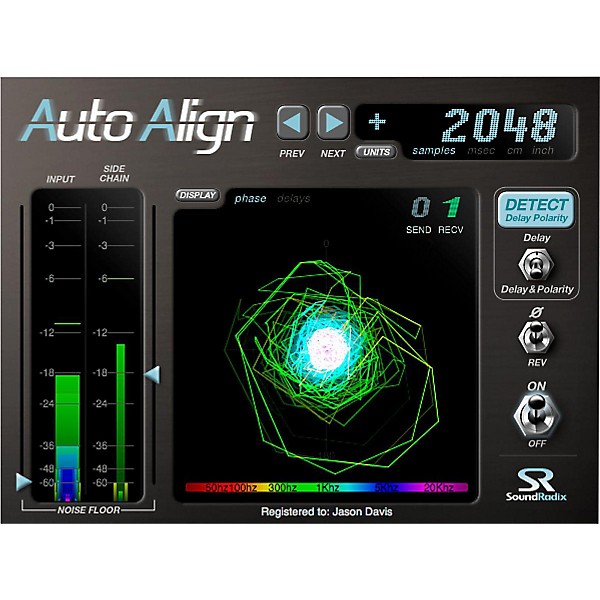
Auto-Align will "listen" to your multi-mic recording and automatically measure and compensate for the delay between the microphones, or between a DI box and a microphone - sample accurately, significantly reducing the comb filter effect and dramatically improving the resulting sound.
When distant microphones are used and a delay is desired to enhance the sense of space, Auto-Align can time-place the microphones to better match the close-mic'ed source and therefore minimize the comb filter effect. Auto-Align can also automatically detect a reversed polarity mic and compensate for it.
Until now, compensating for the delay between the microphones had to be done manually - an extremely time consuming and inaccurate process.
Enter Auto-Align
Auto-Align will "listen" to your multi-mic recording and automatically measure and compensate for the delay between the microphones, or between a DI box and a microphone - sample accurately, significantly reducing the comb filter effect and dramatically improving the resulting sound.
When distant microphones are used and a delay is desired to enhance the sense of space, Auto-Align can time-place the microphones to better match the close-mic'ed source and therefore minimize the comb filter effect. Auto-Align can also automatically detect a reversed polarity mic and compensate for it.
Features
- Automatic, Sample Accurate Time & Phase Alignment
- Phase Polarity Detection
- Alternate Matching Points for Improving Phase Correlation while Reserving Delay
- Displays Distance in Samples, Milliseconds, Inches and Centimeters
Reviews
4.75
4 Reviews
100%
of respondents would recommend this to a friend
Filters
Best Uses
- Pro Audio / DJ / Mixing1
Computer Platform
- Mac3
Describe Yourself
- Mixing Engineer1
Primary use
- Business2
Pros
- Versatile2
- Easy To Collaborate Across Programs1
- Easy to Navigate1
Reviewed by 4 customers
GREAT TIME SAVER
submitted4 years ago
byLance
fromEdinburg
Great product, easy to use. Highly recommended for live recordings
Great utility plug-in
submitted4 years ago
byChris N
fromAtlanta
Yeah e been waiting to pick this up for awhile now. This is great for multi-mic'd instruments where you want to ensure phase is accurate. Great instructional videos on YouTube out there and will get you up and going in now time. I bought specifically for drum set mixing but do a lot of live recording at FOH as well.
Brilliant
submitted4 years ago
byDavid, B.
fromLos Angeles, CA
Brilliant plugin. One of the best ways to deal with phase alignment issues.
Feels like Cheating
Verified Buyer
submitted8 years ago
byparis
fromundisclosed
Auto-Align gets multiple mics in phase with roughly three clicks per track and zero guesswork. Using this for the first time on a project was a revelation. I've already changed my entire workflow to incorporate Auto-Align. It's awesome, and it works wonders for a mix. Hearing a kit come into phase mic by mic isn't an earth-shattering gamechanger until you do a before and after, THEN you'll be blown away. I give only four stars for two reasons. 1) This program acts like a plugin on a track and sometimes running two instances of it (one track, say your left overhead, acts as a 'send' to tell the other tracks what to align with) causes my DAW to crash. My mixing environment is both very powerful and stable, so I was shocked. The issue goes away if I clear away all plugins, remove all eq, and only have tracks in my project that are getting Auto-Aligned. A print after getting everything i phase is mandatory so you can remove the instances of it from your project. This isn't a deal breaker because I prefer to use Auto-Align immediately after recording, so I'm not working with any other plugins. 2) SoundRadix insists on a bunch of needless copy protection, which really only serves to punish people like me who bought the software legally and haven't cracked it. You have to have an iLok program running on your computer to use Auto-Align; the plugin won't even function without iLok. Whether or not you can use this program offline is for you to find out. It's complicated for a first time user and keeps you away from using what you bought. Be prepared to sign up both on SoundRadix's website and on iLok's. My specs that might help you decide: Cubase 5 AMD Vishera FX-8350 Octo-core CPU Black Edition (4.2 gHz) 32gb Kingston HyperX Black RAM
- Previous
- 1
- Next
Q&A
Have a question about this product? Our expert Gear Advisers have the answers.
No results but…
You can be the first to ask a new question.
It may be Answered within 48 hours.
Be the first to know about exclusive offers, tips and more.

866-498-7882 English
877-687-5402 Español