


Gear SpecialistBundlingMusician
.jpeg)

Pro Gear Advisers
•866-498-7882
Guitars
Guitars
Amps & Effects
Amps & Effects
Used & Vintage
Keyboards & MIDI
Keyboards & MIDI
Drums
Drums
DJ Equipment
DJ Equipment
Basses
Basses
Recording
Recording
Live Sound
Live Sound
Accessories
Accessories
Mics & Wireless
Mics & Wireless
Music Software
Music Software
Lighting
Lighting
- Popular Brands
Band & Orchestra
Band & Orchestra
Platinum Gear
Deals
Open Box Image Line FL Studio 9 Signature Bundle Level 1 Education Edition
Condition:Open Box - Like New
$157.52

Save on orders $199+ and get expert advice from a Gear Adviser
Need Help?

Description
FL Studio 9 Signature Edition is the full boxed version of FL9, a complete software for music production, representing the culmination of more than 10 years of sustained & focused development. FL9 is designed to be one of the fastest ways to get music from your brain to your speakers. It comes with many extra features the Fruity and Producer Editions don't, including Maximus, a peak limiter and volume maximizer; Hardcore, which has 10 guitar pedal effects, plus 8-band EQ, and 5 cab simulator in one plug-in; VideoPlayer for playing video or flash files; Sytrus, a hybrid synthesizer; Soundfont player which gives you the power to load, play, and render soundfonts; and DirectWave Sampler, one of the most complete VSTi samplers; as well as a $49 virtual card for putting towards any other FL Studio plug-ins of your choice.
What is FL9?
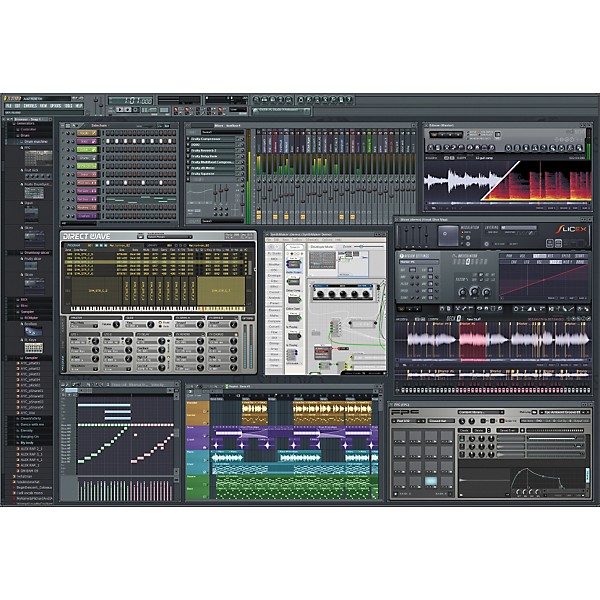
This full-featured, open architecture, music production software is capable of audio recording, composing, sequencing, and mixing, for the creation of professional quality music. The FL Studio philosophy is creative freedom, allowing you to route any instrument to any mixer track. Each mixer track can receive audio from any number of instruments, any number of other mixer tracks and a soundcard input. Mixer tracks, in turn, can send audio to any number of other mixer tracks and a soundcard output. You can create sub-mixes, effects chains, or complex mixes. With FL Studio's flexible architecture audio is set free.
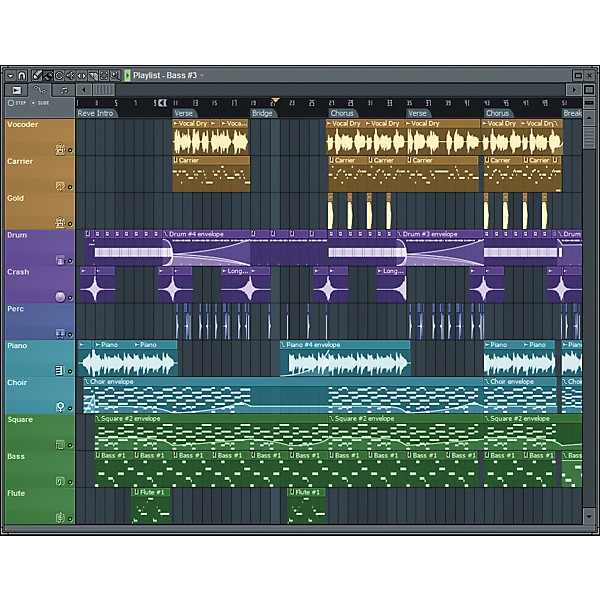
FL Studio 9 music software also allows you to free your creative mind. You can choose your preferred workflow, compose using the step-sequencer or piano roll. Create in pattern or track mode, then arrange your ideas in the free palette Playlist. The Playlist presents timeline as a virtual canvas where each Playlist track can simultaneously hold any number of score, audio, and automation events.
Instruments
Make virtually any sound ” FL9 includes over 30 software synthesizers covering acoustic/synthetic bass, electric guitar, multi-sampler tools including piano & strings, general sample playback, and beatslicing (with Rex 1 & 2 support).
Synthesis techniques ” span subtractive, modeling, FM, RM, granular, and additive. With the addition of FL SynthMaker you can further create & share your own FL instruments, effects & MIDI control dashboards without the need to write basic code.
Open plug-in standards ” FL Studio 9 supports all PC industry plug-in instrument standards including VSTi (1/2), DXi(1/2), Buzz, and Rewire. This means you can sequence with your favorite plug-ins and applications.
Audio Recording & Editing
Multi-channel audio inputs ” With the ability to simultaneously capture all the inputs on your audio interface, Image Line FL Studio has the flexibility to record a single vocalist, guitar, or a full symphony orchestra.
Arranging audio ” Audio can be arranged, with complete freedom in the Playlist. Features include the ability to host an unlimited number of audio recordings, time-stretching, pitch-shifting, beat-slicing, cropping, editing, and the rearranging of audio with only a few mouse clicks.
Edison ” FL9's audio capabilities are further enhanced with Edison, the recording wave editor. Edison is an integrated audio editing and recording tool with spectral analysis, convolution reverb, noise reduction, loop-recording, loop-construction tools and more.
FL Studio supports WAV, MP3, OGG, WavPack, AIFF, and REX audio formats.
Sequencing
Compose and record your musical performances and ideas in a very logical way.
Pattern or track sequencing ” You choose, record your musical performances and ideas in the most logical way. FL Studio 9 can simultaneously function as a pattern and track-based sequencer. Reuse patterns as Pattern Clips in the Playlist or record song-length sequences, as desired.
Step sequencer or Piano roll ” Scoring tools include FL Studio's legendary Step-sequencer, one of the most advanced Piano roll's in any software studio, event and multipoint automation envelopes. FL Studio supports MIDI input, standard controller compatibility, and the ability to simultaneously control multiple instrument channels from separate controllers.
Arranging
Image Line FL Studio 9 allows you to do what you want where and when you want.
Determine your own project design ” In FL Studio 9, you decide how your project will be laid out. Unlike the competition, FL9's Playlist is a totally flexible and virtually unbounded workspace where Note Pattern, Audio and Automation data can be arranged and edited to suit your creative ideas and preferred workflow.
Audio Mixing & Mastering
FL Studio provides all the tools you need to produce your tracks to high professional standards.
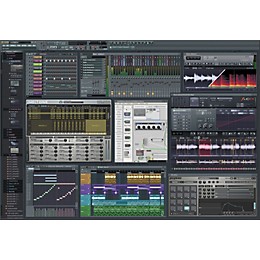
The mixer ” FL9 includes a superb 104-track stereo track mixer that is about precision, control, and flexibility. The mixer's tracks each hold up to 8 effects (VST, DX, or FL's proprietary format). To create sub-mixes or mixing chains of almost unlimited complexity, each mixer track can be routed to any other mixer track, one of 4 dedicated send channels and/or the Master track. Sends provide the ability to sidechain inputs to multi-input effects plug-ins. Finally, each of the mixer tracks can be routed to any output on your audio interface.
Effects ” What about effects? FL Studio software includes more than 40 effects spanning maximization, limiting, compression, delay, distortion, equalization (graphic & parametric), filtering, phasing, flanging, chorus, vocoding, and reverb. These have you covered for the creative broad-brush effects, through to the minutia of the mastering process.
Open plug-in standards ” FL Studio supports all PC industry plug-in effect standards including VST (1/2), DX(1/2), Buzz, and Rewire. This means you can mix with your favorite plug-ins and applications.
What is FL9?
This full-featured, open architecture, music production software is capable of audio recording, composing, sequencing, and mixing, for the creation of professional quality music. The FL Studio philosophy is creative freedom, allowing you to route any instrument to any mixer track. Each mixer track can receive audio from any number of instruments, any number of other mixer tracks and a soundcard input. Mixer tracks, in turn, can send audio to any number of other mixer tracks and a soundcard output. You can create sub-mixes, effects chains, or complex mixes. With FL Studio's flexible architecture audio is set free.
FL Studio 9 music software also allows you to free your creative mind. You can choose your preferred workflow, compose using the step-sequencer or piano roll. Create in pattern or track mode, then arrange your ideas in the free palette Playlist. The Playlist presents timeline as a virtual canvas where each Playlist track can simultaneously hold any number of score, audio, and automation events.
Instruments
Make virtually any sound ” FL9 includes over 30 software synthesizers covering acoustic/synthetic bass, electric guitar, multi-sampler tools including piano & strings, general sample playback, and beatslicing (with Rex 1 & 2 support).
Synthesis techniques ” span subtractive, modeling, FM, RM, granular, and additive. With the addition of FL SynthMaker you can further create & share your own FL instruments, effects & MIDI control dashboards without the need to write basic code.
Open plug-in standards ” FL Studio 9 supports all PC industry plug-in instrument standards including VSTi (1/2), DXi(1/2), Buzz, and Rewire. This means you can sequence with your favorite plug-ins and applications.
Audio Recording & Editing
Multi-channel audio inputs ” With the ability to simultaneously capture all the inputs on your audio interface, Image Line FL Studio has the flexibility to record a single vocalist, guitar, or a full symphony orchestra.
Arranging audio ” Audio can be arranged, with complete freedom in the Playlist. Features include the ability to host an unlimited number of audio recordings, time-stretching, pitch-shifting, beat-slicing, cropping, editing, and the rearranging of audio with only a few mouse clicks.
Edison ” FL9's audio capabilities are further enhanced with Edison, the recording wave editor. Edison is an integrated audio editing and recording tool with spectral analysis, convolution reverb, noise reduction, loop-recording, loop-construction tools and more.
FL Studio supports WAV, MP3, OGG, WavPack, AIFF, and REX audio formats.
Sequencing
Compose and record your musical performances and ideas in a very logical way.
Pattern or track sequencing ” You choose, record your musical performances and ideas in the most logical way. FL Studio 9 can simultaneously function as a pattern and track-based sequencer. Reuse patterns as Pattern Clips in the Playlist or record song-length sequences, as desired.
Step sequencer or Piano roll ” Scoring tools include FL Studio's legendary Step-sequencer, one of the most advanced Piano roll's in any software studio, event and multipoint automation envelopes. FL Studio supports MIDI input, standard controller compatibility, and the ability to simultaneously control multiple instrument channels from separate controllers.
Arranging
Image Line FL Studio 9 allows you to do what you want where and when you want.
Determine your own project design ” In FL Studio 9, you decide how your project will be laid out. Unlike the competition, FL9's Playlist is a totally flexible and virtually unbounded workspace where Note Pattern, Audio and Automation data can be arranged and edited to suit your creative ideas and preferred workflow.
Audio Mixing & Mastering
FL Studio provides all the tools you need to produce your tracks to high professional standards.
The mixer ” FL9 includes a superb 104-track stereo track mixer that is about precision, control, and flexibility. The mixer's tracks each hold up to 8 effects (VST, DX, or FL's proprietary format). To create sub-mixes or mixing chains of almost unlimited complexity, each mixer track can be routed to any other mixer track, one of 4 dedicated send channels and/or the Master track. Sends provide the ability to sidechain inputs to multi-input effects plug-ins. Finally, each of the mixer tracks can be routed to any output on your audio interface.
Effects ” What about effects? FL Studio software includes more than 40 effects spanning maximization, limiting, compression, delay, distortion, equalization (graphic & parametric), filtering, phasing, flanging, chorus, vocoding, and reverb. These have you covered for the creative broad-brush effects, through to the minutia of the mastering process.
Open plug-in standards ” FL Studio supports all PC industry plug-in effect standards including VST (1/2), DX(1/2), Buzz, and Rewire. This means you can mix with your favorite plug-ins and applications.

Features
Key new features and changes to version 9:
- Over 370 additions, changes & bugfixes featuring:
- Sidechaining: The FL Studio Mixer Track Send now has an additional Sidechain mode to support multiple-input mixer plug-ins
- Multi-core CPU (Hyperthreading): Improved multithreaded generator & added multithreaded effects processing
- Multiple controllers: can now control multiple independent instrument channels, assigned by MIDI number
- New volatile linking feature
- Wrapper: Aligned tick lengths checkbox for greater plug-in compatibility
- Revised Playlist
- Playlist track naming & icon: tools for better song organization
- Playlist track mute controls
- Piano roll
- Riff machine: Automatic sequence generator tool.
- Note Grouping: New feature (works on selecting, moving, resizing, deletion, muting, shifting using mouse-wheel)
- Mixer
- More tracks: Now has 99 Insert tracks (up from 64)
- Multi-core CPU support: Added 'multithreaded mixer' tracks processing for improved multi-core performance
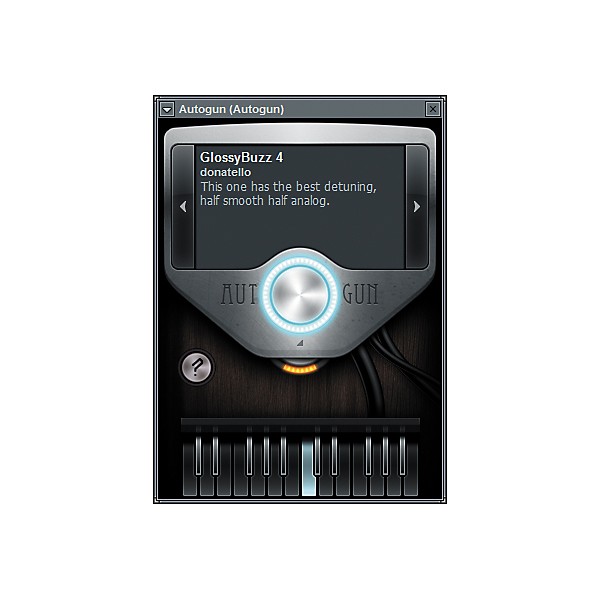
- Autogun (free): Sonic adventure, Based on Ogun.
- Sakura (demo): String physical modelling instrument
- Ogun (demo): Additive metal simulation synthesizer
- Gross Beat (demo): Realtime, audio-stream playback, pitch, position and volume manipulation effect
- Stereo Shaper (free): Mid / Side stereo processing
- Vocodex: The last word in vocoders
- SimSynth Live, DrumSynth Live, DX-10, WASP and WASP XT are now included in FL Studio
- Fruity Reeverb 2: Added Mid vs Side input signal processing
- Fruity Wrapper: Now supports multiple inputs/outputs (free)
- Wavecandy: Visualization & analysis tools (free)
- Fruity Limiter: Compressor section now has sidechaining (free)
- Presets: Drop effect presets onto mixer tracks & channels, mixer track presets onto effect slots and channels, channel & generator presets onto mixer tracks & effect slots
- Windows file shell menu: Available from Browser (right-click) item menu
- All FL Studio demo versions are fully featured, giving you access to features associated with the highest level of the program (Producer Edition). Compose new songs and export them to WAV, MP3 or OGG. The only limitation is that projects saved in demo mode will only open fully once FL Studio and plug-ins have been registered. This gives you the ability to save recover your original projects post-purchase.
- FL9 will fit easily within your current software supporting VST/VSTi/VST2, DXi, DXi2, MP3, WAV, OGG, MIDI, ASIO, ASIO 2, REWIRE, REX 1 & 2
- Additionally supported through DirectWave Editor: AKAI AKP (S5/6K,Z4,Z8), Battery (version 1), MPC, Reason, Kurzweil, EXS24, KONTAKT (version 1 & 2), Recycle, SFZ+, and SoundFont2
- FL Studio not only supports VST, DX, & ReWire plug-ins and includes Image Line's own advanced FL Studio 'native plug-in' architecture. The FL native format overcomes several major limitations of the VST & VST2 format and allows:
- Quick linking of controls and automation. Simply right click any knob or slider to link it to a (MIDI or internal) controller and automate it.
- Full expressive control per note control (pitch, volume & panning), and multiple independent note slides which are color-coded in the Piano roll.
- FL Studio is one of the most open virtual music studios currently available. It (natively) hosts:
- ¢FL Studio plug-ins
- ¢VST Effects & VSTi Instruments
- ¢ReWire clients
- ¢DX Effects & DXi Instruments
- ¢Buzz Effects & Instruments
- If you want to use your existing sequencer, just plug FL Studio into any host you can find. It works as a multi-out client, including as a VSTi client, ReWire client, and DXi client.
- FL Studio can be loaded and used as a VSTi or DXi2 instrument in a compatible host application. In this mode the output is sent to the host and the play/stop events and tempo are synchronized. Control of FL Studio channels and parameters using MIDI messages is supported, and you can also send each plug-in's output to a separate output if the host supports VSTi/DXi plug-ins with multiple outputs.
- Multi-out VSTi, Rewire & DXi softsynths
- VST & DX effects
- FPC: Fruity Pad Controller
- FL Studio Generators & FX
- Usable as multi-out VSTi client in hosts like Cubase
- Usable as multi-out ReWire client in hosts like Sonar
- Usable as multi-out DXi client in hosts like Sonar
- Use external MIDI keyboards & MIDI controllers
- Import & export MIDI files
- MIDI SysEx input and basic MMC functions
- Full audiotracks with WAV form display
- Reads .WAV, .MP3, .SYN, .DS, .Speech files
- Edison Wave Editor included
- ASIO-in recording
- Step sequencer with integrated Piano keyboard
- Pianoroll (allowing chords)
- Full, realtime recording & automation of all parameters
- Internal controllers
- Arpeggiator
- Automatic slicer (that reads .REX files)
- More than 15 generators (softsynths) included
- Over 40 HQ FX (effects) included
- Pattern (MIDI) clips in the playlist
- Pattern-based event automation
- Envelope automation of all parameters in playlist
- 99 Insert & 4 Send Tracks with 8 FX channels each
- Post FX Parametric EQ, Volume, Pan, VU meter
- Full FX (re)routing
- Lifetime Free updates
- available
- Download more than 2GB of HQ samples on SampleFusion
- Watch dozens of online Video Tutorials
- Exchange songs & tips with users & developers in our forums
- Directsound
- Multi-out ASIO
- MIDI out
- Render to .WAV (16-bit, 24-bit or 32-bit)
- Render to .MP3 (32K-bit up to 320K-bit)
- Render to .OGG (32K-bit up to 450K-bit)
- Render separate 'stems' for each mixer track
- FL versions of SimSynth Live, DX-10, DrumSynth, WASP, WASP XT, SynthMaker Player
- Delay, Delay Bank, Equo, Flangus, Love Philter, Vocoder, Parametric EQ & EQ2, Multiband Compressor, Spectroman, Stereo Enhancer, Wave Candy, Wave Shaper, Soundgoodizer
- FL SynthMaker Full, Slicex, Vocodex
- 3xOsc, Sampler, BooBass, Beepmap, Plucked, Fruit Kick, Chrome, FPC, WaveTraveller, Dashboard, KB Controller, Fruity Vibrator, MIDI Out, FL Slayer, FL Keys, Granuliser
- DirectWave Player
- Maximus, Hardcore, VideoPlayer, Sytrus, Soundfont player, DirectWave Sampler
- +1900 presets using 600 WAV files
- Generic Sample CD
- $49 Virtual Cash card
Specs
Minimum System Requirements
- 2Ghz AMD or Intel Pentium 3 compatible CPU with full SSE1 support
- (or) Intel Mac with Bootcamp (running XP or Vista)
- Windows 7, Vista, XP & 2000 (32- & 64-bit)
- 512MB RAM
- 500MB Free hard disk space
- Windows-compatible soundcard with DirectSound drivers. ASIO drivers are required for audio recording (FL installer comes with generic Asio4All drivers)
- The faster your CPU, the more channels you will be able to run simultaneously and/or the more effects you will be able to use. The more memory you have the larger the samples you will be able to load.
Reviews
5
5 Reviews
0%
of respondents would recommend this to a friend
Reviewed by 5 customers
AMAZING!!!
submitted15 years ago
byANGELA
fromNEW WATERFORD, OHIO
FL9 is absolutely amazing... Even if you are just starting it is so easy to use. My daughter loves to get on and record beats. It is even so easy to connect the midi to it with no problems. Imagine line is great with customer service of you have any questions. Great software!
Easy to use
submitted15 years ago
byLil Hend
fromH TOWN
FL Studio made it very easy to produce beats with. I can simply click on a note on the piano roll and produce a sequence
FL Studio 9 rocks!
submitted16 years ago
byBeatzman
fromLouisville
Another amazing update to the software that was once a simple sequencer and is quietly climbing the ranks as a proper professional tool. I remember Fruity Loops when it was a basic step sequencer, which they still have, but this isn't just putting nice rims on a volvo, they basically took the best parts and redesigned the whole thing. I admit at first it was tough learning, but the more I used it the faster creation happened. Hardcore is the easiest way to instantly get my ideas down from my guitar, the FPC makes creating beats and adjusting them on the fly very fluid and the plugins for sound EQ allow me to make quality mixes. This program is easy on the computer, opens almost instantly, dropping songs takes seconds instead of how long the song is, and I can make my own synths and sounds right inside the program. Even using it in Pro Tools is a breeze through rewire. I admit I attained some great help from a book that I grabbed from Cengage Learning, but after things were explained to me, I really feel that I can make any type of music out there. I have not found any limitations yet and highly recommend FL Studio! Besides, buying it once ensures lifetime free updates!
I Love It
submitted16 years ago
byWilliam Moncure
fromMadison, WI
I have been using FL8 and upgraded to FL9 with all the bells and whistles. as posted above, it is easy to learn. easily connects my MIDI devices without problems, easily map knobs to my taste and needs. connects everything i have per USB. i have a simple studio, FL9, M-Audio Axiom, Korg PadKontrol for drums, Blue Mic, Lexicon preamp. thats it. i create my music with just these tools. i can plug in my Bass Guitar or accoustic and play seemlessly. i would go to protools, but dont want to relearn a complicated program. This is great for creating demos and full CD's. I highly recommend it for those who are begginers to intermmediate users and even professionals. Pro Tools is just a high end industry standard when passing or delvering tracks which is understandable.but as a independent player.. use this tool. upgrades are affordable and sometimes fre!! Updates are free when you register and pay a 29.00 fee . so if you have FL5 , you get FL9 for free, etc..
Just Amazing
submitted16 years ago
byMr. Tune
fromMiami, Fl
WOW,... just an amazing DAW. If you are just beginning with software you for sure want to get this DAW. This software gives you all, it is very very very easy to use and learn. Some other great softwares like Ableton Live and Reason are great but very complicated to learn and master. Fl Studio gives you all and everything you need to make great music. It has great plug-ins like Edison which you can chop up the beat and not have buy and other software in order to do it like ReCycle for Reason. You have so many options and plug-ins, and everyday you just learn new things and Fl makes it fun for you not frustrating. It is really easy to connect and use MIDI keyboards and controllers. If you have an Akai MPD32 or Akai MPK o does type of controllers and MIDI they go perfect with fruity loops. If you are just starting with software you should go with this DAW, but if you are more advanced and have been with software the whole time you may not be satisfied with fruity loops. You have other softwares such as Ableton Live 8, Reason 4.0, Cubase 5, Sonar 8, Pro Tools 8, Logic Studio 9, but those will cost you more and take you more time to learn but that is up to you and your opinion. Before you buy a software you should always do research! And find what you need in your software, dont just buy the best software because every one says its the best.
- Previous
- 1
- Next
Q&A
Have a question about this product? Our expert Gear Advisers have the answers.
No results but…
You can be the first to ask a new question.
It may be Answered within 48 hours.
Be the first to know about exclusive offers, tips and more.

866-498-7882 English
877-687-5402 Español