

StudioMonitorsMixing
.jpeg)

Pro Gear Advisers
•866-498-7882
Guitars
Guitars
Amps & Effects
Amps & Effects
Used & Vintage
Keyboards & MIDI
Keyboards & MIDI
Drums
Drums
DJ Equipment
DJ Equipment
Basses
Basses
Recording
Recording
Live Sound
Live Sound
Accessories
Accessories
Mics & Wireless
Mics & Wireless
Music Software
Music Software
Lighting
Lighting
- Popular Brands
Band & Orchestra
Band & Orchestra
Platinum Gear
Deals
Deals
New Arrivals
Open Box
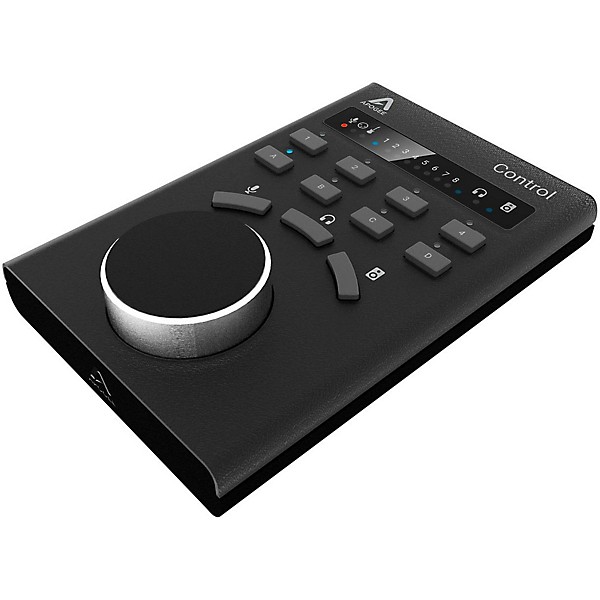
Open Box Apogee Electronics Control Remote Level 1
Condition:Open Box - Like New
$263.12
6-month special financing^ + $13 back in Rewards** Limited time Learn More
Lease-To-Own Purchase OptionsLearn more

Protect your gearLearn more
Cover drops, spills or cracks with Pro Coverage

Need Help?

Description
Apogee's Element 24, 46 and 88 audio interfaces are built to be controlled by a powerful software eco-system. With the Element series you have more control options than ever before. Access all I/O controls and settings for your Element hardware with Element Control, Apogee’s software control application for Mac. Use the app to select your input type, adjust input/output levels, configure up to three different low-latency mixers and more. You can also use the arrow keys on your keyboard to quickly select any input or output and adjust the level.
With Element Control’s Essentials window, you’ll see just the hardware settings you need in a form that requires minimal screen space. Move the Essentials window under, over or to the side of your DAW window for lightning access and total control. Your workflow will be uninterrupted as you keep your focus on the computer screen. Sometimes, it just feels right to have hardware control at your fingertips. With the Apogee Control hardware remote, you have eight buttons and a control knob that you can configure to control a wide range of settings. Apogee Control Hardware Remote connects directly to your Mac using a simple USB cable.
With Element Control’s Essentials window, you’ll see just the hardware settings you need in a form that requires minimal screen space. Move the Essentials window under, over or to the side of your DAW window for lightning access and total control. Your workflow will be uninterrupted as you keep your focus on the computer screen. Sometimes, it just feels right to have hardware control at your fingertips. With the Apogee Control hardware remote, you have eight buttons and a control knob that you can configure to control a wide range of settings. Apogee Control Hardware Remote connects directly to your Mac using a simple USB cable.
Featured Articles
Reviews
Be the first to review the Product
Q&A
Have a question about this product? Our expert Gear Advisers have the answers.
No results but…
You can be the first to ask a new question.
It may be Answered within 48 hours.
Be the first to know about exclusive offers, tips and more.

866-498-7882 English
877-687-5402 Español