


Gear SpecialistBundlingMusician


Pro Gear Advisers
•866-498-7882
Guitars
Guitars
Amps & Effects
Amps & Effects
Used & Vintage
Keyboards & MIDI
Keyboards & MIDI
Drums
Drums
DJ Equipment
DJ Equipment
Basses
Basses
Recording
Recording
Live Sound
Live Sound
Accessories
Accessories
Mics & Wireless
Mics & Wireless
Music Software
Music Software
Lighting
Lighting
- Popular Brands
Band & Orchestra
Band & Orchestra
Platinum Gear
Deals
Demo Gear
Save 10% when you add to cart
Alesis MultiMix 4 USB FX 4-Channel Mixer with Effects & USB Audio Interface
$149.00
6-month special financing^ + $7 back in Rewards** Limited time Learn More

Protect your gearLearn more
Cover drops, spills or cracks with Pro Coverage

Save on orders $199+ and get expert advice from a Gear Adviser
Need Help?

Description
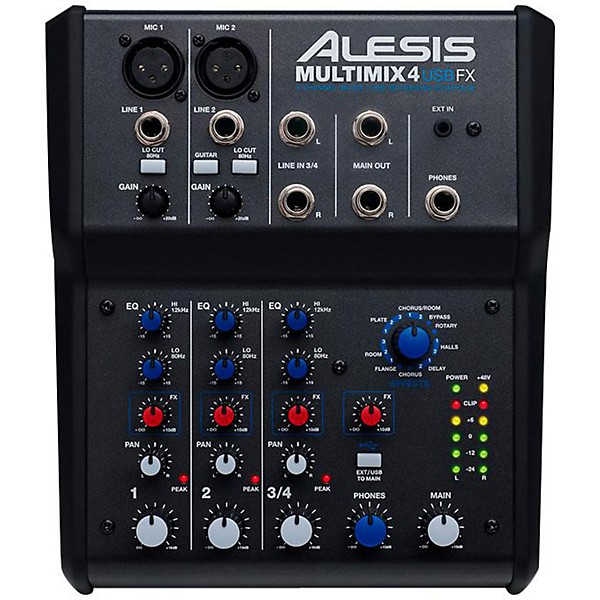
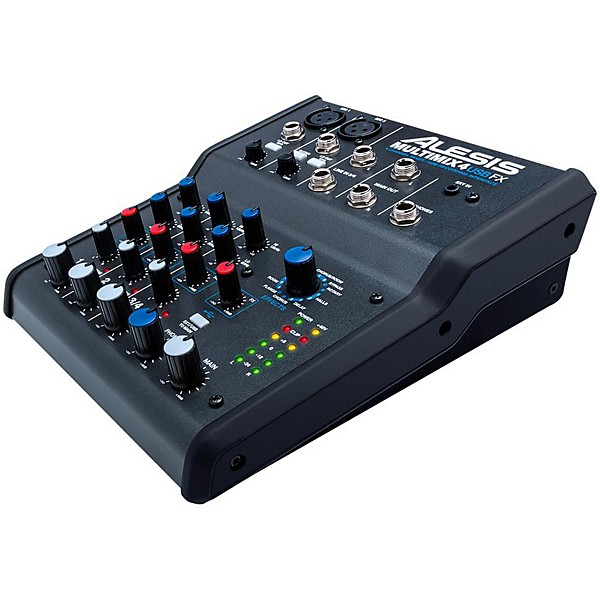
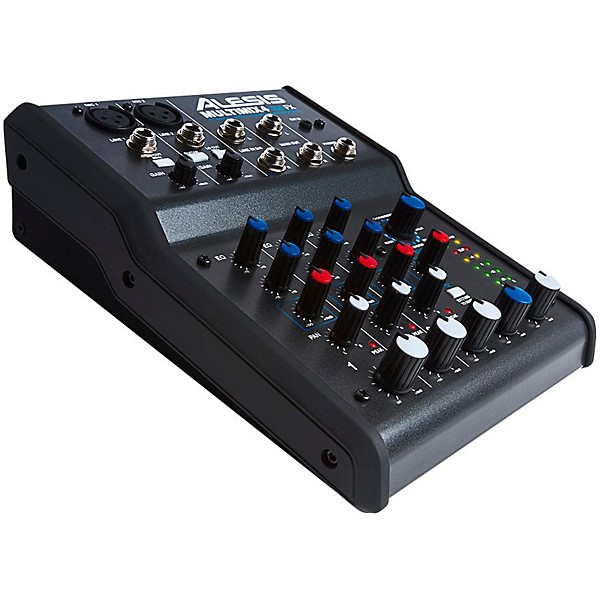
This is a very successful mixer for Alesis, now with some very valuable improvements over the previous design. MultiMix 4 USB FX is a four-channel desktop mixer with a USB digital audio interface that lets you mix live, in the home studio, and record audio directly to a computer. This compact mixer is perfect for using in computer-recording setups, intimate live-sound environments, video-editing and production studios, and portable podcasting setups. It outputs line-level analog audio and stereo 16-bit, 44.1/48 kHz digital audio over USB for recording low-noise, CD-quality mixes directly to your Mac or PC.
Plug it in
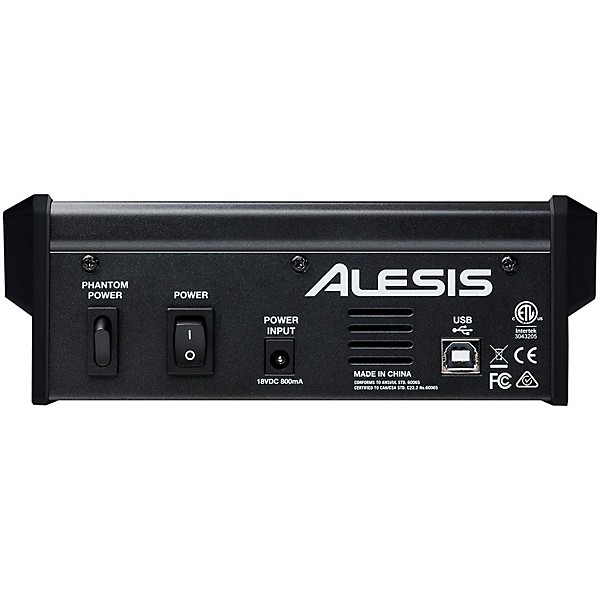
The MultiMix 4 USB FX mixer has four input channels, all of which can accept a 1/4" line input. You can plug XLR microphones into channels one and two, including condensers thanks to the selectable 48V-phantom power supply. You can also plug a guitar or bass directly into channel one's switchable high-impedance input. A stereo, 1/4" headphone output has its own level control for private monitoring.
Get in the Mix
Ideal for live sound engineering or home recording, MultiMix 4 USB FX features onboard volume, pan, and EQ controls for making quick, accurate adjustments to your mix. The MultiMix 4 USB FX mixer has a two-channel, five-stage, multicolor LED meter for visual monitoring the main output level. Channels one and two offer switchable high-pass filtering at 75Hz to reduce low-frequency rumble, handling, and wind noise. Channels one and two provide high- and low-shelving EQs, independent gain trims, and have independent pan controls. For convenient stereo mixing and recording, channels three and four are configured as a stereo pair at the level and pan controls.
Record via USB
MultiMix 4 USB FX contains a complete USB recording interface. Plug the MultiMix 4 USB FX's class-compliant USB connection into your Mac or PC without the need for software drivers and enjoy a digital-direct stereo connection with virtually any audio software application. The MultiMix 4 USB FX enables bidirectional stereo playback, so you can record the stereo Main output into your computer and listen back using the mixer as an interface from software to headphones and monitoring loudspeakers. Pro Tools First comes bundled with MultiMix 4 USB FX and gives you a powerful software environment to record, edit, and bounce down your mixes. Plus, you can record stereo audio directly to your iPad with the Apple iPad Camera Connection Kit (sold separately).
Built-In Effects
MultiMix 4 USB FX comes with high-quality Alesis DSP effects that include spacious reverbs, delays, phasers, and much more. For lush mixes, the internal effects processors enables you to add extra depth to live sound--say, a long delay on the vocalist's channel--or beef up dry recordings with some extra ambiance. Now, you can use professional audio effects with your mixer whether you're out mixing the live gig or at home recording at your desktop.
Plug it in
The MultiMix 4 USB FX mixer has four input channels, all of which can accept a 1/4" line input. You can plug XLR microphones into channels one and two, including condensers thanks to the selectable 48V-phantom power supply. You can also plug a guitar or bass directly into channel one's switchable high-impedance input. A stereo, 1/4" headphone output has its own level control for private monitoring.
Get in the Mix
Ideal for live sound engineering or home recording, MultiMix 4 USB FX features onboard volume, pan, and EQ controls for making quick, accurate adjustments to your mix. The MultiMix 4 USB FX mixer has a two-channel, five-stage, multicolor LED meter for visual monitoring the main output level. Channels one and two offer switchable high-pass filtering at 75Hz to reduce low-frequency rumble, handling, and wind noise. Channels one and two provide high- and low-shelving EQs, independent gain trims, and have independent pan controls. For convenient stereo mixing and recording, channels three and four are configured as a stereo pair at the level and pan controls.
Record via USB
MultiMix 4 USB FX contains a complete USB recording interface. Plug the MultiMix 4 USB FX's class-compliant USB connection into your Mac or PC without the need for software drivers and enjoy a digital-direct stereo connection with virtually any audio software application. The MultiMix 4 USB FX enables bidirectional stereo playback, so you can record the stereo Main output into your computer and listen back using the mixer as an interface from software to headphones and monitoring loudspeakers. Pro Tools First comes bundled with MultiMix 4 USB FX and gives you a powerful software environment to record, edit, and bounce down your mixes. Plus, you can record stereo audio directly to your iPad with the Apple iPad Camera Connection Kit (sold separately).
Built-In Effects
MultiMix 4 USB FX comes with high-quality Alesis DSP effects that include spacious reverbs, delays, phasers, and much more. For lush mixes, the internal effects processors enables you to add extra depth to live sound--say, a long delay on the vocalist's channel--or beef up dry recordings with some extra ambiance. Now, you can use professional audio effects with your mixer whether you're out mixing the live gig or at home recording at your desktop.
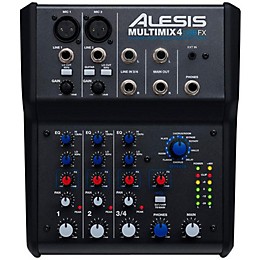
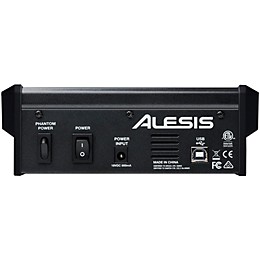
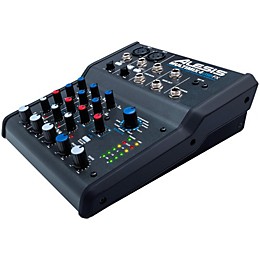
Features
- 4-channel mixer with stereo (2) 1/4" inputs and stereo (2) 1/4" outputs
- 16-bit, 44.1/48 kHz signal stereo in / stereo out via USB for easy recording and playback
- (2) XLR inputs with gain trim, switchable high-pass filters, and 48V phantom power
- (4) 1/4" line-level inputs for instruments and high-impedance guitar input
- Record directly to your iPad via the Apple iPad Camera Connection Kit (sold separately)
- Dual-band EQ on XLR inputs for accurate tone control
- 15 DSP effects with footswitch bypass control and aux bus for external processing
- Multicolor LED metering for real-time, visual level feedback
- Headphone output with independent level control for additional monitoring and mixing
- Class-compliant USB for plug-and-play support on both Mac and PC
- Includes Pro Tools First for out-of-the-box music creation
Specs
- Inputs:
- Line (CH 1, 2): 10 K„¦ input impedance 5.5 mV 4.9 V RMS sensitivity Mic (CH 1, 2): 600 „¦ input impedance balanced 700 mV RMS sensitivity
- Line (CH 3, 4): 700 mV RMS sensitivity for max output
- HPF (CH 1, 2): 200 Hz (-1 dB), 80 Hz (-3 dB), 20 Hz (-24 dB)
- Outputs:
- Line: 7 V RMS max
- Headphone: 0.5 W into 47 „¦
- Signal-to-Noise Ratio:
- Line: > 92 dB
- (max output; JIS A-weighted) Mic: > 62 dB
- Distortion: < 0.02%
- Frequency Response: Line: 20 Hz - 20 kHz (± 0.5 dB), Mic: 20 Hz - 15 kHz (± 0.5 dB)
- Channel Equalizer: Bass: ± 14 dB @ 80 Hz, Treble: ± 14 dB @ 12 kHz
- Channel Fader Kill: > 90 dB @ 1 kHz
- Crosstalk: > 85 dB @ 1 kHz
- Interface: USB 1.1 or higher (stereo in and stereo out)
- Power Adapter: 10 V AC, 500 mA
- Weight: 1.5 lbs.
- Dimensions: 7 3/4 x 6 x 2"
Featured Articles
Reviews
3.78
18 Reviews
63%
of respondents would recommend this to a friend
Most Liked Positive Review
4
Work in Progress
Ok lets start, Good price,delivered on time from GC.Simple to use and like input for Iphone for my drumbeats and backing tracks. Down side is the Stienburg software. The main program, plan to take up to 5 hrs to download but loaded fine. The main problem was the "eLicenser" (excuse spelling}. If you do not have the this flashdrive you need to do a "Soft eLicenser" They tell you about it but no link on info page. Had to go to another Guitar store after a search to find link. After that program started. Now learning to use program. Looking for a step by step manual, not able to follow instructions clear enough that I have foumd so far. This is my own problem to work out as a beginner. Bottom line good mixer for beginner and practice gear for me.
VS
Most Liked Negative Review
3
Great for a budget board, but has serious limitations
To start, for basic needs, you can't beat the price of this board. The sound and effects are great. If you need something basic to hook a mic up to a PC, such as basic podcasting or perhaps video commentary, this may be a good option. Beyond that, there are serious limitations. The Auxiliary/USB input back to the board only routes to the main channel. This is unlike the Multimix 8+, which allow you to receive USB input to the monitor channel. As a result, if you are planning to do any multitrack recording, you will not be able to use this board as your track monitor. For my own ear, the lack of a midrange EQ is also difficult to swallow. I know this is a budget board, but if you have a tuned ear, you will likely not be able to get a sound you're pleased with, especially for vocals.
Filters
Best Uses
- Amateur Recording6
- Performances5
- Music Videos4
- Outdoor Events / Games4
- Soundtracks2
Cons
- Poor Quality Sound4
- Limited Functions2
- Not Durable2
- Difficult To Use1
Describe Yourself
- Experienced8
- Professional Musician5
- Novice3
Pros
- Compact10
- Easy To Use10
- Simple Controls9
- Excellent Sound7
- Versatile3
Reviewed by 18 customers
Be sure to get the extended warranty. You will need it!
submitted2 years ago
byJim
fromDenver Colorado
Use with professional back- up tracks via a CPU
Works good plus has independent channel effects controls.
submitted3 years ago
byAudrey
fromMichigan
I think it is very nice mixer and the sound is quite crisp and it isn't my favorite for vocals but it does very good and so do the effects but I think it works very nice for some pianos and the extra effects can be very useful and I hope someday in firewire but USB for now it 'tis be.
I don't recommend this product
Verified Buyer
submitted4 years ago
byBrenda
fromDracut, Massachusetts
Didn't get the job done and I am an Alesis fan the audio was poor quality.
This little baby is awesome.
submitted4 years ago
byJim T
fromPortland, OR
Finally found something to replace using the mic/line in and headphone out of my legacy laptop with just USB and it's perfect. I run my bass guitar and stereo vocal effects along with midi or YouTube videos on my pc seamlessly to jam with. Alesis has always made great stuff, this one for sure.
Works great for what I need it for
submitted5 years ago
byJim H
fromCT
Works great to play guitar and sing into my computer via USB, and to be able to add good reverb and control EQ and panning on the way in. I've been using Windows Camera app to record video through my web cam and audio through this unit, it's a simple and easy way to make good videos to post online. Just know that if you want to use this to add tracks in a digital audio workstation environment, that you can't send the DAW output back through this unit via USB to monitor the signal as effected by the DAW/plugins.
It works as advertised!
submitted5 years ago
byMinor C
fromMesa, AZ
I use the mixer between a PA system in a meeting room and my computer so I can feed the PA sound to the zoom meeting.
Q&A
Have a question about this product? Our expert Gear Advisers have the answers.
submitted3 years ago
asked byTra
fromMartin Tn
Does this have effects and low impedance inputs
Mic 1 & 2 are low impedancesubmitted5 years ago
asked byMac
fromConnecticut
Would this mixer be good for live podcast
Yes it will.Yes, this can be used for live podcastssubmitted5 years ago
asked byJohn
fromDelaware
what kind of usb cable will i need to connect the Alesis MultiMix 4 USB FX 4-Channel Mixer with Effects & USB Audio Interface to my 2019 macbook pro?
Any standard USB cable should work to make this connection.submitted5 years ago
asked byBart
fromMpls Mn
Does this come with the necessary USB cable?
yes it does.This mixer does come with a USB cable.submitted6 years ago
asked byLaurence
fromFlorida
How ca I return my unopened purchase
Please give us a call at 866-498-7882 to set up a return.submitted6 years ago
asked byMickey
fromOR
Can I hook mixer to Fender Acoustic 100 amp mic & guitar and have live sound and listen theu headphones?
In certain setups you can, but it really depends on what you're looking to do with it. Give us a call at 866-498-7882 and we can get you squared away.submitted6 years ago
asked byMax
fromAustin, TX
Simple question, can I simultaneously record guitar on one channel and electronic drum kit on a separate channel into Logic Pro X on a Mac. In other words, setup one audio track in Logic for the drums and another audio track for the guitar. Thanks
Yes, you can record multiple tracks at the same time.
Be the first to know about exclusive offers, tips and more.

866-498-7882 English
877-687-5402 Español