


DigitalPianistSynths


Pro Gear Advisers
•866-498-7882
Guitars
Guitars
Amps & Effects
Amps & Effects
Used & Vintage
Keyboards & MIDI
Keyboards & MIDI
Drums
Drums
DJ Equipment
DJ Equipment
Basses
Basses
Recording
Recording
Live Sound
Live Sound
Accessories
Accessories
Mics & Wireless
Mics & Wireless
Music Software
Music Software
Lighting
Lighting
- Popular Brands
Band & Orchestra
Band & Orchestra
Platinum Gear
Deals
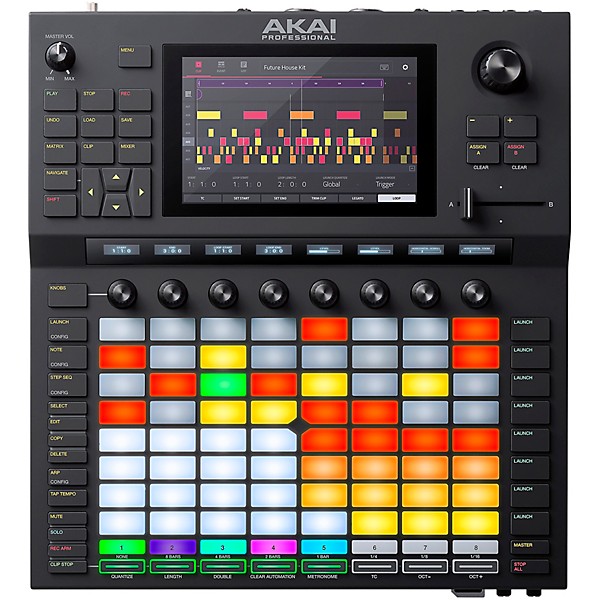
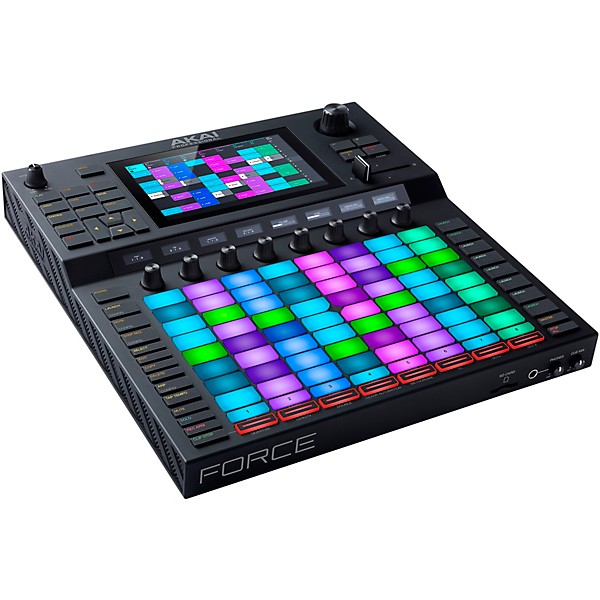
Open Box Akai Professional Force Music Production System Level 1
Condition:Open Box - Like New
$1,143.12

Need Help?
Videos (4)
View All
Introducing Force - Play / Perform / Produce

Force | Firmware Update 3.0.2

Force | Firmware Update 3.0.3
Force 3.0.4 | Ableton Live Control Integration

Description
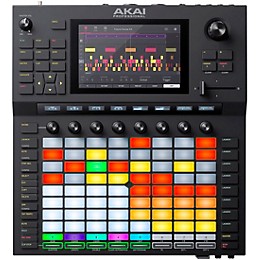
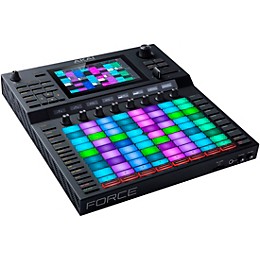
You may decide to ditch your laptop for good after you get your hands on the Akai Professional Force standalone sampler and sequencer. But combined with Ableton Live on your computer, Force becomes one of the most powerful music production systems available. On its own, you have command over powerful sampling capabilities (with real-time time stretching and pitch shifting), looping, four built-in synth engines, clip launching, step sequencing and even DJ functionality. And Force is also ready to integrate with your favorite hardware, with CV/Gate and MIDI connectivity. Complete with over 10GB of sounds and the ability to import your own samples via USB, SD card or even a SATA drive, the Akai Professional Force is one of the most comprehensive standalone music production systems ever created.
True Standalone Sampling and Sequencing
Force delivers a comprehensive DAW-like experience, complete with deep sampling and sequencing capabilities from the MPC series. Record your own samples and loops directly via the audio inputs, or import them via USB or SD card. You can even expand Force’s capacity with your own SATA drive. Real-time time stretch algorithms and auto bpm detection make syncing samples and loops fast and easy. You can even import multiple stems and sync them to the same bpm for instant mashups. With its highly playable 8 x 8 matrix, its vivid 7" multi-touch screen and built-in synth engines, the Akai Professional Force is a powerful tool whether you’re producing in your studio or performing onstage.
Now With Ableton Live Control
Force comes premapped for deep tactile control of Ableton Live clip launching, mixer panel and of course, Ableton devices. Ableton Live Control functions wirelessly over a Wi-Fi network via Ableton Link. This is an unparalleled level of Ableton integration from a standalone device. Ableton Live Control mode has been carefully designed to enable users to instantly switch between standalone operation and Live Control mode without ever stopping playback from either platform. With Ableton Control integration, Akai Professional has bridged the standalone and Ableton worlds seamlessly for an unprecedented amount of creative power.
The ingenuity of Force plug-in instruments Bassline and Tube Synth, pristine sound processing FX and stellar sample manipulation algorithms, paired with Ableton and the power of clip launching is here and ready for musical ambitions of the most adventurous kind.
Specific features of Ableton Live Control include:
Matrix Tab: The Matrix tab displays an 8x8 section of Live’s Session View marked in the Live GUI by the colored session ring. Users have a complete overview of—and immediate access to—the scenes, clips, play status, recording status as well as control over playback, recording quantize functions and scene/clip management
Mixer Tab: The Mixer Tab provides instant access to Live’s key mixing functions, divided into three views for control of Levels, Main mixer parameters and Sends. Using Force’s touch interface, control any slider/knob or bring up a full-screen editor for precise adjustments
Device Tab: The Device tab controls the device on the current track at Ableton Live’s Blue Hand position, providing control and key visual feedback on Ableton Instruments and third-party plug-ins.
Control Bar: At the top of the touch user interface, users can customize the Control Bar to display preset displays for Session, Arrangement and Performance modes including BPM, Phase Nudge Down/Up, Metronome, Follow, Overdub, Automation Arm and more.
Firmware 3.0.5 Update (Oct. 6, 2020)
FORCE Firmware 3.0.5 Highlights
• Arranger mode for song finalization
• MIDI Multi for expanded device connectivity
• Macros - layered parameter assignments, effects and automations
• Assign control parameters to 64 pads, crossfader and touch UI
• Advanced 16 levels for dynamic sample triggering
• Ableton Live Project Import
True Standalone Sampling and Sequencing
Force delivers a comprehensive DAW-like experience, complete with deep sampling and sequencing capabilities from the MPC series. Record your own samples and loops directly via the audio inputs, or import them via USB or SD card. You can even expand Force’s capacity with your own SATA drive. Real-time time stretch algorithms and auto bpm detection make syncing samples and loops fast and easy. You can even import multiple stems and sync them to the same bpm for instant mashups. With its highly playable 8 x 8 matrix, its vivid 7" multi-touch screen and built-in synth engines, the Akai Professional Force is a powerful tool whether you’re producing in your studio or performing onstage.Four Built-in Synth Engines From AIR Music Technology
Within Force are four impressive synth engines developed by AIR Music Technology. They offer deep editing capabilities, giving you access to everything from bass, leads, and plucks to pads, soundscapes and effects. Play them in real time via the velocity-sensitive pads or an external MIDI controller, if you prefer. Or sequence them with the piano roll. Either way, you can apply the onboard arpeggiator at any time or switch over to Note mode to access intelligent chord, progression and scale options.Deep Integration With Ableton Live and Akai Professional Software
If you’re already producing music with Ableton Live DAW software, the Akai Professional Force is the perfect addition to your workflow. Everything you do with Force in standalone mode can be saved as an Ableton Live Set and exported to Live for further production. And because it’s compatible with Ableton Link, you can connect Force to your wireless network and sync your project with any Ableton Link–compatible software or hardware, including Akai Professional’s MPC series.Now With Ableton Live Control
Force comes premapped for deep tactile control of Ableton Live clip launching, mixer panel and of course, Ableton devices. Ableton Live Control functions wirelessly over a Wi-Fi network via Ableton Link. This is an unparalleled level of Ableton integration from a standalone device. Ableton Live Control mode has been carefully designed to enable users to instantly switch between standalone operation and Live Control mode without ever stopping playback from either platform. With Ableton Control integration, Akai Professional has bridged the standalone and Ableton worlds seamlessly for an unprecedented amount of creative power.The ingenuity of Force plug-in instruments Bassline and Tube Synth, pristine sound processing FX and stellar sample manipulation algorithms, paired with Ableton and the power of clip launching is here and ready for musical ambitions of the most adventurous kind.
Specific features of Ableton Live Control include:
Matrix Tab: The Matrix tab displays an 8x8 section of Live’s Session View marked in the Live GUI by the colored session ring. Users have a complete overview of—and immediate access to—the scenes, clips, play status, recording status as well as control over playback, recording quantize functions and scene/clip management
Mixer Tab: The Mixer Tab provides instant access to Live’s key mixing functions, divided into three views for control of Levels, Main mixer parameters and Sends. Using Force’s touch interface, control any slider/knob or bring up a full-screen editor for precise adjustments
Device Tab: The Device tab controls the device on the current track at Ableton Live’s Blue Hand position, providing control and key visual feedback on Ableton Instruments and third-party plug-ins.
Control Bar: At the top of the touch user interface, users can customize the Control Bar to display preset displays for Session, Arrangement and Performance modes including BPM, Phase Nudge Down/Up, Metronome, Follow, Overdub, Automation Arm and more.
Firmware 3.0.5 Update (Oct. 6, 2020)
FORCE Firmware 3.0.5 Highlights
• Arranger mode for song finalization
• MIDI Multi for expanded device connectivity
• Macros - layered parameter assignments, effects and automations
• Assign control parameters to 64 pads, crossfader and touch UI
• Advanced 16 levels for dynamic sample triggering
• Ableton Live Project Import
Features
- Standalone—no computer required
- 8x8 clip-launch matrix with RGB LEDs
- 7" full-color capacitive multitouch display
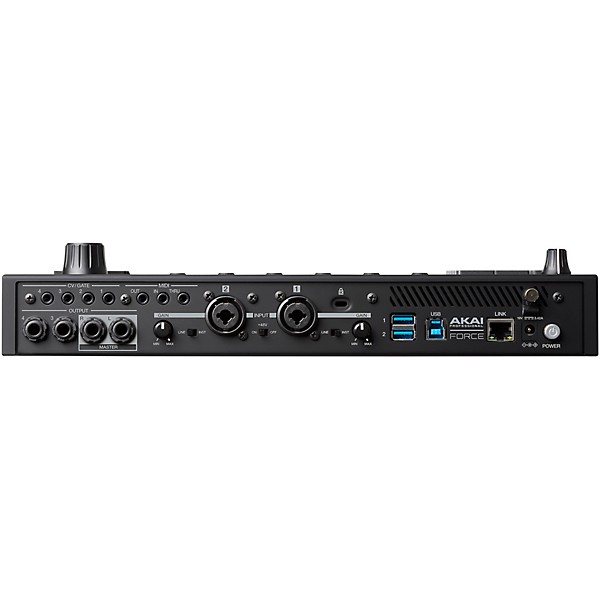
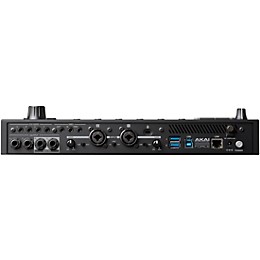
- Mic/instrument/line inputs, 4 outputs
- MIDI In/Out/Thru
- 4 configurable CV/Gate outputs
- Remix, mash-Up, DJ and produce with 6 Track types for complete audio
- MIDI/CV sequencing and performance capability
- Performance Modes including 16-Pad Drums, Notes, Smart Scales, Chords & Progressions
- MPC Sample Editing
- Automatic BPM detection, real-time time-stretching and pitch-shifting
- 8 touch-sensitive knobs with graphical OLED displays
- 4 powerful, fully editable synth engines
- 16GB of onboard storage (over 10 gigs of sound content included)
- Full-Size SD Card Slot & 2 USB 3.0 slots for thumb drives or MIDI controllers
- User-expandable 2.5" SATA drive connector (SSD or HDD)
- Deep wireless integration as controller for Ableton Live
Reviews
4
7 Reviews
100%
of respondents would recommend this to a friend


Filters
Best Uses
- Performance1
- Practicing1
- Production1
- Create looping samples easily1
- Full music production1
Cons
- Difficult To Use1
- Not a huge online community to support, MPC bias1
- Nothing is easy1
- Has a leaning curve1
Describe Yourself
- Novice3
- Experienced2
- Professional Musician2
Pros
- Functional6
- Good Quality5
- Easy To Use3
- Improves Sound3
- Has a lot to offer to the persistent1
Reviewed by 7 customers
The product is great, BUT
submitted2 years ago
byShawn
fromOrlando, Florida
Guitar center sold me a brand new unit, but sent me a used unit, that diod not even have all the parts in the box, much less the power plug and thought this was proper business. They sent me a second unit that is used, but had all the parts, and told me they would send a brand new unit as soon as it was back in stock. I sent a message a few days ago, and still have not heard back, and the site says they have them in stock. I really think they have gone down hill, and will find a new retailer to buy from.
Feature Rich
Verified Buyer
submitted3 years ago
byJ.
fromNorth Louisiana
With the Akai Force, you get the best of both worlds: a formidable live performance beast and a stand-alone production powerhouse. I am amazed at how thoughtful the Akai engineers and software developers are. The Force has made me schedule daily routines around its use. I couldn't be happier.
The Force is pretty Dope
Verified Buyer
submitted3 years ago
byDM
fromTexas
I actually traded my MPC Live II for the Force, and I have zero regrets. I know they are similar, but very different as far as learning how to operate and create…I liked the LiveII bit learning to love the Force.
A long path up a steep hill with the promise of a view…
submitted5 years ago
byWalter, A
fromSt Paul, MN
I have had this unit for a couple weeks and I can honestly say it's more frustrating to use than anticipated. I would caution you that the demos on YouTube and elsewhere are likely staged. There's more to say but if your simple intention is just chop up samples and layer them over a simple beat then this is your unit. If you're trying to use this, as advertised, as a standalone studio then I would pump the breaks. You'd likely be better off investing in an interface and DAW. Not to say I hate this unit but it's been frustrating: 1. Your fingers, like mine, are not precise enough to easily edit errors from tracks in the "grid tab" in the clip mode. There have been MANY occasions where I wished I had the use of a Bluetooth mouse or something. I s 2. The user manual, now on version 3.0.6, is not abundantly helpful in describing the sub-sub-menus and why they're needed. The community isn't deep on this unit and so you typically have to try and translate MPC lingo for the force. The full 329 page instruction book isn't included in the box but easy to find. 3. There is a really, really, intimidating learning curve. I think yesterday is the first time I actually had fun using this machine. It has been challenging: had to overcome the "time correction" over correcting freely recorded drums, loops getting out of sync, a cumbersome browser interface, losing my projects somewhere in the menus, a cryptic instruction guide, audio track playbacks not working as they do in the vids and not being able to understand why (adjust your monitoring to auto after setting up the input, and turn up the gain) 4. That screen is at an inconvenient angle, admit it. 5. Understanding this can do much more but HOW do you do it. 6. Trying to work out what it is doing and how is it doing it… like what's the pattern or system behind the chromatic mode or progression scales…? I Still don't know that. I just bang away on it. It is built well, I'm persevering but it hasn't been an easy journey.
Akai Force has Fulfilled it's promise
submitted5 years ago
byMin
fromMaryland
Akai update finally released and now brings a full song arranger mode and Control of Multiple External MIDI instruments through USB hubs. Took them a LONG time, but new users, this is the best bargain going for a powerful computer free production setup. Ableton LIVE export and Import and control when you want to use a Computer.
Insane stand alone power under the hood - and fun!
submitted6 years ago
byKarmacomposer
fromFL
If you put in the time, the force is a beast! I am creating and playing awesome grooves and loops from a wide variety of software.
Q&A
Have a question about this product? Our expert Gear Advisers have the answers.
submitted4 years ago
asked byPhaethon
fromDenver, CO
Does the deep editing in the synth engines allow for pitch adjustments to alternative tuning systems? Secondly, in the digital environment of the synth engine am I able to layer multiple frequencies of my choosing together to generate my own tones? Thirdly, do I have complete control of the parameters of time-based effects including phasing?
I’m very sorry, we don’t have that information available. Perhaps an inquiry to Akai.submitted4 years ago
asked byR.E.
fromNashville
Can you record vocals, possibly doing a ruff draft song?
I’m sorry, but no. Please give us a call if you would like some help 855-770-3373submitted7 years ago
asked byLazzafisc
fromPaso Robles
Is the Akai Force able to run on battery power like the live does?
No. This one does not have battery power as an option.
Be the first to know about exclusive offers, tips and more.

866-498-7882 English
877-687-5402 Español