


StudioMonitorsMixing


Pro Gear Advisers
•866-498-7882
Guitars
Guitars
Amps & Effects
Amps & Effects
Used & Vintage
Keyboards & MIDI
Keyboards & MIDI
Drums
Drums
DJ Equipment
DJ Equipment
Basses
Basses
Recording
Recording
Live Sound
Live Sound
Accessories
Accessories
Mics & Wireless
Mics & Wireless
Music Software
Music Software
Lighting
Lighting
- Popular Brands
Band & Orchestra
Band & Orchestra
Platinum Gear
Deals
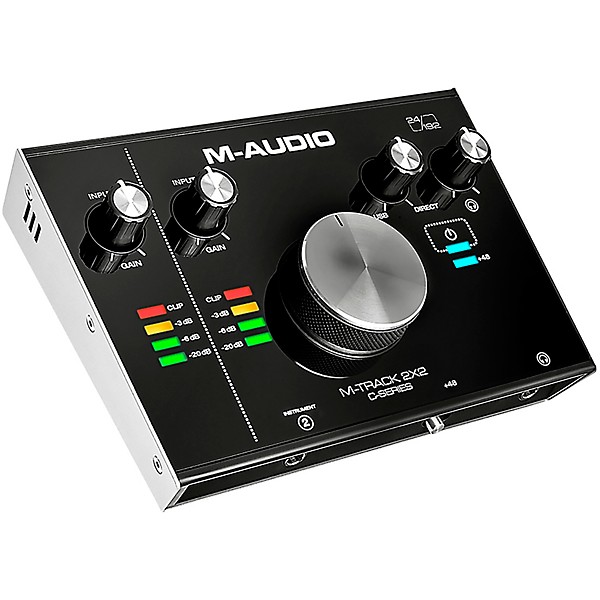
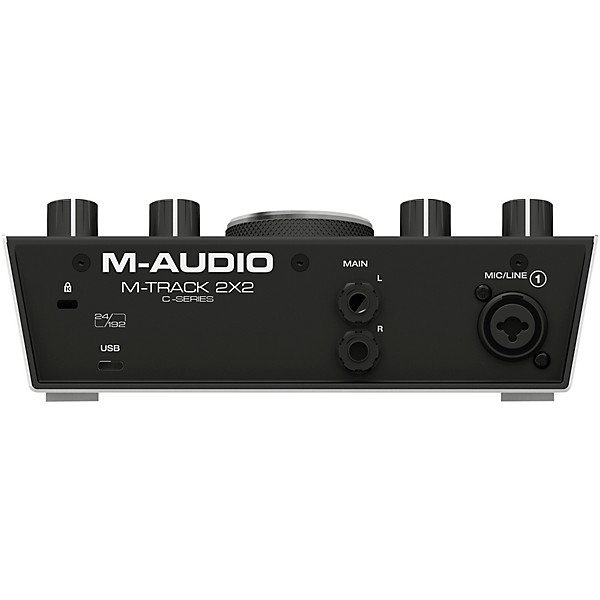
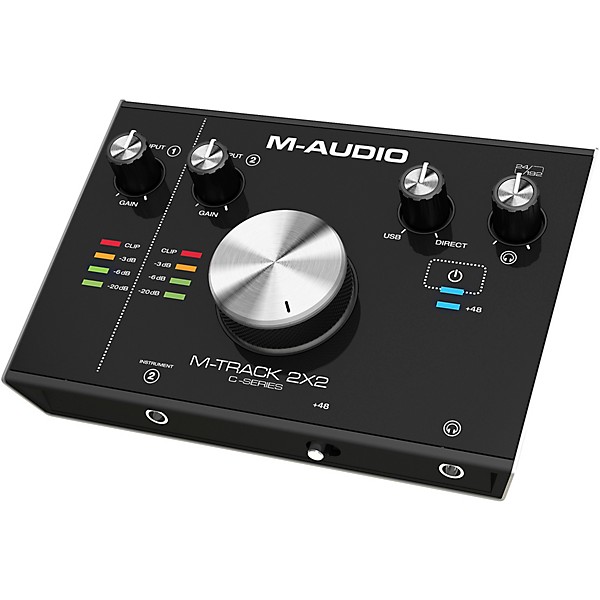
M-Audio M-Track C-Series 2x2 USB Audio Interface
$119.00

Need Help?

Description
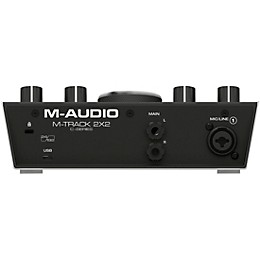
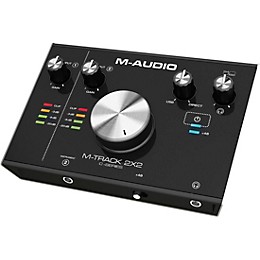
With the M-Track 2x2, you can create flawless 24-bit/192kHz studio-quality recordings with an intuitive and easy-to-use audio interface. Boasting an elegant pro-grade metal chassis with a large central volume knob, the M-Track 2x2 features all-new transparent low-noise pre-amps and pristine A/D converters that deliver the highest audio performance in its class. The M-Track 2x2 enables you to record up to 2 channels at once with its dedicated XLR/TRS balanced combo input, and an all-new 1/4” instrument input that has a specially designed gain and impedance stage to provide the most accurate representation of a guitar or bass plugged directly into the interface.
The M-Track 2x2 connects to your Mac or PC via a standard USB or USB-C port using one of the two included cables. This premium Hi-Speed USB connection combined with the USB/Direct balance knob enables you to have zero-latency monitoring of your inputs, making the recording process easier than ever. The overall combination of professional audio performance, easy-to-use features, and the included software bundle that provides everything you need to start recording now makes the M-Track 2x2 the best and only choice for solo artists.
The M-Track 2x2 connects to your Mac or PC via a standard USB or USB-C port using one of the two included cables. This premium Hi-Speed USB connection combined with the USB/Direct balance knob enables you to have zero-latency monitoring of your inputs, making the recording process easier than ever. The overall combination of professional audio performance, easy-to-use features, and the included software bundle that provides everything you need to start recording now makes the M-Track 2x2 the best and only choice for solo artists.
Features
Comes with Pro Tools First
Specs
Audio Quality
- Max bit depth: 24-bit
- Max sampling rate: 192kHz
- Total inputs: 2
- Analog inputs: 2
- Digital inputs: 0
- Mic Preamps: 2
- XLR/TRS combo jacks: 0
- XLR only jacks: 1
- 1/4” only jacks: 1
- S/PDIF in: 0
- ADAT/optical in: 0
- RCA in: No
- AES/EBU DSUB: No
- MADI: No
- Total outputs: 2
- Analog outputs: 2
- Digital outputs: 0
- XLR out: 0
- 1/4” out: 2
- S/PDIF out: 0
- ADAT/optical out: 0
- RCA out: No
- AES / EBU DSUB: No
- MADI: No
- Connections: USB
- MIDI I/O: No
- Headphone output(s): 1
- Word-clock I/O: No
- Onboard Features
- Computer platform: Mac, Windows
- Phantom power: Yes
- Direct monitoring: Yes
- Rack-mountable: No
- Included software: Yes
Reviews
4
26 Reviews
74%
of respondents would recommend this to a friend

Most Liked Positive Review
5
Perfect Product
I updated my MacOS to Sierra on day one and that took out my fancy Thunderbolt UAD Apollo Twin which costed me $900 - there is no updated driver for it yet. Guess what? With a Mac the M-Track doesn't need a driver and it does indeed work with Sierra. This is true plug and play, although naturally you have to select it in the sound preferences for regular audio and in Logic or your DAW of choice which is a simple preference choice for audio in and out. There's one port each for mic and instrument and dedicated gain knobs for each. And another 1/4" port and knob for headphones. There are two balanced 1/4" outs for your powered monitor speakers and a lovely big knob to control their volume. All the knobs have a perfect amount of resistance and the entire unit looks and sounds absolutely premium. After hearing my audio through the M-Track, I don't see ever going back to the much more expensive Apollo Twin. The M-Track is as good or better - stellar sound. Trust me, this M-Track is the way to go regardless of price. Take my Apollo Twin, PLEASE!
VS
Most Liked Negative Review
1
Whole lotta nope.
I bought this last night to record vocals in ProTools. Never got that far. The first issue was the usb-c jack does not hold the cord firmly in place. When it is not in place, the unit has no power. Simply bumping the unit often cut the power connection. The driver install was relatively easy. But neither my DAW or my computer will recognize the device. They claim this issue was fixed for my OS in version 1.0.6 of the driver. The current driver is 1.0.12. I was able to get some sound through the headphone jack on the unit even though I could not get my PC to recognize the device. I had to jack the gain practically to the maximum to get enough volume to hear myself. I was not overly impressed with the volume or sound quality. After spending the afternoon fighting with this, I will be returning this item tomorrow.
Filters
Best Uses
- Home Studio14
- Amateur Recording10
- Performances5
- Professional Recording5
- Outdoor Events / Games2
Cons
- Limited Functions3
- Poor Sound Quality3
- Unreliable3
- Bulky/Heavy1
- Not Durable1
Describe Yourself
- Experienced13
- Professional Musician3
- Novice1
Pros
- Easy To Use15
- Compact12
- Good Audio12
- Durable7
- Lightweight6
Reviewed by 26 customers
DEFECTIVE INTERFACE
submitted6 years ago
byCARLOS
fromMILWAUKEE, WISCONSIN
MY INTERFACE WAS DEFECTIVE AND I HAD TO EXCHANGE IT FOR A SCARLETT FOCUSRITE INTERFACE SOLO, INWHICH I DO NOT LIKE
Caused my computer to crash
submitted6 years ago
byTim
fromTexas
I had gotten this interface as an upgrade from a very basic one. I had used it for a couple of days with Reaper and Windows 10, and it sounded great and would work perfectly for tracking. However after using it for a little while, my computer began crashing. I couldn't figure out what was causing this, and started to try and solve the problem. I tried all the "fixes" suggested online, and ended up coming across a forum of people having the same problem with the M-Audio Interface. I wasn't 100% sure it was the interface, but I ended up returning it and switching to an equivalent interface and haven't had any issues since then. Which leads me to believe the interface was the culprit. That being said, the interface worked fine when it wasn't crashing my computer, but I had a bad experience with it causing my computer to restart unexpectedly.
Constant noise in voice recording
submitted7 years ago
byFerdousR
fromRedmond, WA
I had to return this product. I downloaded right driver from M-Audio website, went through setup. But no matter how many parameters I tried to tweak and change, I never got clean vocal track recorded through this. It is a poorly designed hardware. I appreciate GuitarCenter's return policy. I opted for FocusRite now.
Very solid interface!!
submitted7 years ago
byIsaac
fromHouston, TX.
I use This interface for music production and as a Guitar audio interface to use with BIAS FX and AmpliTube. This is a very solid interface and I love the layout and functionality. M-Audio has upped their game on the low/mid level interfaces in terms of build quality. I would definitely recommend this interface.
Just works. Awesome.
submitted7 years ago
byMelithos
fromEast
Been looking for a new interface. Tried Audiobox USB 96... buzzed and hummed like mad. Troubleshot. No fix. Returned. Bought this Mtrack 2x2... wow. Much better build quality and beautiful design than Audiobox. Best part. Totally clean sound. No buzzing or weird hum whatsoever. Sound quality is amazing. Running 48Khz 64 samples with no glitches whatsoever. This thing is so nice. It just works, and works very well. All you could ask for an interface. Running Cubase Pro 10.
Whole lotta nope.
submitted7 years ago
byMichael
fromRichmond, VA
I bought this last night to record vocals in ProTools. Never got that far. The first issue was the usb-c jack does not hold the cord firmly in place. When it is not in place, the unit has no power. Simply bumping the unit often cut the power connection. The driver install was relatively easy. But neither my DAW or my computer will recognize the device. They claim this issue was fixed for my OS in version 1.0.6 of the driver. The current driver is 1.0.12. I was able to get some sound through the headphone jack on the unit even though I could not get my PC to recognize the device. I had to jack the gain practically to the maximum to get enough volume to hear myself. I was not overly impressed with the volume or sound quality. After spending the afternoon fighting with this, I will be returning this item tomorrow.
Q&A
Have a question about this product? Our expert Gear Advisers have the answers.
submitted7 years ago
asked byJosh
fromRome, ga
Does the M audio have a built in pre amp
This model actually has 2 mic pre-amps.submitted7 years ago
asked byAaron
fromKY
Does it have MIDI input / output?
This model does not come with midi connections.submitted7 years ago
asked byDreamkid
fromUnited States
would this be compatible with Presonus Studio One 4?
This should work with Presonus Studio One 4.submitted7 years ago
asked byNoah
fromSanta Cruz, Ca
Can I play my guitar through an amp and into this thing? or do I have to play directly into it without an amp?
Yes, you can play through your amp into this interfaceYou should be able to go from your amp in to this audio interface depending on which amp you have.You should be able to go from your amp in to this audio interface depending on which amp you have.Yes, you can play through your amp into this interfacesubmitted7 years ago
asked byJacob
fromLehi
Does this interface work with a MXL 770 condenser microphone??
An MXL 770 could be used with this audio interface.submitted7 years ago
asked byStraightliner
fromOr
How many tracks are available
The M-Track 2x2 enables you to record up to 2 channels at once.
Be the first to know about exclusive offers, tips and more.

866-498-7882 English
877-687-5402 Español