
Gear SpecialistBundlingMusician


Pro Gear Advisers
•866-498-7882
Guitars
Guitars
Amps & Effects
Amps & Effects
Used & Vintage
Keyboards & MIDI
Keyboards & MIDI
Drums
Drums
DJ Equipment
DJ Equipment
Basses
Basses
Recording
Recording
Live Sound
Live Sound
Accessories
Accessories
Mics & Wireless
Mics & Wireless
Music Software
Music Software
Lighting
Lighting
- Popular Brands
Band & Orchestra
Band & Orchestra
Platinum Gear
Deals
Download
Blue Cat Audio DP Meter Pro Software Download
$99.00
6-month special financing^ + $4 back in Rewards** Limited time Learn More

Save on orders $199+ and get expert advice from a Gear Adviser
Need Help?
Description
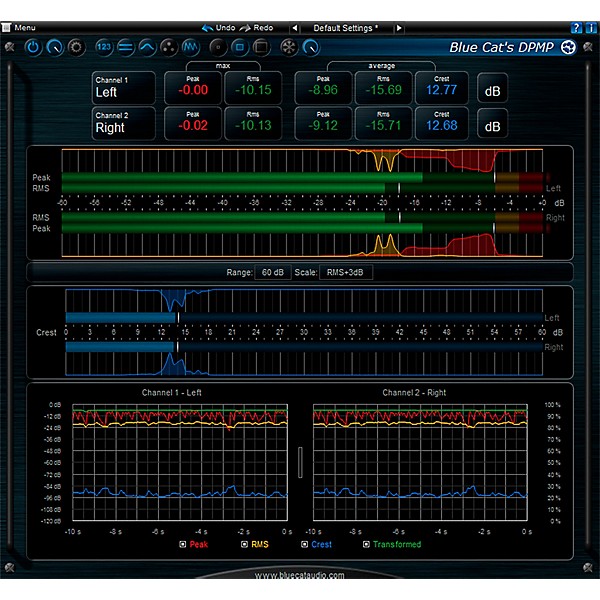
Blue Cat's DP Meter Pro (DPMP) is a unique audio analysis tool: it combines very flexible and customizable audio meters with advanced side chaining control capabilities thanks to its MIDI and automation outputs.
The metering capabilities of the DPMP plug-in let you control and monitor audio signals exactly the way you want: almost every aspect of the peak, RMS and crest factor meters can be customized. It proposes five different scales by default, including Bob Katz's popular K-System scales (K-12, K-14, K-20), and you can create your own.
Large colored statistics displays following your own scales are included for an overview of a track, while histograms give you a precise measurement of the dynamic range of the track. The graphs show the evolution of the audio envelopes over time, and the mid-side switch lets you verify mono compatibility problems and check the "stereoness" of your audio sources very easily. Whether you are working with mono, stereo or surround tracks, this plug-in will fit into your workflow.
All envelopes (peak, RMS, crest factor...) can be reused for additional monitoring or side chaining purposes: combined together, reversed, modified and recorded as automation curves or sent as MIDI CC messages, they can control other effects in real time.
The metering capabilities of the DPMP plug-in let you control and monitor audio signals exactly the way you want: almost every aspect of the peak, RMS and crest factor meters can be customized. It proposes five different scales by default, including Bob Katz's popular K-System scales (K-12, K-14, K-20), and you can create your own.
Large colored statistics displays following your own scales are included for an overview of a track, while histograms give you a precise measurement of the dynamic range of the track. The graphs show the evolution of the audio envelopes over time, and the mid-side switch lets you verify mono compatibility problems and check the "stereoness" of your audio sources very easily. Whether you are working with mono, stereo or surround tracks, this plug-in will fit into your workflow.
All envelopes (peak, RMS, crest factor...) can be reused for additional monitoring or side chaining purposes: combined together, reversed, modified and recorded as automation curves or sent as MIDI CC messages, they can control other effects in real time.
Features
- Multichannel peak, RMS & crest factor meter
- True dynamic range measurement with levels histograms
- Instant, average and maximum audio levels
- Modular user interface to fit into your workflow, with multiple screen sizes
- Total control over metering characteristics, including attack/release shape
- Bob Katz's K-System scales support (K-12 / K-14 / K-20 and custom)
- Mono, stereo, mid-side or surround analysis
- Record measurements (peak, RMS, crest factor, clip etc.) as automation curves
- Control in real time any MIDI-compatible plug-in or external MIDI device with the generated envelopes thanks to the plugin's MIDI CC output
- Manage the shape of the output envelope: record reversed envelope, change amount of signal, and offset the generated envelope. This lets you use the plug-in for side chain ducking, compression and much more
- Easy 'stereoness' and phase cancelation measurement
Specs
System Requirements
- An OpenGL-compatible graphics card for the 3D View
- An SSE2-enabled processor (Pentium 4 or later)
- Microsoft Windows XP, Vista, Windows 7 or 8
- Any DirectX / VST / RTAS / AAX compatible host software (32 or 64 bit)
- An Intel or PowerPC processor
- Mac OS X Mavericks(10.9), Moutain Lion (10.8), Lion (10.7), Snow Leopard (10.6), or Leopard (10.5).
- Any VST / Audio Unit (32/64-bit) / RTAS / AAX compatible application.
- Available as: Mac-AAX, Mac-AU, Mac-RTAS, Mac-VST, Win-AAX, Win-DX, Win-RTAS, Win-VST, Win x64-AAX, Win x64-DX, Win x64-VST.
- Native DSP code for optimal performance.
- Full MIDI control and automation support with silent, zipper-free parameters update, advanced response control and MIDI Learn.
- No CPU load on idle: when the plug-in is fed with silence, the processing smoothly shuts down, to optimize the CPU usage of your Digital Audio Workstation
- Skinnable and customizable user interface with transparency management
- Automation and MIDI output: record output parameters as automation curves or send MIDI CC messages to other plug-ins for powerful side chain effects
- Smooth Bypass: activate/deactivate the plug-in with absolutely no noise
- Undo/Redo.
- Import/Export presets in a host independent format.
- Any sample rate supported
Featured Articles
Reviews
5
2 Reviews
100%
of respondents would recommend this to a friend
Filters
Computer Platform
- PC1
Primary use
- Personal1
Pros
- Easy to Customize1
- Easy to Navigate1
- Versatile1
Reviewed by 2 customers
Great
submitted4 years ago
byBob K
fromTexas
Great
DP Meter Pro
submitted11 years ago
byJustin
fromLos Angeles, CA
This is easily one of the most useful tools in my arsenal. I can't stress enough how important metering has been for me in getting clarity, depth, and dimension in a mix. I'm using this meter on my master bus, and mixing through it right from the start. That way I am not mixing, throwing it up, and then making adjustments as an afterthought. The K system metering is easily my favorite feature of the DP Meter Pro, as it gives me a great reference for what dynamic range I should be shooting for right from the get go. It's made mixing easier, faster, and more enjoyable. My only complaint is that it doesn't have a trim function, but that isn't that big of an issue; it makes up for it with other features. I really have only been using this on the master bus, but I am confident that you could move it around for critical metering of other sources. Now that I have the DP Meter Pro, I can't imagine mixing without it.
- Previous
- 1
- Next
Q&A
Have a question about this product? Our expert Gear Advisers have the answers.
No results but…
You can be the first to ask a new question.
It may be Answered within 48 hours.
Be the first to know about exclusive offers, tips and more.

866-498-7882 English
877-687-5402 Español