

Gear SpecialistBundlingMusician
.jpeg)

Pro Gear Advisers
•866-498-7882
Guitars
Guitars
Amps & Effects
Amps & Effects
Used & Vintage
Keyboards & MIDI
Keyboards & MIDI
Drums
Drums
DJ Equipment
DJ Equipment
Basses
Basses
Recording
Recording
Live Sound
Live Sound
Accessories
Accessories
Mics & Wireless
Mics & Wireless
Music Software
Music Software
Lighting
Lighting
- Popular Brands
Band & Orchestra
Band & Orchestra
Platinum Gear
Deals
New Arrivals
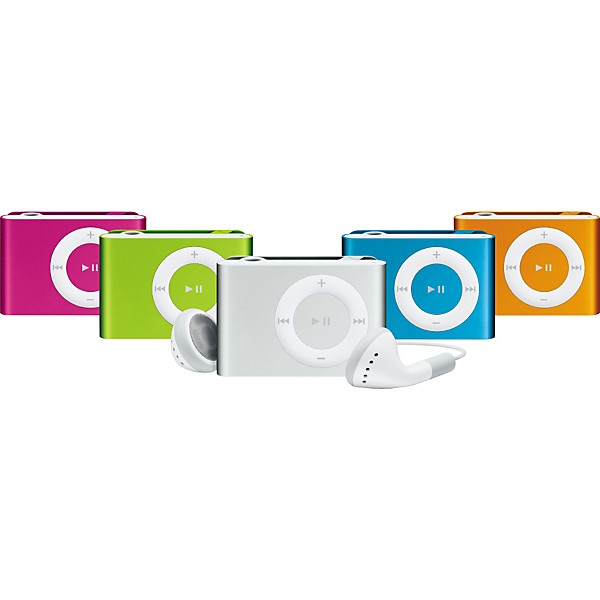
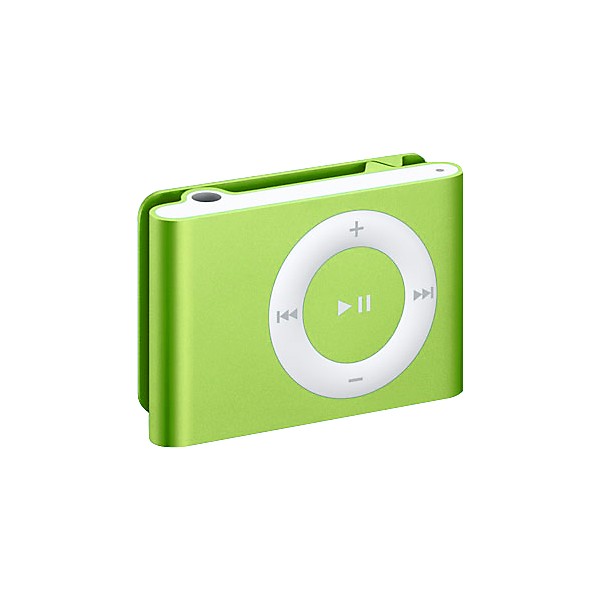
Apple iPod shuffle 1GB 2nd Generation (Clamshell) Orange
$79.99

Need Help?

Description
One size fits all
iPod shuffle from Apple just may be the biggest thing in small. You know what they say about good things and small packages. But when something 1.62 inches long and about half an ounce holds up to 240 songs, "good" and "small" don't cut it. Especially when you can listen to your music for up to 12 continuous hours.**
Ready to wear
Clip the iPod shuffle to your coin pocket. Clip it to your bag. No matter where you clip your skip-free iPod shuffle, you'll have instant access to music. Put it on, turn it up, and turn some heads.
Remix and match
The first step to wearing 240 songs is downloading iTunes -- free. Then drop your iPod shuffle into the included dock, plug the dock into your Mac or PC's USB port, and sync in minutes. Got more than 240 songs? No problem. Let iTunes autofill your iPod shuffle and get a new musical experience every time.
Controls
iPod shuffle pays due respect to its bigger siblings with a thumb-friendly, circular control pad that puts the "go" in ergonomic. Click the center button to play and pause. Click the outer buttons to move back, skip forward, and adjust volume.
Headphone jack
iPod shuffle's headphone jack does double-duty as a dock connector. Flip iPod shuffle upside-down and drop it into the included dock. Then connect the dock to your Mac or Windows PC via USB for a quick sync and charge. And if you're away from your computer, you can charge on the go with an optional USB adapter.
Clip
Thanks to a sturdy, built-in clip, iPod shuffle goes with anything. Clip it to your sleeve, your lapel, your coin pocket, your backpack. No matter where you wear it, iPod shuffle speaks volumes about your style.
Battery indicator
Green means go, amber means you're low, and red means you've almost hit zero. But with up to 12 hours of battery life,** iPod shuffle may keep rocking even longer than you do.
Shuffle switch
Embrace your inner rebel: Flip the shuffle switch to mix up iPod shuffle's contents. Then flip the switch again to play your handpicked playlists and albums in the order you synced them from iTunes.
Something new every sync.
With iTunes, listening to iPod shuffle is never the same experience twice. Connect iPod shuffle to your Mac or PC and see what musical adventures await.
Stop, dock, and sync
iPod shuffle comes with its very own dock that you connect to your Mac or PC via USB. Then, whenever you feel the need for a quick sync, just drop iPod shuffle into the dock and iTunes goes to work.
More in store
With up to 1GB of storage space, iPod shuffle happily stores files along with your music. Use iTunes to tell iPod shuffle how much space to leave free for files and how much to fill with music.
World's smallest DJ
For the ultimate exercise in uncertainty, let iTunes randomly autofill your iPod shuffle. iTunes creates a playlist that fits your style -- and your iPod shuffle's capacity. For finer control over your portable music collection, set Autofill to sync from specific playlists or add higher-rated songs first. Or turn Autofill off and manually select the songs you want to tote on your iPod shuffle.
Fill 'er up fast
iPod shuffle transfers the contents of an entire CD in a flash, so even if you completely refill iPod shuffle, you won't be waiting very long at all. Of course, total time varies depending on how much music you want to add or replace.
* 1GB = 1 billion bytes; actual formatted capacity less. Song capacity is based on 4 minutes per song and 128-Kbps AAC encoding; actual capacity varies by content.
**Rechargeable batteries have a limited number of charge cycles and may eventually need to be replaced. Battery life and number of charge cycles vary by use and settings.
iPod shuffle from Apple just may be the biggest thing in small. You know what they say about good things and small packages. But when something 1.62 inches long and about half an ounce holds up to 240 songs, "good" and "small" don't cut it. Especially when you can listen to your music for up to 12 continuous hours.**
Ready to wear
Clip the iPod shuffle to your coin pocket. Clip it to your bag. No matter where you clip your skip-free iPod shuffle, you'll have instant access to music. Put it on, turn it up, and turn some heads.
Remix and match
The first step to wearing 240 songs is downloading iTunes -- free. Then drop your iPod shuffle into the included dock, plug the dock into your Mac or PC's USB port, and sync in minutes. Got more than 240 songs? No problem. Let iTunes autofill your iPod shuffle and get a new musical experience every time.
Controls
iPod shuffle pays due respect to its bigger siblings with a thumb-friendly, circular control pad that puts the "go" in ergonomic. Click the center button to play and pause. Click the outer buttons to move back, skip forward, and adjust volume.
Headphone jack
iPod shuffle's headphone jack does double-duty as a dock connector. Flip iPod shuffle upside-down and drop it into the included dock. Then connect the dock to your Mac or Windows PC via USB for a quick sync and charge. And if you're away from your computer, you can charge on the go with an optional USB adapter.
Clip
Thanks to a sturdy, built-in clip, iPod shuffle goes with anything. Clip it to your sleeve, your lapel, your coin pocket, your backpack. No matter where you wear it, iPod shuffle speaks volumes about your style.
Battery indicator
Green means go, amber means you're low, and red means you've almost hit zero. But with up to 12 hours of battery life,** iPod shuffle may keep rocking even longer than you do.
Shuffle switch
Embrace your inner rebel: Flip the shuffle switch to mix up iPod shuffle's contents. Then flip the switch again to play your handpicked playlists and albums in the order you synced them from iTunes.
Something new every sync.
With iTunes, listening to iPod shuffle is never the same experience twice. Connect iPod shuffle to your Mac or PC and see what musical adventures await.
Stop, dock, and sync
iPod shuffle comes with its very own dock that you connect to your Mac or PC via USB. Then, whenever you feel the need for a quick sync, just drop iPod shuffle into the dock and iTunes goes to work.
More in store
With up to 1GB of storage space, iPod shuffle happily stores files along with your music. Use iTunes to tell iPod shuffle how much space to leave free for files and how much to fill with music.
World's smallest DJ
For the ultimate exercise in uncertainty, let iTunes randomly autofill your iPod shuffle. iTunes creates a playlist that fits your style -- and your iPod shuffle's capacity. For finer control over your portable music collection, set Autofill to sync from specific playlists or add higher-rated songs first. Or turn Autofill off and manually select the songs you want to tote on your iPod shuffle.
Fill 'er up fast
iPod shuffle transfers the contents of an entire CD in a flash, so even if you completely refill iPod shuffle, you won't be waiting very long at all. Of course, total time varies depending on how much music you want to add or replace.
* 1GB = 1 billion bytes; actual formatted capacity less. Song capacity is based on 4 minutes per song and 128-Kbps AAC encoding; actual capacity varies by content.
**Rechargeable batteries have a limited number of charge cycles and may eventually need to be replaced. Battery life and number of charge cycles vary by use and settings.
Specs
Size and weight
- Height: 1.07 inches
- Width: 1.62 inches
- Depth: 0.41 inch (including clip)
- Weight: 0.55 ounce
- Volume: 0.5 cubic inch (not including volume under clip)
- iPod shuffle
- Earphones
- Dock
- Quick Start guide
- 1GB USB flash drive(1)
- Holds up to 240 songs in 128-Kbps AAC format(2)
- Stores data via USB flash drive
- Skip-free playback
- Frequency response: 20Hz to 20,000Hz
- MP3 (8 to 320 Kbps), MP3 VBR, AAC (8 to 320 Kbps), Protected AAC (from iTunes Store, M4A, M4B, M4P), Audible (formats 2, 3 and 4), WAV, and AIFF
- Earphones
- Frequency response: 20Hz to 20,000Hz
- Impedance: 32 ohms
- Macintosh computer with USB port
- Mac OS X v10.3.9 and later
- iTunes 7.0.2 or later(3)
- PC with USB port
- Windows 2000 with Service Pack 4 or later or Windows XP Home or Professional with Service Pack 2 or later
- iTunes 7.0.2 or later(3)
- Environmental requirements
- Operating temperature: 32 to 95 F (0 to 35 C)
- Nonoperating temperature: -4 to 113 F (-20 to 45 C)
- Relative humidity: 5% to 95% noncondensing
- Maximum operating altitude: 10,000 feet (3000 m)
- Input and output
- 3.5-mm stereo headphone minijack
- Power and battery(4)
- Built-in rechargeable lithium polymer battery
- Playtime: Up to 12 hours when fully charged
- Charging via included USB dock
- Full-charge time: about 4 hours
- 1. 1GB = 1 billion bytes; actual formatted capacity less.
- 2. Song capacity based on 4 minutes per song and 128kbps AAC encoding; actual capacity varies by content.
- 3. iPod and iTunes are for legal or rightholder-authorized copying only.
- 4. Rechargeable batteries have a limited number of charge cycles and may eventually need to be replaced. Battery life and number of charge cycles vary by use and settings.
Reviews
Be the first to review the Product
Q&A
Have a question about this product? Our expert Gear Advisers have the answers.
No results but…
You can be the first to ask a new question.
It may be Answered within 48 hours.
Be the first to know about exclusive offers, tips and more.

866-498-7882 English
877-687-5402 Español