


DigitalPianistSynths
.jpeg)

Pro Gear Advisers
•866-498-7882
Guitars
Guitars
Amps & Effects
Amps & Effects
Used & Vintage
Keyboards & MIDI
Keyboards & MIDI
Drums
Drums
DJ Equipment
DJ Equipment
Basses
Basses
Recording
Recording
Live Sound
Live Sound
Accessories
Accessories
Mics & Wireless
Mics & Wireless
Music Software
Music Software
Lighting
Lighting
- Popular Brands
Band & Orchestra
Band & Orchestra
Platinum Gear
Deals
New Arrivals
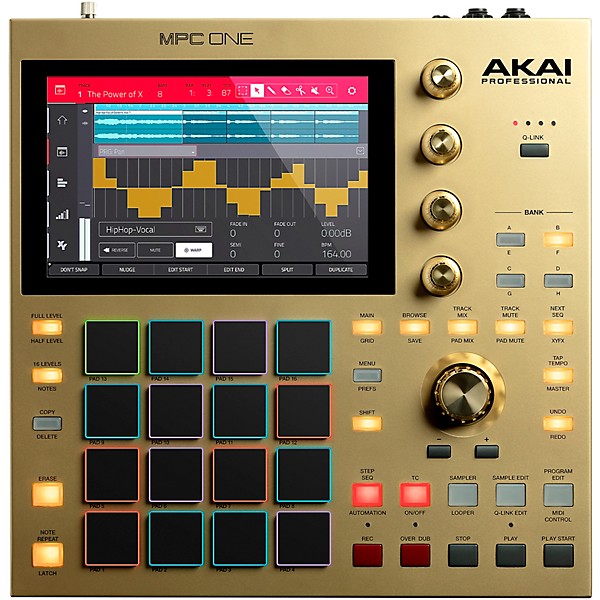
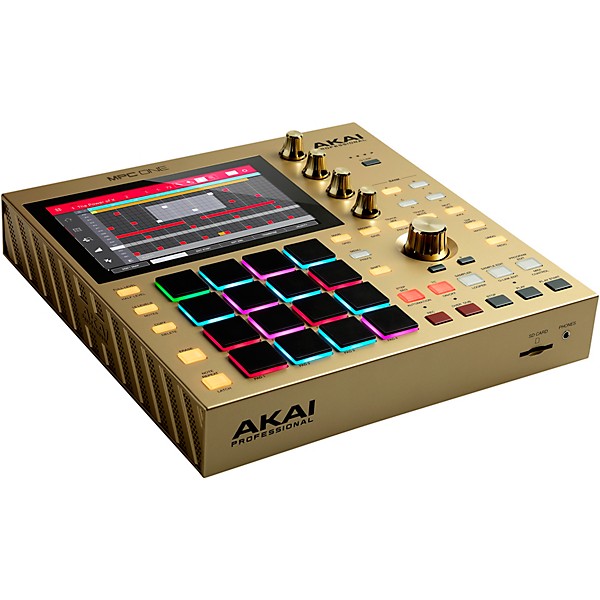
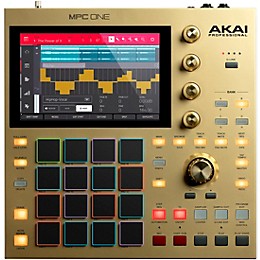
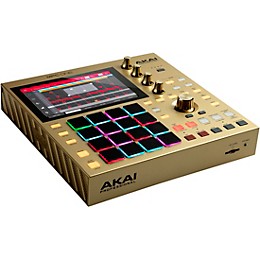
Akai Professional MPC One Gold Standalone Music Production Center
$699.00

Need Help?
Videos (8)
View All
Akai Professional MPC One | First Impressions with Machinedrum

MPC One | Product Overview
MPC Firmware Update 2.8 Overview

Getting Started with MPC One | Making Your First Beat

Description
From rich melodics and hard-hitting drums to the most infectious grooves, if you expect to get real professional production results you need next-generation tools that act as a natural extension of your creativity. Enter the MPC One Gold Standalone Music Production Center engineered to enrich your work flow and create the ultimate standalone production experience. Spend less time hitting roadblocks and take command of your production with this latest addition to the MPC family.
Full MPC Experience
Don’t let the size fool you. The MPC One packs a lot of features and workflow tools into ONE powerful punch, like beat programming, editing, mixing FX, instruments and so much more. This is truly an uncompromised creative experience.
The heart and soul of the MPC One is the same multi-core processor as the MPC X, skillfully combined into a compact standalone desktop unit that easily handles the most demanding tasks. MPC One delivers a truly empowering hands-on experience, ready for any music production task. Edit and chop samples with hand gestures on the bright 7-inch touch screen color display. Express your ideas effortlessly and directly with the dedicated knobs and touch keys that eliminate cumbersome drop-down menus.
MPC Mainstays
Everything you expect from a Standalone MPC is here, without compromise.
With the MPC One, all MPC functionality you expect is here, perfectly positioned with two goals clearly in mind – ease of use and no-nonsense work ow enhancement. Four touch sensitive controls and a large data encoder seamlessly map to critical parameters. Sixteen velocity- and pressure-sensitive RBG pads deliver perfect response for full expressive range. MPC mainstays including Note Repeat, Full Level, 16 Levels and dedicated Transport Controls complete the MPC One’s arsenal of control options, providing complete production capability.
Studio Connectivity
MPC One integrates into your creative space with all the connectivity you demand.
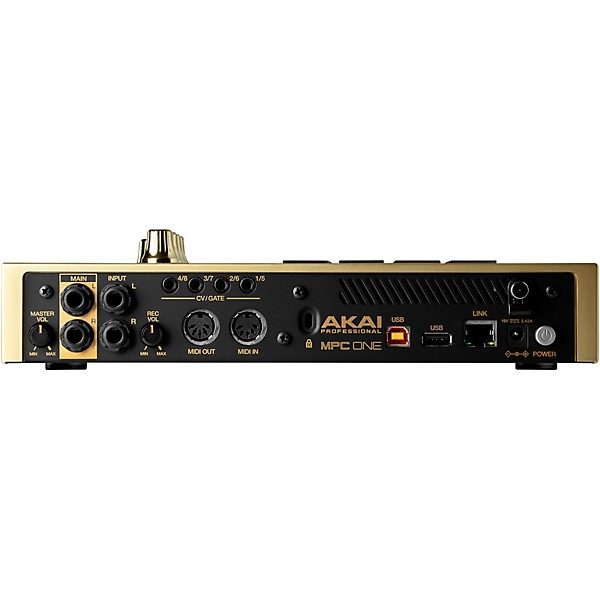
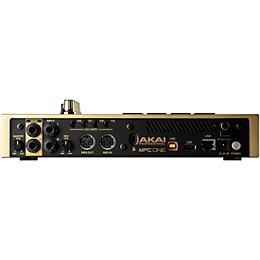
The MPC One is ready to work with your current studio environment and will grow with you as your needs expand. Connect your USB controller or line-level 1⁄4-inch instruments. Control your MIDI devices and your CV/Gate modules & racks. And there’s no need to worry about interconnectivity, since MPC One is ready to work right alongside professional music production gear.
MPC Software 2
Discover your creative workspace with ground-breaking MPC Software.
Akai Professional’s reimagined MPC 2 Software drives MPC One in both standalone and controller modes. This is a cutting-edge production suite combining 128-track sequencing capability, real-time time stretching, clip-launch functionality, advanced MIDI editing capability, VST compatibility in controller mode, operation as a standalone application on Mac & PC, advanced sampling & audio editing/recording functionality, seamless DAW integration, a redesigned GUI and much more. Whether you’re seeking freedom from computer-based music production or searching for the perfect controller for DAW-centric creative exploration, MPC 2 Software delivers the ultimate in adaptive creative versatility.
Splice Integration
The future of on-demand content is here, all accessible in MPC One’s standalone environment.
Simplify your sample browsing and auditioning with on-board Splice integration in MPC One. Splice Sounds fuels the creativity of producers around the world with millions of high-quality, royalty-free samples, sounds, presets and loops, covering every musical style. With Splice natively embedded in MPC One, you will experience immediate network access to your own Splice library directly from the touch user interface.
Storage & Connectivity
Take the hassle out of importing your own samples with MPC One’s content driven connectivity and on- board storage.
As standard, MPC One ships with 4GB of internal Micro SD storage. Looking to add your own sounds? MPC One features a built-in SD Card slot and USB thumb input for immediate access to your own sample libraries.
Packed with Content
From critically-acclaimed synth engines and mixing tools to in-demand sample and loop content, everything you need for immediate creativity is here.
MPC One comes with its own new drum sample & loop library that continues the MPC tradition of hard- hitting, industry-renowned drum sounds from leading sound designers including RawCutz, Sample Tools by CR2, F9, Decap, MSX Sound Design and MVP Loops. MPC One also features signature synth engines, Electric, Tubesynth and Bassline, as well as premium AIR FX for mixing & mastering. With MPC One, you have everything you need to produce hard-hitting, unforgettable music — music that is uniquely yours.
Full MPC Experience
Don’t let the size fool you. The MPC One packs a lot of features and workflow tools into ONE powerful punch, like beat programming, editing, mixing FX, instruments and so much more. This is truly an uncompromised creative experience.
The heart and soul of the MPC One is the same multi-core processor as the MPC X, skillfully combined into a compact standalone desktop unit that easily handles the most demanding tasks. MPC One delivers a truly empowering hands-on experience, ready for any music production task. Edit and chop samples with hand gestures on the bright 7-inch touch screen color display. Express your ideas effortlessly and directly with the dedicated knobs and touch keys that eliminate cumbersome drop-down menus.
MPC Mainstays
Everything you expect from a Standalone MPC is here, without compromise.
With the MPC One, all MPC functionality you expect is here, perfectly positioned with two goals clearly in mind – ease of use and no-nonsense work ow enhancement. Four touch sensitive controls and a large data encoder seamlessly map to critical parameters. Sixteen velocity- and pressure-sensitive RBG pads deliver perfect response for full expressive range. MPC mainstays including Note Repeat, Full Level, 16 Levels and dedicated Transport Controls complete the MPC One’s arsenal of control options, providing complete production capability.
Studio Connectivity
MPC One integrates into your creative space with all the connectivity you demand.
The MPC One is ready to work with your current studio environment and will grow with you as your needs expand. Connect your USB controller or line-level 1⁄4-inch instruments. Control your MIDI devices and your CV/Gate modules & racks. And there’s no need to worry about interconnectivity, since MPC One is ready to work right alongside professional music production gear.
MPC Software 2
Discover your creative workspace with ground-breaking MPC Software.
Akai Professional’s reimagined MPC 2 Software drives MPC One in both standalone and controller modes. This is a cutting-edge production suite combining 128-track sequencing capability, real-time time stretching, clip-launch functionality, advanced MIDI editing capability, VST compatibility in controller mode, operation as a standalone application on Mac & PC, advanced sampling & audio editing/recording functionality, seamless DAW integration, a redesigned GUI and much more. Whether you’re seeking freedom from computer-based music production or searching for the perfect controller for DAW-centric creative exploration, MPC 2 Software delivers the ultimate in adaptive creative versatility.
Splice Integration
The future of on-demand content is here, all accessible in MPC One’s standalone environment.
Simplify your sample browsing and auditioning with on-board Splice integration in MPC One. Splice Sounds fuels the creativity of producers around the world with millions of high-quality, royalty-free samples, sounds, presets and loops, covering every musical style. With Splice natively embedded in MPC One, you will experience immediate network access to your own Splice library directly from the touch user interface.
Storage & Connectivity
Take the hassle out of importing your own samples with MPC One’s content driven connectivity and on- board storage.
As standard, MPC One ships with 4GB of internal Micro SD storage. Looking to add your own sounds? MPC One features a built-in SD Card slot and USB thumb input for immediate access to your own sample libraries.
Packed with Content
From critically-acclaimed synth engines and mixing tools to in-demand sample and loop content, everything you need for immediate creativity is here.
MPC One comes with its own new drum sample & loop library that continues the MPC tradition of hard- hitting, industry-renowned drum sounds from leading sound designers including RawCutz, Sample Tools by CR2, F9, Decap, MSX Sound Design and MVP Loops. MPC One also features signature synth engines, Electric, Tubesynth and Bassline, as well as premium AIR FX for mixing & mastering. With MPC One, you have everything you need to produce hard-hitting, unforgettable music — music that is uniquely yours.
Features
- Standalone MPC – no computer required
- Powerful Multicore System from the MPC Live and MPC X
- 16 velocity-sensitive RGB Pads
- 7-inch high-resolution multi-touch display
- 2GB RAM, 4GB of on-board storage
- Mac & PC Controller for MPC Software (Included)
- Stereo Line-Level Inputs
- MIDI In and MIDI Out
- (8) CV/Gate Outputs using 1⁄8-inch (3.5mm) TRS cables (mono TS cable compatible)
- (2) USB-A 3.0 Slots for thumb drives or MIDI Controllers
- SD card slot
Specs
- Pads
- (16) velocity- and pressure-sensitive pads, RGB-backlit
- (8) banks accessible via Pad Bank buttons
- Knobs
- (4) 360° touch-sensitive Q-Link Knobs
- (4) Q-Link Knob columns accessible via Q-Link button
- (1) 360° encoder for display navigation and selection via push
- Buttons
- (31) dedicated function buttons; red-, amber-, or green-backlit
- Display
- 7.0” / 177mm (diagonal)
- 5.9” x 3.7” / 151 x 94mm (width x height)
- Full-color LED-backlit display with touch interface
- CPU
- Processor: Quad-core ARM processor
- RAM: 2GB
- Storage: 2GB user storage, 2GB pre-installed content
- Connections
- (2) 1⁄4” (6.35mm) TRS inputs (1 stereo pair)
- (2) 1⁄4” (6.35mm) TRS outputs (1 stereo pair)
- (1) 1⁄8” (3.5mm) stereo headphone output
- (1) 5-pin MIDI inputs
- (1) 5-pin MIDI outputs
- (4) CV/Gate outputs
- (1) USB Type-A port
- (1) USB Type-B port
- (1) SD card slot
- (1) power adapter input
- Power
- via power adapter: 19V, 3.42A, center-positive, included
- Dimensions (width x depth x height)
- 10.7” x 10.7” x 2.1”
- 272 x 272 x 53mm
- Weight
- 4.7 lbs.
- 2.1kg
Reviews
4.89
9 Reviews
100%
of respondents would recommend this to a friend



Filters
Best Uses
- Practicing4
- Arrangeing Music1
- Back-Up1
- Concerts1
- Making Beats1
Cons
- Learning curve to unlock full potential1
Describe Yourself
- Experienced8
- Professional Musician1
Pros
- Good Quality8
- Functional7
- Easy To Use5
- Improves Sound5
- Increases Productivity1
Reviewed by 9 customers
Bad to the Bone
submitted3 years ago
byDJ Jorgey
fromMiami
I have purchased a lot of new products over the years...and a lot of them end up being duds....but this one is exceptional. It is my new favorite and 2nd only to my MicroKORG and BOSS sampler. Im a 20+ year DJ and still trying to figure it out but Ive got it hooked up to an Asturia essential 49 and my DJ set up and its just a matter of putting in the time now.
J. Gamble gives it 👍👍
submitted3 years ago
byJustin
fromCleveland OH
I've been using older equipment and software for a while. Within the past week, I have purchased this MPC one as well as the MK3 keyboard and a universal audio twin X duo interface, along with a brand new Mac Studio and Studio Display. Out of all the things I bought this MPC one is my favorite. I love the stand alone function for when I wanna take it to the couch or out of the house but I prefer using it as a controller. It's so much easier and quicker to lay out a beat on the software in conjunction with using the MPC itself. I love it. The sound samples that were preloaded are pretty dope and has unlimited potential for more.
Yes I would But It Again!
Verified Buyer
submitted3 years ago
byElliott
fromColumbus, Ohio
Submitted as part of a sweepstakes
Mixing, Mastering Songs Beat Making It Is A Great addition to my Studio!
So much potential
Verified Buyer
submitted3 years ago
byLenny
fromSt Petersburg Fl.
First off. I am approaching my 70th birthday. So why would I want a beatbox. Simple this device has everything and more. Drums bass synths leads and pads vocal sounds you name it I plan on integrating it into my setup which is a korg arranger and some rack modules from the 80s So how is it to work with. Very intuitive the key seems to be navigation which is trial and error but gets easier the longer I use it. Sound quality is amazing and tweakability is whatever you need it to be. Will it work out I think so. It's a device that rewards the time you put into it
The Best In Standalone Music Production
submitted4 years ago
byEdward
fromJacksonville, Fl
Using the MPC One to produce music of various genres, I find myself not wanting to put it down for anything else. Its portable and easy to use in my opinion.
Should Have Purchased Sooner
submitted4 years ago
byRiq
fromChicago
I use the MPC One for music production. I like that the machine has function buttons to make accessing menu items easily. The dial is amazing. Once you get some practice on it, navigating becomes 2nd nature. I feel that it's value far exceeds the price.
Q&A
Have a question about this product? Our expert Gear Advisers have the answers.
submitted3 years ago
asked byJ
fromSanta Cruz
Can I plug my mic into the machine and create vocal for the track I make?
Please see "https://www.akaipro.com/mpc-one"submitted5 years ago
asked byNathan
fromPortsmouth, NH
When will Guitar Center get more of these?
Please contact our Customer Service agents to get an updated Back Order time frame
Be the first to know about exclusive offers, tips and more.

866-498-7882 English
877-687-5402 Español