




Gear SpecialistBundlingMusician
.jpeg)

Pro Gear Advisers
•866-498-7882
Guitars
Guitars
Amps & Effects
Amps & Effects
Used & Vintage
Keyboards & MIDI
Keyboards & MIDI
Drums
Drums
DJ Equipment
DJ Equipment
Basses
Basses
Recording
Recording
Live Sound
Live Sound
Accessories
Accessories
Mics & Wireless
Mics & Wireless
Music Software
Music Software
Lighting
Lighting
Band & Orchestra
Band & Orchestra
Platinum Gear
Deals
Deals
New Arrivals
Brands
Brands
- A
- A Designs
- A&F Drum Co
- A&S Crafted Products
- A-Tempo Percussion
- AAS
- Accu-Stand
- Aclam Guitars
- ACON DIGITAL
- AcoustaGrip
- Acoustic
- Acoustica
- Acus Sound Engineering
- ADAM Audio
- Adams
- ADVANCE MUSIC
- AEA Microphones
- AER
- Aguilar
- Ahead
- Ahead Armor Cases
- AIAIAI
- AIM
- Air Music Tech
- AirTurn
- Akai Professional
- AKG
- Al Cass
- Alacran
- Alaska Pik
- Alesis
- Alfred
- Alhambra
- Allen & Heath
- Alliance
- Allied Music Supply
- Allora
- Allparts
- AlphaTheta
- Alpine Hearing Protection
- Altieri
- Alto
- Altus
- Aluratek
- Alvarez
- Amadeus Press
- Amati
- American Audio
- American Classics
- American DJ
- American Recorder Technologies
- Ampeg
- Amphion
- Amprx Power Solutions
- Analysis Plus
- Anchor Audio
- Andreas Eastman
- Animals Pedal
- Ansmann
- Antares
- Antelope Audio
- Antoine Courtois Paris
- Anton Breton
- Anton Eminescu
- API
- Apogee
- Applause
- Apple
- Apple Creek
- Applied Acoustics Systems
- Applied Microphone Technology
- Aquarian
- AQUILA
- Arcolla
- Argosy
- Arion Humidifier
- Arobas Music
- ARP
- Arrangers
- Arriba Cases
- Art
- Art & Lutherie
- Artino
- Artiphon
- ArtistPro
- Arturia
- Ashdown
- Asher Guitars & Lap Steels
- Ashley Mark
- Ashley Publications Inc.
- Aspen Pittman Designs
- Aston Microphones
- Atlas Sound
- Atlas-C1
- Attack Drumheads
- Audeze
- Audient
- Audiffex
- Audio Innovate
- Audio Modeling
- Audio-Technica
- Audiomodern
- Audix
- Auralex
- Ausounds
- Austrian Audio
- Avalon
- Avante
- Avantone
- Avid
- Aviom
- Axe Heaven
- AxLabs
- Azumi
- B
- B&O Play
- B&S
- B.C. Rich
- Baby Audio
- Bach
- Backbeat Books
- Backun
- Bad Cat
- BAE
- Baker Street
- Balter Mallets
- Bam
- BandStorage.com
- Barcus Berry
- Barefoot Buttons
- Barefoot Sound
- Barn3
- Bartolini
- Bass Drum O's
- Bass Plate
- BASSBOSS
- Basslines
- BBE
- BC Audio
- BCM International
- Bearcat
- Bears for Humanity
- Beechler
- Beetronics FX
- Behringer
- Belkin
- Bellafina
- Belmonte
- BELWIN
- BENRO
- Bergerault
- Berklee Press
- Berp
- Besson
- Best Service
- beyerdynamic
- Beyron Audio
- BG
- Big Bang Distribution
- Big Bends
- Big Fat Snare Drum
- Big Fish
- Bigsby
- Bill Edwards Publishing
- Bitwig
- BK Media
- Black Box Analog
- Black Cherry USA
- Black Diamond
- Black Ice
- Black Label
- Black Lion Audio
- Black Market Modular
- Black Swamp Percussion
- Blackmagic Design
- Blackstar
- Blessing
- BlissLights
- Blitz
- Blizzard
- Blue
- Blue Cat Audio
- Blue Juice
- Blueridge
- BluGuitar
- Bob Reeves
- Bobcat
- Bobelock
- Bogner
- Bonade
- BONE Drums
- BongoTies
- Boomwhackers
- Boosey and Hawkes
- Bose
- Bosphorus Cymbals
- BOSS
- Boveda
- Bow-Right
- Brainwerks
- Bravo Reeds
- Breath Builder
- Breedlove
- Brian May Guitars
- Bridge
- Brilhart
- Bristol
- British Drum Co.
- BROADWAY GIFTS
- Brookfield
- Browntrout Publishing
- BSS Audio
- BSX Bass
- Buffet Crampon
- Bugera
- Bundy
- BURKART
- Burl Audio
- BusyBox
- Buttkicker
- C
- C&D Visionary
- CAD
- CadLive
- CAIG
- Canadian Brass
- Caparison Guitars
- Cardinal Percussion
- Carl Fischer
- Carl Martin
- Carlisle Cases
- CARTEC Audio
- Casio
- Catalinbread
- CB Percussion
- Celemony
- Celestion
- Cengage Learning
- Centerstream Publishing
- Cerwin-Vega
- Chamsys
- Chandler Limited
- Chaos Audio
- Chapman
- Charter Oak Acoustics
- Charvel
- CHAUVET DJ
- CHAUVET Professional
- Chedeville
- Cherry Audio
- Cherry Lane
- Chester Music
- ChopSaver
- CIOKS
- Circa 74
- Clark W Fobes
- Classical Destinations Educational
- Clayton
- Cleartone
- Cloud
- CME
- Coffin Case
- Cole Clark
- ColorKey
- Conn
- Conn-Selmer
- Control Acoustics
- COOL
- Cool Wind
- Cooperstand
- CopperSound Pedals
- Cordoba
- Corelli
- Cort
- Course Technology PTR
- CP
- CRAFTER
- crazybaby
- Cre8audio
- Creative Concepts
- Creative Tunings
- Cremona
- Crown
- CTM
- Curnow Music
- Curry
- Cusack Music
- Cymbal Crown
- Cympad
- D
- D&A Guitar Gear
- D'Addario
- D'Addario Woodwinds
- D'Andrea
- D'Angelico
- D.W. Fearn
- D16 Group
- Daking
- Dampit
- Danelectro
- Dangerous Music
- Danmar Percussion
- Darco
- Daredevil Pedals
- Darkglass
- Darkglass Electronics
- DataVideo
- Dava
- Daybreak Music
- dbx
- ddrum
- Dean
- Dean Markley
- DeArmond
- Death By Audio
- Decibel Eleven
- Decibullz
- Decksaver
- Deer River
- Deering
- Defender
- DEG
- Delkin
- Delta Sound Labs
- DeltaLab
- Denis Wick
- Denon DJ
- Devine Entertainment
- Dexibell
- DG De Gregorio
- Di Zhao
- Diago
- dialtune
- Diamond Head
- Diezel
- Digidesign
- DIGITAL AUDIO LABS
- Digital Music Doctor
- Digitech
- DiMarzio
- Direct Sound
- Dixon
- DJ.Studio
- DJI
- Dobro
- Doc Sweeney Drums
- DOD
- Dogman Devices
- Donato
- Donner
- DPA Microphones
- DR LISTON's
- DR Pro
- DR Strings
- Dragonfly Clothing
- Drawmer
- Dreadbox
- Dream
- Dreamtonics
- DRS Racks
- Drum Chart Builder
- Drum Fun Inc
- Drum Pike
- DrumClip
- DrumDial
- drumdots
- DRUMnBASE
- DrumTags
- Dual Turntables
- Duesenberg
- Duesenberg USA
- Dunable Guitars
- Dunlop
- Duracell
- Durand
- DV Mark
- DW
- DWe
- DYNACORD
- Dynasty
- Dynaudio
- Dynaudio Acoustics
- E
- E-Cords
- E. Rousseau
- Earasers
- EAROS
- Earthenware
- EarthQuaker Devices
- Earthworks
- Eastman
- EastWest
- Ebow
- EBS
- Ecler
- Eden
- Editions Durand
- Educational Activities
- EFNOTE
- Egnater
- Elation
- Electro-Harmonix
- Electro-Voice
- Elektron
- Eliminator Lighting
- Elixir
- Elysia
- eMedia
- EMG
- Emma Electronic
- Empirical Labs
- Empress Effects
- Endust
- Engelhardt
- ENGL
- ENKI
- Epiphone
- EQUI=TECH
- Ernie Ball
- Ernie Ball Music Man
- Erogenous Tones
- ESP
- Essential Pak
- Etude
- Etymotic Research
- Eulenburg
- EvaBeat
- EVANS
- Eventide
- Everly
- EVH
- Exponential Audio
- Expressive E
- Extendabone
- EZ Dupe
- F
- Faber Music LTD
- Faber Piano Adventures
- FabFilter
- Fat Cat
- Favored Nations
- Faxx
- Fender
- Fender Custom Shop
- Ferrofish
- Fibracell
- Finger Fitness
- Fingerease
- FingerWeights
- Firestix
- First Note
- Fischer Amps
- Fishman
- FJH Music
- Flea Market Music
- Flight
- Flock Audio
- Florea
- Floyd Rose
- Fluid Audio
- Focal
- Focusrite
- Fodera Guitars
- Forestone
- FORTALEZA GUITARS
- Fostex
- Fox
- Franklin Strap
- Fred Bock Music
- Fred Kelly Picks
- Frederick Hemke
- Freedom
- Fret Daddy
- Fret12
- Fret37
- Friedman
- Fryette
- Fuchs
- Funko
- Furman
- Fusion
- G
- G&L
- G. Henle Verlag
- G. Schirmer
- G7th
- Galaxy Audio
- Gallien-Krueger
- GAMAGO
- Gamechanger Audio
- GAMMA
- Gard
- Gator
- GATOR CABLEWORKS
- Gazley
- Gear One
- Gem Sound
- GEM Swabs
- Gemeinhardt
- Gemini
- Genalex
- Genelec
- Gentry Publications
- Genzler Amplification
- George L's
- Gerlitz
- Get'm Get'm
- Getzen
- GForce
- GHS
- Giardinelli
- Gibraltar
- Gibson
- Gibson Custom
- Gig Gear
- Ginger Audio
- Gitane
- Glaesel
- Glasser
- Global Creative Group
- GLOBAL TRUSS
- Glorious
- Glowtronics
- Glyph
- Godin
- Godlyke
- Gold Tone
- Golden Age Project
- Gon Bops
- Gonzalez
- Goodview
- Goodwood
- GoPro
- Gorilla Snot
- Gorilla Tips
- Gotoh
- Grace Design
- Graph Tech
- GRAVITY PICKS
- Gravity Stands
- Gretsch
- Gretsch Drums
- Gretsch Guitars
- Groove Juice
- Groove Synthesis
- Groove Tubes
- GROOVETECH TOOLS, INC.
- GROVER
- Grover Pro
- Grover-Trophy
- Gruv Gear
- Gruv Glide
- Gruv-X
- Guild
- Guitar Center
- Guitar Triller
- Guitar World
- GuitarGrip
- Guy's Publishing
- H
- H. Jimenez
- H. Wilson
- H.W.
- Habanero Pickups by Grover Jackson
- Hagerty
- Hagstrom
- Hal Leonard
- Hamilton
- Hammond
- Hans Hoyer
- HansenFutz
- Happy Socks
- Harbinger
- HARDCASE
- Harmon
- Harmonic Vision
- Harmony
- Harper Trucks
- Harrison
- Harry Hartmann
- Headliner
- HeadRush
- Headway
- Hearos
- Heather Brown Electronicals
- Heavyocity
- HEDD
- Heil Sound
- Hennessey
- Henry Heller
- Hercules
- Hercules DJ
- Heritage
- Hetman
- HexHider
- Hidersine
- Hill
- Hilo
- HINGESTIX
- Hinkler
- Hinshaw Music
- Hit'n'Mix
- HK AUDIO
- Hodge
- Hofner
- Hohner
- Holton
- Homespun
- Honeytone
- Hornberg Research
- Hosa
- Hot Licks
- Hot Sox
- House of Blues
- Hudson Music
- Hughes & Kettner
- Huiksi Music Company
- Huisku Music
- Humes & Berg
- HumiCase
- J
- J & D Hite
- J Meinlschmidt
- J. La Salle
- J. Winter
- J.Rockett Audio Designs
- Jackson
- Jackson Audio
- Jade
- Jambone
- Jamey Aebersold
- Jamhub
- JamStands
- Jamstik
- Jargar
- Jasmine
- Jawbone Press
- JAZZLAB
- JBE Pickups
- JBL
- JBL Bag
- Jet-Tone
- JetSlide
- Jewel
- JH Audio
- JHS
- JHS Pedals
- JICO
- JMAZ Lighting
- JMR Electronics
- JN Guitars
- Jo-Ral
- Jodi Head
- JodyJazz
- Joia Tubes
- Jose Ramirez
- Joyo
- JUBILATE
- Juice Goose
- Jupiter
- K
- K&M
- K. Bell
- Kaces
- Kala
- Kali Audio
- Kanile'a Ukulele
- Kaotica
- Karl Willhelm
- Kasza Cymbals
- KAT Percussion
- Kauer Guitars
- Kawai
- KB Covers
- Keeley
- Keith McMillen
- Kelly SHU
- Kemper
- Kendrick
- Kentucky
- Kernom
- Key Leaves
- Keyfax
- KEYTAB
- Kickport
- KickPro
- Kicktone
- Kilpatrick Audio
- Kimbo
- King
- King David
- Kirlin
- KJOS
- Klark Teknik
- Kluson
- KNA
- Knc Picks
- Knilling
- Kohala
- Kohlert
- Kolstein
- KORG
- Kramer
- Krane
- Kratt
- Kremona
- KRK
- KSP
- KTS Titanium
- Kuassa
- Kun
- Kuppmen Music
- Kurzweil
- Kurzweil Home
- Kustom
- Kustom PA
- KV331 Audio
- Kydd Basses
- Kyser
- L
- L Lab
- La Bella
- La Tromba
- La Voz
- Lab Gruppen
- Lace
- Lag Guitars
- Lake People
- Lakland
- Lamp Lite
- Laney
- Langevin
- Lanikai
- Larsen Strings
- Laskey
- Lauten Audio
- Lava
- LAVA MUSIC
- LD Systems
- LEA Professional
- Leblanc
- Lee Oskar
- Legator
- Legendary Strings
- Legere Reeds
- Lehle
- Leo Quan Badass
- Leslie
- Levante
- Levy's
- LEWITT
- Lexicon
- Licklibrary
- Lighting
- Line 6
- Littlite
- Livemix
- Livewire
- LM Products
- LMI
- Lock-It Straps
- Logickeyboard
- Logitech
- Logjam
- Londoner Bows
- Los Cabos Drumsticks
- LOW BOY
- Loxx
- LP
- LR Baggs
- LsL Instruments
- Lucero
- Lucid Audio
- Lucida
- Luckies
- Ludwig
- Luna
- Luyben
- Lynx
- Lyons
- M
- M-Audio
- Mack's
- Mackie
- Maestro
- MAGMA
- Magma Cases
- Magna Cart
- Mahalo
- Majestic
- Malletech
- MALONEY StageGear Covers
- Manhasset
- Manikin Electronic
- Manley
- maono
- Mapex
- Maple Leaf Strings
- Marantz
- Marantz Professional
- Marcinkiewicz
- Marimba Warehouse
- Markbass
- Marlo Plastics
- Marshall
- Martin
- Martin Professional
- MASSIMO
- Master & Dynamic
- Matthews Effects
- Maxon
- McDSP
- McPherson
- Medallion Strings
- MEINL
- Meinl Stick & Brush
- Meinl Weston
- Mel Bay
- MeldaProduction
- Meredith Music
- Merida
- Meris
- MESA/Boogie
- METRIC HALO
- Meyer
- Meze Audio
- Mic Eze
- Mick's Picks by D'Andrea USA
- Microphome
- Microsoft
- Midas
- Middle Atlantic
- Midwest Folding Products
- Mighty Bright
- Mighty Mite
- Mikme
- Milkman Sound
- Millennia
- Miraphone
- Mirfak
- Mission Engineering
- Mitchell
- Mitchell Lurie
- MJS Music Publications
- Mobart Music Publications/Schott Helicon
- Modal Electronics Limited
- Modartt
- Modern Drummer
- Mogami
- Mojave Audio
- Mojotone
- Moku
- MONO
- Monster Cable
- Monster Oil
- Moog
- Moosmann
- Morgan Amplification
- MORGENSTEIN TOOL
- Morley
- Motion Sound
- MOTU
- MTD
- MTS Products
- MukikiM
- Mullard
- Music Minus One
- Music Nomad
- Music Sales
- Music Theatre International
- Musical Sampling
- Musician's Gear
- Musicians Institute
- MusicLab
- Musser
- Mutec
- MuzicLight
- MVD
- MVP
- MVPPLATINUM
- MWM
- MXL
- MXR
- MXR Custom Shop
- MyStage
- N
- n-Track
- Nady
- NANLITE
- Natal Drums
- National
- National Public Seating
- Native Instruments
- Native Tongue
- NativeAudio
- NBO Oneboard
- Neat
- Nektar
- Neotech
- Neumann
- Neunaber
- Neutrik
- Neve
- Newfangled Audio
- Nexus Lights
- Nightfox Audio
- Nino
- No Nuts
- No1 Stretch Strap
- Nobels
- Noble & Cooley
- Nomad
- Nord
- Noteflight
- Nova
- Novation
- Novello
- NS Design
- NuGen Audio
- Numark
- Nuvo
- NUX
- P
- P. Mauriat
- PACE
- Pageantry Innovations
- Paige Capo
- Paiste
- Palmer Audio
- Panyard
- Parduba
- Pat Petrillo Products
- Pavane
- pBone
- pBugle
- pBuzz
- PCDJ
- pCornet
- PDP by DW
- Peaceland Guitar Ring
- Pearl
- Pearl Flutes
- Peavey
- Pedaltrain
- Peer Music
- Peluso Microphone Lab
- Penguin Books
- Perantucci
- PERMACEL
- Perri's
- Perry's Music
- Peterson
- Petz
- Phaeton
- Phase
- Phil Jones Bass
- Phil's
- Phoenix Audio
- Phonic
- Phottix
- Pianoteq
- Pick Boy
- Pickaso Guitar Bow
- Pickbandz
- Pig Hog
- Pignose
- Pigtronix
- PinchClip
- Ping
- Pintech
- Pioneer DJ
- Pirastro
- Pittsburgh Modular Synthesizers
- Plasti Lyre
- Plasti-Folio
- Platinum Samples
- PLAYdifferently
- Pluginz
- PMC
- PocketStrings
- Point Source Audio
- Polyend
- POLYVERSE
- Pop Audio
- Pork Pie
- Portastand
- Positive Grid
- Powell
- Powell-Sonare
- Practice Tracks
- PraiseSong
- Prelude by Conn-Selmer
- Premier
- Premiere
- PreSonus
- Prim
- Primacoustic
- Pro Tour
- ProCo
- Prodipe
- ProHT
- ProjectSAM
- Proline
- Promark
- Prop-It
- ProPik
- ProRockGear
- Protec
- Protechtor Cases
- Protection Racket
- Providence
- ProX
- PRS
- PSP Audioware
- pTrumpet
- Pure Tone Technologies
- Puresound
- PWM Instruments
- Pyramid America
- R
- Radial Engineering
- Railhammer
- Randall
- Randall May International
- RANE
- Rapco
- Rapco Horizon
- Raxxess
- Ray Ross
- RCF
- Real McCoy Custom
- Reason Studios
- Recording King
- Red Witch
- Reed Wizard
- ReedGeek
- Rees Harps
- Regal
- Reka
- Relab Development
- Relish Guitars
- Reloop
- Remo
- Ren Wei Shi
- Resonans
- Reunion Blues
- Reveal Sound
- Revelle
- Reverend
- Revv Amplification
- RF Venue
- Rhythm Band
- Rhythm Tech
- Richard Cocco
- RICHTER
- Rickenbacker
- Rico
- Rico Royal
- Ricordi
- Rigotti
- Rise by Sawtooth
- Rittor Music
- RME
- Road Ready
- Road Runner
- Roadie Tuner
- ROC-N-SOC
- Roche Thomas
- Rock House
- ROCK LOCKS
- ROCK OFF
- Rock Prodigy
- Rock Steady
- Rockman
- RockNRoller
- rockready
- RockStand by Warwick
- Rockstarz
- Rocktron
- RODE
- Rogers
- Rogue
- Rok-It
- Rokinon
- Roland
- Roland Cloud
- Rolls
- ROSS Electronics
- Rotosound
- Rover
- Rovner
- Row-Loff
- Royer
- Rozanna's Violins
- RTOM
- Ruach Music
- Ruby
- Rupert Neve Designs
- RZ Clarinets
- S
- SABIAN
- Sabra Som
- SafCord
- Salyers Percussion
- Samson
- Saramonic
- SAUDER
- Savannah
- Savarez
- Sawtooth
- Sax Dakota
- Schaller
- SCHAUM
- Schecter Guitar Research
- Scherl and Roth
- Schilke
- Schlagwerk
- Schott
- Schott Japan
- sE Electronics
- Seagull
- Secrets of the Pros
- Seiko
- Sela
- Selmer
- Selmer Paris
- Sennheiser
- Sequential
- Sequenz
- SERATO
- Sevilla Classical Guitar Strings
- SEYDEL
- Seymour Duncan
- Shadow Electronics
- Shaker
- Shawnee Press
- Sheeran by Lowden
- Sheeran Looper
- Sheptone
- Sherman
- Shredneck
- Shubb
- Shubb-Pearse
- Shure
- Silver Creek
- Silverstein Works
- Silvertone
- Simmons
- Singin' Dog
- Singular Sound
- Sire
- SIT Strings
- SJC
- SJC Drums
- SK
- SKB
- Skoove
- Slate Digital
- Slide-O-Mix
- Slider Straps
- Slingerland
- Slug Percussion
- Snareweight LLC
- Snark
- Snarling Dogs
- SofiaMari
- Soldano
- Solid State Logic
- Solid State Logic Software
- SOLOMON MiCS
- Sonarworks
- Song Without Borders
- SONIBLE
- Sonic Reality
- SONiVOX
- Sonnet
- Sonnox
- Sonoma Wire Works
- SONOR
- Sonor Orff
- Sonuscore
- Sonuus
- Sony
- Souldier
- Sound City
- Sound Particles
- Sound Percussion Labs
- Sound Radix
- Soundbrenner
- Soundcraft
- SOUNDRISE
- SoundSwitch
- Soundtoys
- Source Audio
- Southern
- Sovtek
- Soyuz Microphones
- Spaceman Effects
- Spector
- Spectra 1964
- Spectra Sound
- Spectrasonics
- Spitfire Audio
- SPL
- Squier
- Sshhmute
- Stage Ninja
- Stageline
- Stager Microphones
- Stagg
- Standard
- Standtastic
- Stanton
- Startec
- Stay
- Stedman
- Steinberg
- Steinberger
- Sterisol
- Sterling Audio
- Sterling by Music Man
- Steven Slate Audio
- Stick Gripps
- Stork
- strandberg
- String Letter Publishing
- String Sling
- String Swing
- Stringjoy
- Strobel
- Strukture
- Strymon
- Studio 49
- Studio Devil
- Studio Trends
- Studiologic
- Suck UK
- Sugal
- SUGAR BYTES
- Suhr
- Summit Audio
- Super Sensitive
- Super7
- Superslick
- Supro
- Surfy Industries
- Suzuki
- Svetlana
- Sweet Pipes
- SwirlyGig
- Switchcraft
- Sybersound
- Synchro Arts
- Synergy
- Synthogy
- T
- T-Rex Engineering
- Taboo
- Tackle Instrument Supply
- Takamine
- Talicor
- TAMA
- Tama by Kanstul
- Tama Marching
- TAMBURO
- Tanglewood
- Tannoy
- Tara Publications
- TASCAM
- Taurus
- Taylor
- TC Electronic
- TC Helicon
- Technics
- TECHRA
- teenage engineering
- TELEFUNKEN
- Temple Audio Design
- Tempo
- Tera Grand
- Thalia
- The Drum Channel
- The Light Source
- The Loar
- The Lute Hole Company
- The Orchard
- The Realist
- The RimRiser
- The Rock Slide
- The String Centre
- Theo Wanne
- Theodore Presser
- Thomastik
- Thore
- Thud Rumble
- Thum-Eez
- Tiger
- TIK PIK
- Timber Drum Company
- Tinker Tar
- Titan
- Titan Field Frames
- TK Audio
- TKL
- Tobias
- Toca
- Toft Audio Designs
- Tom Crown
- Tone King
- Tonedevil Guitars
- ToneGear
- Tonelux
- TonePros
- ToneSpeak
- Tonewood Cases
- Toontrack
- Tourte
- Tovusound
- Trace Elliot
- Tracktion
- Transcontinental Music
- Traps Drums
- Trash Talk Audio
- Traveler Guitar
- Travelite
- Treeworks
- Trends International
- Triad-Orbit
- Trick
- Trident Audio
- TRO ESSEX Music Group
- Trombotine
- Trophy
- Truetone
- TRUSST
- Tuba Essentials
- Tube-Tech
- Tune-bot
- Tung-Sol
- Turbosound
- Two Notes AUDIO ENGINEERING
- Tycoon Percussion
- W
- Walden
- Waldorf
- WalkaBout
- Walrus Audio
- Walrus Productions
- Walton Music
- Waltons
- Wampler
- Warburton
- Warm Audio
- Warner Bros
- Warwick
- Washburn
- Wathen CryoTone Tubes
- Wave Arts
- WaveDNA
- Way Huge Electronics
- WD Music
- WEA
- WesAudio
- Westone Audio
- WFLIII Drums
- Whirlwind
- Wilfin Music
- Williams
- Willis Music
- Willson
- Win-D-Fender
- Wishbone
- Wm. S Haynes Amadeus
- Wolf
- Wolff Audio
- Woodrow Guitars
- Word Music
- Wrap-It Storage Straps
- Wren And Cuff
- Wuhan
- Wylde Audio

Description
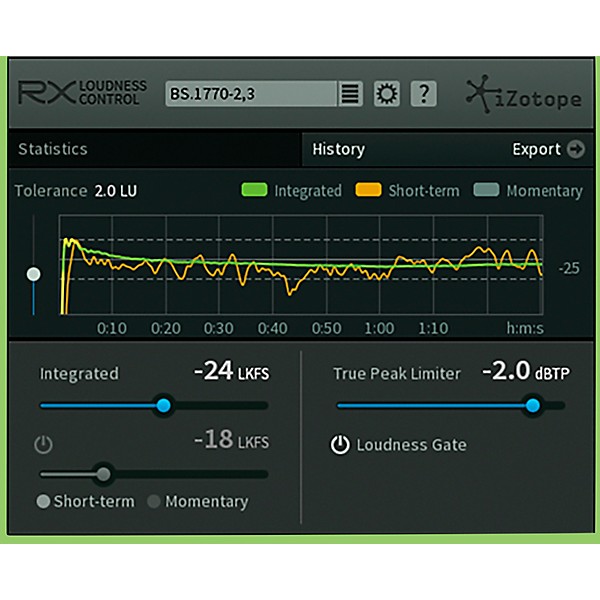
Designed specifically for post production and video editors’ workflows,
RX Loudness Control provides intelligent, industry-leading audio signal
processing in an easy-to-use interface.
Analyze and render a file for broadcast compliance in faster than real-time, then instantly create a .CSV loudness report. It’s the fastest and most reliable way to get the best-sounding automatic loudness compliance processing.
Here are a few helpful things to know about loudness compliance: Peak Level vs. Loudness Peak level represents the maximum output voltage of a system. These are momentary, quantitative measurements that monitor a given instant. Loudness Units (LU), on the other hand, measure average loudness over a period of time. When we compare loudness relative to peak level, we use Loudness, K-weighted, relative to Full Scale (LKFS). These are distinct from decibels (dB), which are the measurement unit for Level. Loudness Subjectivity Two programs with identical peak levels could still be perceived as having different loudness levels. This is because we perceive sounds to be louder or softer relative to each other and their context.
For this reason, integrated loudness measurement uses carefully designed algorithms to attempt to quantify our perception of loudness. The goal is to measure “loudness” using a new kind of meter and represent it absolutely. Holistic Processing Because we perceive loudness relative to context, loudness standards must consider sound levels across an entire program.
RX Loudness Control makes calculated adjustments to the level based on the entire length of the program segments. This ensures that you deliver consistently accurate, broadcast-compliant audio with the most transparent signal processing possible.
Analyze and render a file for broadcast compliance in faster than real-time, then instantly create a .CSV loudness report. It’s the fastest and most reliable way to get the best-sounding automatic loudness compliance processing.
Here are a few helpful things to know about loudness compliance: Peak Level vs. Loudness Peak level represents the maximum output voltage of a system. These are momentary, quantitative measurements that monitor a given instant. Loudness Units (LU), on the other hand, measure average loudness over a period of time. When we compare loudness relative to peak level, we use Loudness, K-weighted, relative to Full Scale (LKFS). These are distinct from decibels (dB), which are the measurement unit for Level. Loudness Subjectivity Two programs with identical peak levels could still be perceived as having different loudness levels. This is because we perceive sounds to be louder or softer relative to each other and their context.
For this reason, integrated loudness measurement uses carefully designed algorithms to attempt to quantify our perception of loudness. The goal is to measure “loudness” using a new kind of meter and represent it absolutely. Holistic Processing Because we perceive loudness relative to context, loudness standards must consider sound levels across an entire program.
RX Loudness Control makes calculated adjustments to the level based on the entire length of the program segments. This ensures that you deliver consistently accurate, broadcast-compliant audio with the most transparent signal processing possible.

Specs
- Operating system requirements
- Windows: 7, 8 and 10
- Mac: OS X 10.7-10.12
- NOTE: We are currently in the process of qualifying our most current products for Mojave 10.14 support. At this time, we recommend that our community wait to update to ensure the smoothest possible experience with our products. More information on Mojave support will be available very soon.
- Supported plug-in hosts
- Media Composer 7.0.4 and 8.3.1, Premiere Pro CC, Pro Tools 10-12.
- Supported plug-in formats
- Adobe Extension for Media Encoder CC, Adobe Extension for Premiere Pro CC, and AudioSuite DPM & AAX.
Reviews
Be the first to review the Product
Q&A
Have a question about this product? Our expert Gear Advisers have the answers.
No results but…
You can be the first to ask a new question.
It may be Answered within 48 hours.
Be the first to know about exclusive offers, tips and more.

866-498-7882 English
877-687-5402 Español