


Gear SpecialistBundlingMusician
.jpeg)

Pro Gear Advisers
•866-498-7882
Guitars
Guitars
Amps & Effects
Amps & Effects
Used & Vintage
Keyboards & MIDI
Keyboards & MIDI
Drums
Drums
DJ Equipment
DJ Equipment
Basses
Basses
Recording
Recording
Live Sound
Live Sound
Accessories
Accessories
Mics & Wireless
Mics & Wireless
Music Software
Music Software
Lighting
Lighting
Band & Orchestra
Band & Orchestra
Platinum Gear
Deals
Deals
New Arrivals
Brands
Brands
- A
- A Designs
- A&F Drum Co
- A&S Crafted Products
- A-Tempo Percussion
- AAS
- Accu-Stand
- Aclam Guitars
- ACON DIGITAL
- AcoustaGrip
- Acoustic
- Acoustica
- Acus Sound Engineering
- ADAM Audio
- Adams
- ADVANCE MUSIC
- AEA Microphones
- AER
- Aguilar
- Ahead
- Ahead Armor Cases
- AIAIAI
- AIM
- Air Music Tech
- AirTurn
- Akai Professional
- AKG
- Al Cass
- Alacran
- Alaska Pik
- Alesis
- Alfred
- Alhambra
- Allen & Heath
- Alliance
- Allied Music Supply
- Allora
- Allparts
- AlphaTheta
- Alpine Hearing Protection
- Altieri
- Alto
- Altus
- Aluratek
- Alvarez
- Amadeus Press
- Amati
- American Audio
- American Classics
- American DJ
- American Recorder Technologies
- Ampeg
- Amphion
- Amprx Power Solutions
- Analysis Plus
- Anchor Audio
- Andreas Eastman
- Animals Pedal
- Ansmann
- Antares
- Antelope Audio
- Antoine Courtois Paris
- Anton Breton
- Anton Eminescu
- API
- Apogee
- Applause
- Apple
- Apple Creek
- Applied Acoustics Systems
- Applied Microphone Technology
- Aquarian
- AQUILA
- Arcolla
- Argosy
- Arion Humidifier
- Arobas Music
- ARP
- Arrangers
- Arriba Cases
- Art
- Art & Lutherie
- Artino
- Artiphon
- ArtistPro
- Arturia
- Ashdown
- Asher Guitars & Lap Steels
- Ashley Mark
- Ashley Publications Inc.
- Aspen Pittman Designs
- Aston Microphones
- Atlas Sound
- Atlas-C1
- Attack Drumheads
- Audeze
- Audient
- Audiffex
- Audio Innovate
- Audio Modeling
- Audio-Technica
- Audiomodern
- Audix
- Auralex
- Ausounds
- Austrian Audio
- Avalon
- Avante
- Avantone
- Avid
- Aviom
- Axe Heaven
- AxLabs
- Azumi
- B
- B&O Play
- B&S
- B.C. Rich
- Baby Audio
- Bach
- Backbeat Books
- Backun
- Bad Cat
- BAE
- Baker Street
- Balter Mallets
- Bam
- BandStorage.com
- Barcus Berry
- Barefoot Buttons
- Barefoot Sound
- Barn3
- Bartolini
- Bass Drum O's
- Bass Plate
- BASSBOSS
- Basslines
- BBE
- BC Audio
- BCM International
- Bearcat
- Bears for Humanity
- Beechler
- Beetronics FX
- Behringer
- Belkin
- Bellafina
- Belmonte
- BELWIN
- BENRO
- Bergerault
- Berklee Press
- Berp
- Besson
- Best Service
- beyerdynamic
- Beyron Audio
- BG
- Big Bang Distribution
- Big Bends
- Big Fat Snare Drum
- Big Fish
- Bigsby
- Bill Edwards Publishing
- Bitwig
- BK Media
- Black Box Analog
- Black Cherry USA
- Black Diamond
- Black Ice
- Black Label
- Black Lion Audio
- Black Market Modular
- Black Swamp Percussion
- Blackmagic Design
- Blackstar
- Blessing
- BlissLights
- Blitz
- Blizzard
- Blue
- Blue Cat Audio
- Blue Juice
- Blueridge
- BluGuitar
- Bob Reeves
- Bobcat
- Bobelock
- Bogner
- Bonade
- BONE Drums
- BongoTies
- Boomwhackers
- Boosey and Hawkes
- Bose
- Bosphorus Cymbals
- BOSS
- Boveda
- Bow-Right
- Brainwerks
- Bravo Reeds
- Breath Builder
- Breedlove
- Brian May Guitars
- Bridge
- Brilhart
- Bristol
- British Drum Co.
- BROADWAY GIFTS
- Brookfield
- Browntrout Publishing
- BSS Audio
- BSX Bass
- Buffet Crampon
- Bugera
- Bundy
- BURKART
- Burl Audio
- BusyBox
- Buttkicker
- C
- C&D Visionary
- CAD
- CadLive
- CAIG
- Canadian Brass
- Caparison Guitars
- Cardinal Percussion
- Carl Fischer
- Carl Martin
- Carlisle Cases
- CARTEC Audio
- Casio
- Catalinbread
- CB Percussion
- Celemony
- Celestion
- Cengage Learning
- Centerstream Publishing
- Cerwin-Vega
- Chamsys
- Chandler Limited
- Chaos Audio
- Chapman
- Charter Oak Acoustics
- Charvel
- CHAUVET DJ
- CHAUVET Professional
- Chedeville
- Cherry Audio
- Cherry Lane
- Chester Music
- ChopSaver
- CIOKS
- Circa 74
- Clark W Fobes
- Classical Destinations Educational
- Clayton
- Cleartone
- Cloud
- CME
- Coffin Case
- Cole Clark
- ColorKey
- Conn
- Conn-Selmer
- Control Acoustics
- COOL
- Cool Wind
- Cooperstand
- CopperSound Pedals
- Cordoba
- Corelli
- Cort
- Course Technology PTR
- CP
- CRAFTER
- crazybaby
- Cre8audio
- Creative Concepts
- Creative Tunings
- Cremona
- Crown
- CTM
- Curnow Music
- Curry
- Cusack Music
- Cymbal Crown
- Cympad
- D
- D&A Guitar Gear
- D'Addario
- D'Addario Woodwinds
- D'Andrea
- D'Angelico
- D.W. Fearn
- D16 Group
- Daking
- Dampit
- Danelectro
- Dangerous Music
- Danmar Percussion
- Darco
- Daredevil Pedals
- Darkglass
- Darkglass Electronics
- DataVideo
- Dava
- Daybreak Music
- dbx
- ddrum
- Dean
- Dean Markley
- DeArmond
- Death By Audio
- Decibel Eleven
- Decibullz
- Decksaver
- Deer River
- Deering
- Defender
- DEG
- Delkin
- Delta Sound Labs
- DeltaLab
- Denis Wick
- Denon DJ
- Devine Entertainment
- Dexibell
- DG De Gregorio
- Di Zhao
- Diago
- dialtune
- Diamond Head
- Diezel
- Digidesign
- DIGITAL AUDIO LABS
- Digital Music Doctor
- Digitech
- DiMarzio
- Direct Sound
- Dixon
- DJ.Studio
- DJI
- Dobro
- Doc Sweeney Drums
- DOD
- Dogman Devices
- Donato
- Donner
- DPA Microphones
- DR LISTON's
- DR Pro
- DR Strings
- Dragonfly Clothing
- Drawmer
- Dreadbox
- Dream
- Dreamtonics
- DRS Racks
- Drum Chart Builder
- Drum Fun Inc
- Drum Pike
- DrumClip
- DrumDial
- drumdots
- DRUMnBASE
- DrumTags
- Dual Turntables
- Duesenberg
- Duesenberg USA
- Dunable Guitars
- Dunlop
- Duracell
- Durand
- DV Mark
- DW
- DWe
- DYNACORD
- Dynasty
- Dynaudio
- Dynaudio Acoustics
- E
- E-Cords
- E. Rousseau
- Earasers
- EAROS
- Earthenware
- EarthQuaker Devices
- Earthworks
- Eastman
- EastWest
- Ebow
- EBS
- Ecler
- Eden
- Editions Durand
- Educational Activities
- EFNOTE
- Egnater
- Elation
- Electro-Harmonix
- Electro-Voice
- Elektron
- Eliminator Lighting
- Elixir
- Elysia
- eMedia
- EMG
- Emma Electronic
- Empirical Labs
- Empress Effects
- Endust
- Engelhardt
- ENGL
- ENKI
- Epiphone
- EQUI=TECH
- Ernie Ball
- Ernie Ball Music Man
- Erogenous Tones
- ESP
- Essential Pak
- Etude
- Etymotic Research
- Eulenburg
- EvaBeat
- EVANS
- Eventide
- Everly
- EVH
- Exponential Audio
- Expressive E
- Extendabone
- EZ Dupe
- F
- Faber Music LTD
- Faber Piano Adventures
- FabFilter
- Fat Cat
- Favored Nations
- Faxx
- Fender
- Fender Custom Shop
- Ferrofish
- Fibracell
- Finger Fitness
- Fingerease
- FingerWeights
- Firestix
- First Note
- Fischer Amps
- Fishman
- FJH Music
- Flea Market Music
- Flight
- Flock Audio
- Florea
- Floyd Rose
- Fluid Audio
- Focal
- Focusrite
- Fodera Guitars
- Forestone
- FORTALEZA GUITARS
- Fostex
- Fox
- Franklin Strap
- Fred Bock Music
- Fred Kelly Picks
- Frederick Hemke
- Freedom
- Fret Daddy
- Fret12
- Fret37
- Friedman
- Fryette
- Fuchs
- Funko
- Furman
- Fusion
- G
- G&L
- G. Henle Verlag
- G. Schirmer
- G7th
- Galaxy Audio
- Gallien-Krueger
- GAMAGO
- Gamechanger Audio
- GAMMA
- Gard
- Gator
- GATOR CABLEWORKS
- Gazley
- Gear One
- Gem Sound
- GEM Swabs
- Gemeinhardt
- Gemini
- Genalex
- Genelec
- Gentry Publications
- Genzler Amplification
- George L's
- Gerlitz
- Get'm Get'm
- Getzen
- GForce
- GHS
- Giardinelli
- Gibraltar
- Gibson
- Gibson Custom
- Gig Gear
- Ginger Audio
- Gitane
- Glaesel
- Glasser
- Global Creative Group
- GLOBAL TRUSS
- Glorious
- Glowtronics
- Glyph
- Godin
- Godlyke
- Gold Tone
- Golden Age Project
- Gon Bops
- Gonzalez
- Goodview
- Goodwood
- GoPro
- Gorilla Snot
- Gorilla Tips
- Gotoh
- Grace Design
- Graph Tech
- GRAVITY PICKS
- Gravity Stands
- Gretsch
- Gretsch Drums
- Gretsch Guitars
- Groove Juice
- Groove Synthesis
- Groove Tubes
- GROOVETECH TOOLS, INC.
- GROVER
- Grover Pro
- Grover-Trophy
- Gruv Gear
- Gruv Glide
- Gruv-X
- Guild
- Guitar Center
- Guitar Triller
- Guitar World
- GuitarGrip
- Guy's Publishing
- H
- H. Jimenez
- H. Wilson
- H.W.
- Habanero Pickups by Grover Jackson
- Hagerty
- Hagstrom
- Hal Leonard
- Hamilton
- Hammond
- Hans Hoyer
- HansenFutz
- Happy Socks
- Harbinger
- HARDCASE
- Harmon
- Harmonic Vision
- Harmony
- Harper Trucks
- Harrison
- Harry Hartmann
- Headliner
- HeadRush
- Headway
- Hearos
- Heather Brown Electronicals
- Heavyocity
- HEDD
- Heil Sound
- Hennessey
- Henry Heller
- Hercules
- Hercules DJ
- Heritage
- Hetman
- HexHider
- Hidersine
- Hill
- Hilo
- HINGESTIX
- Hinkler
- Hinshaw Music
- Hit'n'Mix
- HK AUDIO
- Hodge
- Hofner
- Hohner
- Holton
- Homespun
- Honeytone
- Hornberg Research
- Hosa
- Hot Licks
- Hot Sox
- House of Blues
- Hudson Music
- Hughes & Kettner
- Huiksi Music Company
- Huisku Music
- Humes & Berg
- HumiCase
- J
- J & D Hite
- J Meinlschmidt
- J. La Salle
- J. Winter
- J.Rockett Audio Designs
- Jackson
- Jackson Audio
- Jade
- Jambone
- Jamey Aebersold
- Jamhub
- JamStands
- Jamstik
- Jargar
- Jasmine
- Jawbone Press
- JAZZLAB
- JBE Pickups
- JBL
- JBL Bag
- Jet-Tone
- JetSlide
- Jewel
- JH Audio
- JHS
- JHS Pedals
- JICO
- JMAZ Lighting
- JMR Electronics
- JN Guitars
- Jo-Ral
- Jodi Head
- JodyJazz
- Joia Tubes
- Jose Ramirez
- Joyo
- JUBILATE
- Juice Goose
- Jupiter
- K
- K&M
- K. Bell
- Kaces
- Kala
- Kali Audio
- Kanile'a Ukulele
- Kaotica
- Karl Willhelm
- Kasza Cymbals
- KAT Percussion
- Kauer Guitars
- Kawai
- KB Covers
- Keeley
- Keith McMillen
- Kelly SHU
- Kemper
- Kendrick
- Kentucky
- Kernom
- Key Leaves
- Keyfax
- KEYTAB
- Kickport
- KickPro
- Kicktone
- Kilpatrick Audio
- Kimbo
- King
- King David
- Kirlin
- KJOS
- Klark Teknik
- Kluson
- KNA
- Knc Picks
- Knilling
- Kohala
- Kohlert
- Kolstein
- KORG
- Kramer
- Krane
- Kratt
- Kremona
- KRK
- KSP
- KTS Titanium
- Kuassa
- Kun
- Kuppmen Music
- Kurzweil
- Kurzweil Home
- Kustom
- Kustom PA
- KV331 Audio
- Kydd Basses
- Kyser
- L
- L Lab
- La Bella
- La Tromba
- La Voz
- Lab Gruppen
- Lace
- Lag Guitars
- Lake People
- Lakland
- Lamp Lite
- Laney
- Langevin
- Lanikai
- Larsen Strings
- Laskey
- Lauten Audio
- Lava
- LAVA MUSIC
- LD Systems
- LEA Professional
- Leblanc
- Lee Oskar
- Legator
- Legendary Strings
- Legere Reeds
- Lehle
- Leo Quan Badass
- Leslie
- Levante
- Levy's
- LEWITT
- Lexicon
- Licklibrary
- Lighting
- Line 6
- Littlite
- Livemix
- Livewire
- LM Products
- LMI
- Lock-It Straps
- Logickeyboard
- Logitech
- Logjam
- Londoner Bows
- Los Cabos Drumsticks
- LOW BOY
- Loxx
- LP
- LR Baggs
- LsL Instruments
- Lucero
- Lucid Audio
- Lucida
- Luckies
- Ludwig
- Luna
- Luyben
- Lynx
- Lyons
- M
- M-Audio
- Mack's
- Mackie
- Maestro
- MAGMA
- Magma Cases
- Magna Cart
- Mahalo
- Majestic
- Malletech
- MALONEY StageGear Covers
- Manhasset
- Manikin Electronic
- Manley
- maono
- Mapex
- Maple Leaf Strings
- Marantz
- Marantz Professional
- Marcinkiewicz
- Marimba Warehouse
- Markbass
- Marlo Plastics
- Marshall
- Martin
- Martin Professional
- MASSIMO
- Master & Dynamic
- Matthews Effects
- Maxon
- McDSP
- McPherson
- Medallion Strings
- MEINL
- Meinl Stick & Brush
- Meinl Weston
- Mel Bay
- MeldaProduction
- Meredith Music
- Merida
- Meris
- MESA/Boogie
- METRIC HALO
- Meyer
- Meze Audio
- Mic Eze
- Mick's Picks by D'Andrea USA
- Microphome
- Microsoft
- Midas
- Middle Atlantic
- Midwest Folding Products
- Mighty Bright
- Mighty Mite
- Mikme
- Milkman Sound
- Millennia
- Miraphone
- Mirfak
- Mission Engineering
- Mitchell
- Mitchell Lurie
- MJS Music Publications
- Mobart Music Publications/Schott Helicon
- Modal Electronics Limited
- Modartt
- Modern Drummer
- Mogami
- Mojave Audio
- Mojotone
- Moku
- MONO
- Monster Cable
- Monster Oil
- Moog
- Moosmann
- Morgan Amplification
- MORGENSTEIN TOOL
- Morley
- Motion Sound
- MOTU
- MTD
- MTS Products
- MukikiM
- Mullard
- Music Minus One
- Music Nomad
- Music Sales
- Music Theatre International
- Musical Sampling
- Musician's Gear
- Musicians Institute
- MusicLab
- Musser
- Mutec
- MuzicLight
- MVD
- MVP
- MVPPLATINUM
- MWM
- MXL
- MXR
- MXR Custom Shop
- MyStage
- N
- n-Track
- Nady
- NANLITE
- Natal Drums
- National
- National Public Seating
- Native Instruments
- Native Tongue
- NativeAudio
- NBO Oneboard
- Neat
- Nektar
- Neotech
- Neumann
- Neunaber
- Neutrik
- Neve
- Newfangled Audio
- Nexus Lights
- Nightfox Audio
- Nino
- No Nuts
- No1 Stretch Strap
- Nobels
- Noble & Cooley
- Nomad
- Nord
- Noteflight
- Nova
- Novation
- Novello
- NS Design
- NuGen Audio
- Numark
- Nuvo
- NUX
- P
- P. Mauriat
- PACE
- Pageantry Innovations
- Paige Capo
- Paiste
- Palmer Audio
- Panyard
- Parduba
- Pat Petrillo Products
- Pavane
- pBone
- pBugle
- pBuzz
- PCDJ
- pCornet
- PDP by DW
- Peaceland Guitar Ring
- Pearl
- Pearl Flutes
- Peavey
- Pedaltrain
- Peer Music
- Peluso Microphone Lab
- Penguin Books
- Perantucci
- PERMACEL
- Perri's
- Perry's Music
- Peterson
- Petz
- Phaeton
- Phase
- Phil Jones Bass
- Phil's
- Phoenix Audio
- Phonic
- Phottix
- Pianoteq
- Pick Boy
- Pickaso Guitar Bow
- Pickbandz
- Pig Hog
- Pignose
- Pigtronix
- PinchClip
- Ping
- Pintech
- Pioneer DJ
- Pirastro
- Pittsburgh Modular Synthesizers
- Plasti Lyre
- Plasti-Folio
- Platinum Samples
- PLAYdifferently
- Pluginz
- PMC
- PocketStrings
- Point Source Audio
- Polyend
- POLYVERSE
- Pop Audio
- Pork Pie
- Portastand
- Positive Grid
- Powell
- Powell-Sonare
- Practice Tracks
- PraiseSong
- Prelude by Conn-Selmer
- Premier
- Premiere
- PreSonus
- Prim
- Primacoustic
- Pro Tour
- ProCo
- Prodipe
- ProHT
- ProjectSAM
- Proline
- Promark
- Prop-It
- ProPik
- ProRockGear
- Protec
- Protechtor Cases
- Protection Racket
- Providence
- ProX
- PRS
- PSP Audioware
- pTrumpet
- Pure Tone Technologies
- Puresound
- PWM Instruments
- Pyramid America
- R
- Radial Engineering
- Railhammer
- Randall
- Randall May International
- RANE
- Rapco
- Rapco Horizon
- Raxxess
- Ray Ross
- RCF
- Real McCoy Custom
- Reason Studios
- Recording King
- Red Witch
- Reed Wizard
- ReedGeek
- Rees Harps
- Regal
- Reka
- Relab Development
- Relish Guitars
- Reloop
- Remo
- Ren Wei Shi
- Resonans
- Reunion Blues
- Reveal Sound
- Revelle
- Reverend
- Revv Amplification
- RF Venue
- Rhythm Band
- Rhythm Tech
- Richard Cocco
- RICHTER
- Rickenbacker
- Rico
- Rico Royal
- Ricordi
- Rigotti
- Rise by Sawtooth
- Rittor Music
- RME
- Road Ready
- Road Runner
- Roadie Tuner
- ROC-N-SOC
- Roche Thomas
- Rock House
- ROCK LOCKS
- ROCK OFF
- Rock Prodigy
- Rock Steady
- Rockman
- RockNRoller
- rockready
- RockStand by Warwick
- Rockstarz
- Rocktron
- RODE
- Rogers
- Rogue
- Rok-It
- Rokinon
- Roland
- Roland Cloud
- Rolls
- ROSS Electronics
- Rotosound
- Rover
- Rovner
- Row-Loff
- Royer
- Rozanna's Violins
- RTOM
- Ruach Music
- Ruby
- Rupert Neve Designs
- RZ Clarinets
- S
- SABIAN
- Sabra Som
- SafCord
- Salyers Percussion
- Samson
- Saramonic
- SAUDER
- Savannah
- Savarez
- Sawtooth
- Sax Dakota
- Schaller
- SCHAUM
- Schecter Guitar Research
- Scherl and Roth
- Schilke
- Schlagwerk
- Schott
- Schott Japan
- sE Electronics
- Seagull
- Secrets of the Pros
- Seiko
- Sela
- Selmer
- Selmer Paris
- Sennheiser
- Sequential
- Sequenz
- SERATO
- Sevilla Classical Guitar Strings
- SEYDEL
- Seymour Duncan
- Shadow Electronics
- Shaker
- Shawnee Press
- Sheeran by Lowden
- Sheeran Looper
- Sheptone
- Sherman
- Shredneck
- Shubb
- Shubb-Pearse
- Shure
- Silver Creek
- Silverstein Works
- Silvertone
- Simmons
- Singin' Dog
- Singular Sound
- Sire
- SIT Strings
- SJC
- SJC Drums
- SK
- SKB
- Skoove
- Slate Digital
- Slide-O-Mix
- Slider Straps
- Slingerland
- Slug Percussion
- Snareweight LLC
- Snark
- Snarling Dogs
- SofiaMari
- Soldano
- Solid State Logic
- Solid State Logic Software
- SOLOMON MiCS
- Sonarworks
- Song Without Borders
- SONIBLE
- Sonic Reality
- SONiVOX
- Sonnet
- Sonnox
- Sonoma Wire Works
- SONOR
- Sonor Orff
- Sonuscore
- Sonuus
- Sony
- Souldier
- Sound City
- Sound Particles
- Sound Percussion Labs
- Sound Radix
- Soundbrenner
- Soundcraft
- SOUNDRISE
- SoundSwitch
- Soundtoys
- Source Audio
- Southern
- Sovtek
- Soyuz Microphones
- Spaceman Effects
- Spector
- Spectra 1964
- Spectra Sound
- Spectrasonics
- Spitfire Audio
- SPL
- Squier
- Sshhmute
- Stage Ninja
- Stageline
- Stager Microphones
- Stagg
- Standard
- Standtastic
- Stanton
- Startec
- Stay
- Stedman
- Steinberg
- Steinberger
- Sterisol
- Sterling Audio
- Sterling by Music Man
- Steven Slate Audio
- Stick Gripps
- Stork
- strandberg
- String Letter Publishing
- String Sling
- String Swing
- Stringjoy
- Strobel
- Strukture
- Strymon
- Studio 49
- Studio Devil
- Studio Trends
- Studiologic
- Suck UK
- Sugal
- SUGAR BYTES
- Suhr
- Summit Audio
- Super Sensitive
- Super7
- Superslick
- Supro
- Surfy Industries
- Suzuki
- Svetlana
- Sweet Pipes
- SwirlyGig
- Switchcraft
- Sybersound
- Synchro Arts
- Synergy
- Synthogy
- T
- T-Rex Engineering
- Taboo
- Tackle Instrument Supply
- Takamine
- Talicor
- TAMA
- Tama by Kanstul
- Tama Marching
- TAMBURO
- Tanglewood
- Tannoy
- Tara Publications
- TASCAM
- Taurus
- Taylor
- TC Electronic
- TC Helicon
- Technics
- TECHRA
- teenage engineering
- TELEFUNKEN
- Temple Audio Design
- Tempo
- Tera Grand
- Thalia
- The Drum Channel
- The Light Source
- The Loar
- The Lute Hole Company
- The Orchard
- The Realist
- The RimRiser
- The Rock Slide
- The String Centre
- Theo Wanne
- Theodore Presser
- Thomastik
- Thore
- Thud Rumble
- Thum-Eez
- Tiger
- TIK PIK
- Timber Drum Company
- Tinker Tar
- Titan
- Titan Field Frames
- TK Audio
- TKL
- Tobias
- Toca
- Toft Audio Designs
- Tom Crown
- Tone King
- Tonedevil Guitars
- ToneGear
- Tonelux
- TonePros
- ToneSpeak
- Tonewood Cases
- Toontrack
- Tourte
- Tovusound
- Trace Elliot
- Tracktion
- Transcontinental Music
- Traps Drums
- Trash Talk Audio
- Traveler Guitar
- Travelite
- Treeworks
- Trends International
- Triad-Orbit
- Trick
- Trident Audio
- TRO ESSEX Music Group
- Trombotine
- Trophy
- Truetone
- TRUSST
- Tuba Essentials
- Tube-Tech
- Tune-bot
- Tung-Sol
- Turbosound
- Two Notes AUDIO ENGINEERING
- Tycoon Percussion
- W
- Walden
- Waldorf
- WalkaBout
- Walrus Audio
- Walrus Productions
- Walton Music
- Waltons
- Wampler
- Warburton
- Warm Audio
- Warner Bros
- Warwick
- Washburn
- Wathen CryoTone Tubes
- Wave Arts
- WaveDNA
- Way Huge Electronics
- WD Music
- WEA
- WesAudio
- Westone Audio
- WFLIII Drums
- Whirlwind
- Wilfin Music
- Williams
- Willis Music
- Willson
- Win-D-Fender
- Wishbone
- Wm. S Haynes Amadeus
- Wolf
- Wolff Audio
- Woodrow Guitars
- Word Music
- Wrap-It Storage Straps
- Wren And Cuff
- Wuhan
- Wylde Audio

Description
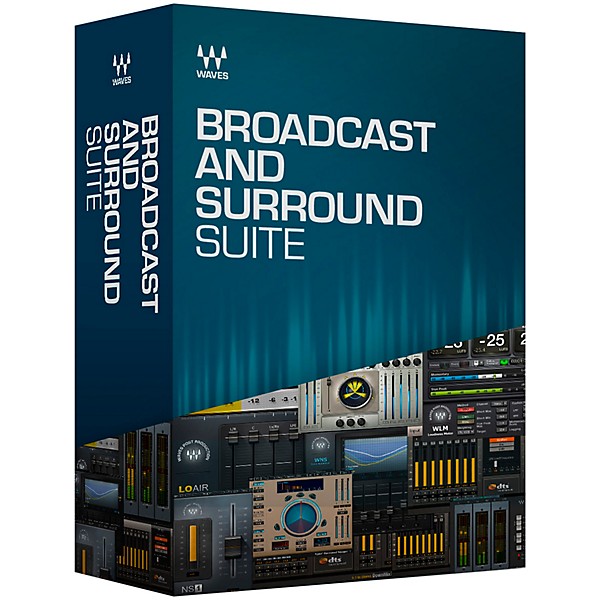
Industry-standard broadcast audio plugins for TV, radio, film and webcasting: noise reduction, loudness metering, and surround mixing, upmixing and downmixing.
The Broadcast and Surround Suite includes the following high-end tools to ensure a smooth, engaging and highly professional broadcast mix:
The DTS® Neural™ Surround plugins for surround upmixing and downmixing.
All plugins from our 360° Surround Tools collection, including 5.1 tools for compression, limiting, reverb, spatial enhancement, subharmonic generation, and more.
Noise reduction plugins: the advanced WNS Noise Suppressor and the simple-to-use NS1 Noise Suppressor, both designed for real-time broadcast as well as post-production.
Precision loudness measurement tools for stereo and surround: the cross-platform WLM Plus Loudness Meter, and the Waves Dorrough Stereo and Surround plugins, modeled on the popular Dorrough meters.
The Broadcast and Surround Suite includes the following high-end tools to ensure a smooth, engaging and highly professional broadcast mix:
The DTS® Neural™ Surround plugins for surround upmixing and downmixing.
All plugins from our 360° Surround Tools collection, including 5.1 tools for compression, limiting, reverb, spatial enhancement, subharmonic generation, and more.
Noise reduction plugins: the advanced WNS Noise Suppressor and the simple-to-use NS1 Noise Suppressor, both designed for real-time broadcast as well as post-production.
Precision loudness measurement tools for stereo and surround: the cross-platform WLM Plus Loudness Meter, and the Waves Dorrough Stereo and Surround plugins, modeled on the popular Dorrough meters.
Features
- Over 20 state-of-the-art audio plugins for broadcast and surround sound
- DTS® Neural™ Surround plugins for surround upmixing and downmixing
- Real-time noise suppression plugins
- Loudness measurement meters for stereo and surround
- Surround sound plugins for compression, reverb, limiting & more
Specs
MacCPU
- Intel Core i5 / i7 / Xeon
- 8 GB RAM
- 8 GB free disk space on the system drive
- 10.11.6 - 10.14
- Minimum: 1024x768
- Recommended: 1280x1024 / 1600x1024
- USB displays are not supported as the primary display.
- Mac OS Sierra 10.12.4
- VoiceOver Utility enabled
- Pro Tools 12.7
- Logic 10.3.1
- Please note: Waves Central and preset management via the WaveSystem Toolbar are currently not supported.
- Intel Core i3 / i5 / i7 / Xeon / AMD Quad-Core
- 8 GB RAM
- 8 GB free disk space on the system drive
- Windows 7 with SP1 64 bit
- Windows 8.1 64 bit
- Windows 10 64 bit
- Minimum: 1024x768
- Recommended: 1280x1024 / 1600x1024
Reviews
Be the first to review the Product
Q&A
Have a question about this product? Our expert Gear Advisers have the answers.
No results but…
You can be the first to ask a new question.
It may be Answered within 48 hours.
Be the first to know about exclusive offers, tips and more.

866-498-7882 English
877-687-5402 Español