

DigitalPianistSynths


Pro Gear Advisers
•866-498-7882
Guitars
Guitars
Amps & Effects
Amps & Effects
Used & Vintage
Keyboards & MIDI
Keyboards & MIDI
Drums
Drums
DJ Equipment
DJ Equipment
Basses
Basses
Recording
Recording
Live Sound
Live Sound
Accessories
Accessories
Mics & Wireless
Mics & Wireless
Music Software
Music Software
Lighting
Lighting
- Popular Brands
Band & Orchestra
Band & Orchestra
Platinum Gear
Deals
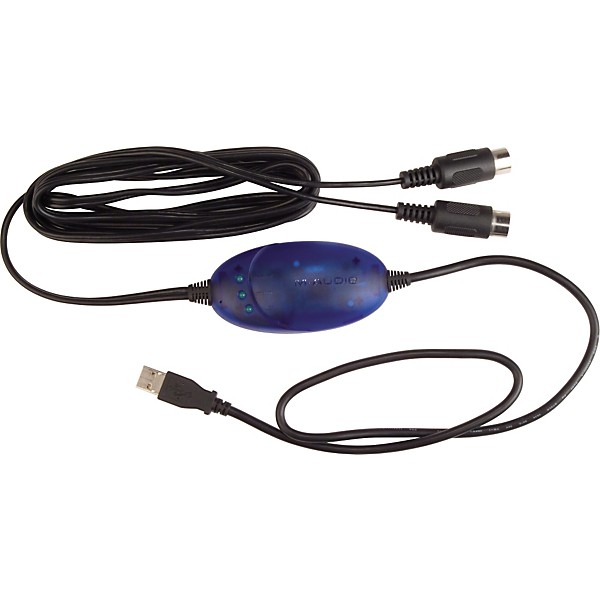
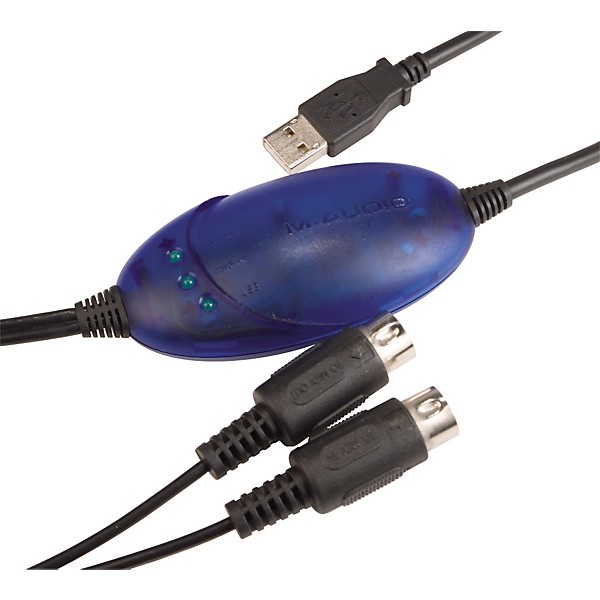
M-Audio USB Uno 1X1 MIDI Interface
$49.00

Need Help?

Description
The M-Audio USB Uno 1X1 MIDI Interface is a complete USB-to-MIDI solution, equipped with a USB connection to your computer and a 1-in/1-out 16-channel MIDI connection to your MIDI devices. Tiny unit comes with USB and MIDI extension cables, features MIDI activity indicators, and works for Windows or Mac. Single MIDI in and out connectors make it perfect for connecting a keyboard or controller to your computer quickly and easily. Powered by the USB port. USB supports connection of up to 127 devices simultaneously, any of which may be hot-plugged from the USB bus at any time. Requirements: Windows 98 SE, 2000, ME, or XP; Mac OS X 10.1.5 or greater.
Features
- 1-in/1-out MIDI interface (16x16 MIDI channels)
- High-speed connection to USB-equipped PC or Macintosh computers
- MIDI-activity indicators for each port
- USB-powered, requires no external power supply
- Built-in USB cable and MIDI extension cables
- Mac OS X 10.1.5 or greater
- Windows 98, ME, 2000, and XP compatible ” true Plug-and-Play installation
- Requires no IRQ, I/O Address, or DMA channel setup
- Extremely compact size
Reviews
4.27
22 Reviews
50%
of respondents would recommend this to a friend
Most Liked Positive Review
5
Awesome.
I'm a proficient guitarist, good-enough piano player, and casual music recorder -- I go through Garage Band, record myself through one dynamic mic and don't know a whole lot about the finer points of mixing/producing. I was intrigued by MIDI though, having never even pursued that route before. So I got one of these guys and plugged it in to my Casio CDP-100 and my iMac, and bam, I was up and running. No install, nothing. Just spent a few hours playing with all the various instruments--including some fine organs, and a nice tremolo is controlled by the sustain pedal. Seriously, I'm a beginner with this and I'm already inspired to learn a whole lot more.
VS
Most Liked Negative Review
2
Midi In problems
Though this little device is expensive, it is hardly worthy of the price. Low frequency artifacts are introduced into the mix via MIDI In. Without the right patch sound or watching the MIDI events scroll on the screen, one would guess that the MIDI signal is being dropped. I have tried working the incident with M-Audio and the tech G.W. doesn't even read the issue. I keep getting one sentence responses, including that he was glad that my problem was solved. It isn't solved. Not even close. On the internet, reviews make it obvious that others are experiencing the same problem without resolution. My Uno is now in the closet and I installed the M-Audio 1010LT instead. I like their products as a rule. Spend the extra money and skip a USB interface.
Filters
Best Uses
- Back-Up1
Cons
- Not Functional2
Describe Yourself
- Experienced2
- Professional Musician1
Pros
- Easy To Use2
- Good Quality2
- Functional1
Reviewed by 22 customers
Classic USB-MIDI Adapter
submitted3 years ago
byTom
fromSilver Spring, MD
The M-Audio Uno has been around for ages. I have one and use it quite a bit. It's completely reliable. It has three LEDs that light up. One lights up to show USB power, one lights up to show MIDI In data, and one lights up to show MIDI Out data. I originally bought this specifically for use with a MIDI Solutions Event Processor Plus. This device for some reason is listed as requiring an Uno for programming. So I suppose the Uno delivers a stronger and more reliable MIDI signal than alternative options. Not sure about PC but for Mac this is class compliant and requires no driver.
Not worth it, in this day and age
submitted7 years ago
byLuke
fromKnoxville, TN
I've had this midi to usb converter for over 5 years now, used it mosly on Windows Vista/7 which worked well with them after installing the drivers I've had no latency issues or anything like that. Used it with Roland FP4 and Yamaha PSR750. Recently I got a pc with Windows 10, and cannot install the drivers for it, tried different versions/ways but same result. Learned online that most people had same problem. Drivers were last updated in 2013 it appears. It's an old product and at time it was released it was great, but technology advanced but software for this device didn't.
I would buy more products from this store.
Verified Buyer
submitted8 years ago
byAdan
fromundisclosed
The service is always remarkable and the perks of being a customer are beyond satisfying.
Works just fine. Glad it s inexpensive
Verified Buyer
submitted8 years ago
byLAURENCE
fromundisclosed
Works just fine. Sometimes I have to work with the midi utility on my Mac to get it going. Once it begins I have no problems.
Just like before and very accomadating!
Verified Buyer
submitted8 years ago
byJohn
fromundisclosed
Great and easy to use. Just had to adjust because my Windows 10 browser had to update the midi interface.
I want to record my Roland Octopad spd 30 to Garageband
submitted8 years ago
byArun
fromJacksonville, FL
i want to record my playings of ROLAND SPD 30 OCTOPAD onto my MACbook garageband while playing. Can this cable be used to record audio signals from octopad spd 30 to garageband while playing? Please let me know as the simple USB to USB from octopad to laptop isn't working as it does not recognize the audio signals.
Q&A
Have a question about this product? Our expert Gear Advisers have the answers.
submitted3 years ago
asked byDaryl
fromTemperance, MI 48182
Is the USB connection , a type B connection, and will it fit into the Casio CTX series USB Midi connector?
Yes, but I don't know about your Casiosubmitted4 years ago
asked byShawn
fromSac
Can I use this for a Roland td12 to Logic Pro x?
We need a little more information to better help you. Please give us a call at 855-770-3373submitted4 years ago
asked byGoneTruckin99
fromBaraboo, WI
Which keyboards under $200 would this cable work with?
We need a little more information to better help you. Please give us a call at 855-770-3373submitted5 years ago
asked byClifford
fromSC
Will this work on a Casio Priva Px 320 keyboard
It will not because the PX 320 doesn't have midi inputs/outputs.submitted5 years ago
asked byCarlos
fromNC
How long is it?
Cable Length 5 feet feet
Be the first to know about exclusive offers, tips and more.

866-498-7882 English
877-687-5402 Español