

DigitalPianistSynths


Pro Gear Advisers
•866-498-7882
Guitars
Guitars
Amps & Effects
Amps & Effects
Used & Vintage
Keyboards & MIDI
Keyboards & MIDI
Drums
Drums
DJ Equipment
DJ Equipment
Basses
Basses
Recording
Recording
Live Sound
Live Sound
Accessories
Accessories
Mics & Wireless
Mics & Wireless
Music Software
Music Software
Lighting
Lighting
- Popular Brands
Band & Orchestra
Band & Orchestra
Platinum Gear
Deals

Description
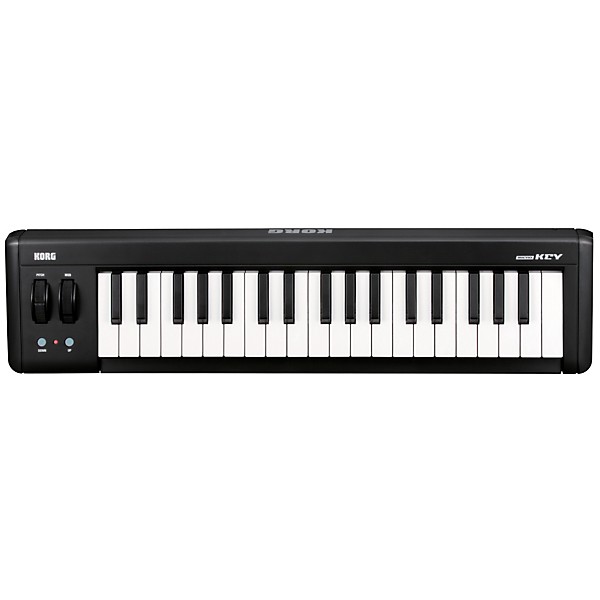
The microKEY37 is just as comfortable on the road as it is in your living room; providing excellent playability while still integrating nicely into a compact production setup. The Pitch Bend and Modulation wheels help you add dynamic expression to your performances with ease. The microKEY37 also serves double-duty as a USB hub. The two USB ports (Type A) allow you to expand your custom control center by adding on a Korg nanoPAD2 or nanoKONTROL2 - or any other USB device. The microKEY37 also includes a download code for FREE Korg M1Le software, giving you all of the preset sounds and all of the PCM waveforms of the original M1, and a browser/search function that makes it easy to find that "perfect sound."
Also included are licenses* for Applied Acoustics Systems' Strum Acoustic Session, Lounge Lizard Session, and Ultra Analog Session as well as a license for Toontrack's software drum sound module EzDrummer Lite,* and a discount coupon* for Ableton's "Live," "Live Suite," and "Live LE" DAW software, widely popular for its sophisticated functionality.
Also included are licenses* for Applied Acoustics Systems' Strum Acoustic Session, Lounge Lizard Session, and Ultra Analog Session as well as a license for Toontrack's software drum sound module EzDrummer Lite,* and a discount coupon* for Ableton's "Live," "Live Suite," and "Live LE" DAW software, widely popular for its sophisticated functionality.
Features
- USB MIDI keyboard - thin, lightweight, and USB-powered
- Velocity-sensitive natural-touch mini-keyboard with excellent playing feel
- Octave Shift and Key Transpose features access the full MIDI note range
- Pitch Bend and Modulation wheels add expression to your performance
- No need to install a driver; just connect it to your computer, and it's ready for use
- Great for use with iPad (microKey37 requires external USB power)
- Dual USB ports; ideal for adding Korg's nanoPAD2 or other USB devices to your setup
- A generous assortment of licenses and discount coupons for popular software titles is included
- KORG KONTROL Editor is included
- No driver installation needed - the standard USB MIDI driver provided by Windows/Mac OS X is supported
Specs
Keyboard
- :
- Natural Touch mini-keyboard
- microKEY 37 =37 keys
- :
- microKEY-37 =Pitch bend wheel, Modulation wheel
- :
- microKEY 37 =-4+4
- :
- microKEY 37 =USB: Type A (x 2); Type B (x1)
- :
- USB bus power
- :
- microKEY 37 = Less than 500mA
- :
- microKEY 37 =565(W)x 139(D)x 54(H)mm
- :
- microKEY 37 =1.0 kg / 2.21 lb.
- :
- USB cable
- KORG BUNDLE SOFTWARE PIN Card
- [iPad]
- You can connect the microKEY25 to your iPad and use it to control apps such as the Korg iMS-20 via MIDI. (With Apple's iPad Camera Connection Kit or similar device). For the 37/61-key models, you just need to connect them via a USB hub that can supply power.
- [Mac]
- Supported Computer:
- Apple Macintosh with USB port, satisfying the operating requirements of Mac OS X or Apple Macintosh with Intel supported processor
- Supported OS:
- Mac OS X10.5 or later
- [Windows]
- Supported Computer:
- Computer with USB port, satisfying the operating requirements of Microsoft Windows XP/ Vista/7
- Supported OS:
- Microsoft Windows XP SP3 (32bit), Microsoft Windows Vista SP2 (32bit, 64bit) or Windows 7 SP1 (32bit, 64bit)
Reviews
3.4
5 Reviews
67%
of respondents would recommend this to a friend
Filters
Best Uses
- Doorstop1
- Practicing1
Cons
- Difficult To Use1
- Not Functional1
- Poor or complete incompatibility with Windows1
- Customer Serviceno Reply1
- Poor Instuctions1
Describe Yourself
- Experienced1
- Novice1
- Professional Musician1
Pros
- Easy To Use2
- Functional2
- Good Quality1
- nice idea1
Reviewed by 5 customers
DO NOT BUY IF USING WITH WINDOWS
submitted9 years ago
byCEMEGO
fromBethesda, MD
I have had the Korg Microkey connected to a Windows system since the microkey was first released. History: Windows XP: constant driver updates. spent more time trying to get it to recognize they playing it. drivers unsigned by windows. Windows rates the Korg USB/MIDI driver as not compliant. Windows 7: same problems. it worked but was a pain because of constant updates and troubleshooting. Windows rates the Korg USB/MIDI driver as not compliant. 10: even worse. with the latest drivers, it doesn't work at all. Cant get it troubleshooted or connected anymore. its like it is completely dead. DOES NOT WORK WITH WINDOWS 10 and Korg doesn't care about supporting windows users AT ALL. THIS DEVICE IS SIMPLY NOT COMPATIBLE WITH WINDOWS OPERATING SYSTEMS. DONT BE FOOLED BY THE KORG LIES.
Product nice, Korg instructions/support terrible!
Verified Buyer
submitted10 years ago
byMarty
fromRice Lake, Wi
Product seems nice. Korg instructions on how to hook up are lacking and Korg Customer service uses email and its been 3 days and I still haven't heard back. Guitar Center has young customer service rep that helped me out big time. Thank God for him or I would be sending this unit back.
Finally a micro keyboard that doesn't feel like a toy!
Verified Buyer
submitted10 years ago
byEpidrake
fromNYC
Looks great and feels solid. Doesn't feel and look like a toy, like most mini controllers do. It's plug and play on my Mac and it's large enough to really play songs on. I wish it would have a sustain pedal input and the option of putting batteries in it when using it with the iPad and GarageBand so I wouldn't have to plug it in to a powered USB cable.
great, but needs sustain input
submitted12 years ago
bypeter
fromsimpsonville, sc
Great form factor, nice feeling keys. Not plasticky like most other small keyboards. Needs a sustain input, though. Korg put TWO extra usb connectors on it. Which is nice and all, but my laptop has enough usb ports. What I find myself wanting is a sustain input (which a few others do have). 4 stars for that. Overall great buy. The included software is nice too.
Decent for the price
submitted12 years ago
byDaniel Blackmon
fromHuntsville, AL
I found this device on sale at another retailer, and Guitar Center matched the price. The installation was a little cumbersome due to the fact that I planned to install this on a PC that did not currently have an internet connection. You will need to get drivers and software from Korg, which, if you have an active internet connection, is not all that bad. I run the audio from the computer into a small mixer, and aside from a short delay the results are good. I've found plenty of sounds using just the free software, but Korg does offer a discount on various other sound banks and software packages. All in all, I would recommend this product to someone who is looking for additional sounds in recording. If you want something to use live, then YMMV. Whenever I use this in jam sessions, I tend to limit it to creating background sounds in a loop. I use the same mixer for guitar input, and then run the FX out to a string of guitar effects. So I can take the keyboard audio and run that into the loop pedal at the end. It's still a good sound, but the slight delay is just enough to cause some headaches.
- Previous
- 1
- Next
Q&A
Have a question about this product? Our expert Gear Advisers have the answers.
No results but…
You can be the first to ask a new question.
It may be Answered within 48 hours.
Be the first to know about exclusive offers, tips and more.

866-498-7882 English
877-687-5402 Español