



StudioMonitorsMixing
.jpeg)

Pro Gear Advisers
•866-498-7882
Guitars
Guitars
Amps & Effects
Amps & Effects
Used & Vintage
Keyboards & MIDI
Keyboards & MIDI
Drums
Drums
DJ Equipment
DJ Equipment
Basses
Basses
Recording
Recording
Live Sound
Live Sound
Accessories
Accessories
Mics & Wireless
Mics & Wireless
Music Software
Music Software
Lighting
Lighting
- Popular Brands
Band & Orchestra
Band & Orchestra
Platinum Gear
Deals
New Arrivals
Videos (1)
View All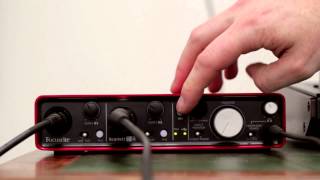
2i4 Tutorial

Description
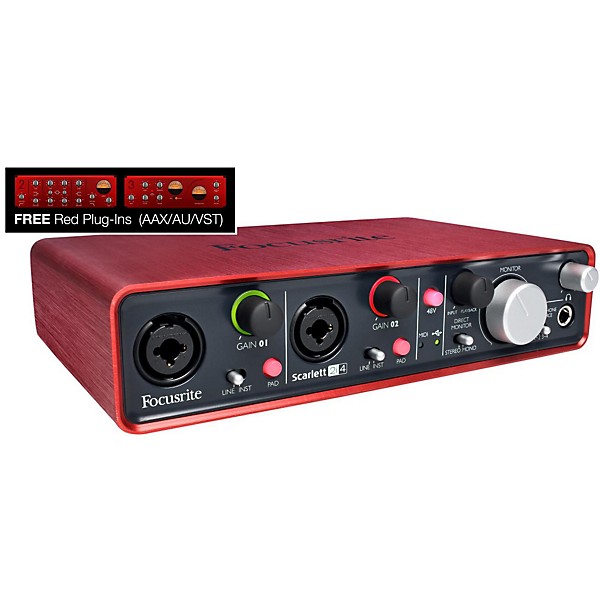
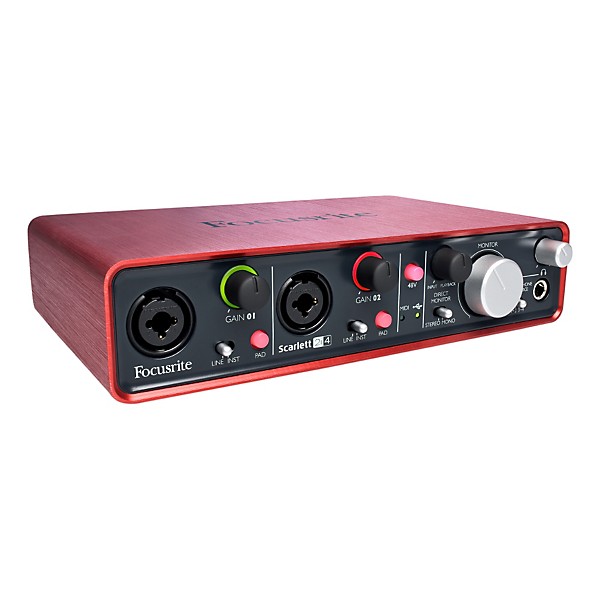
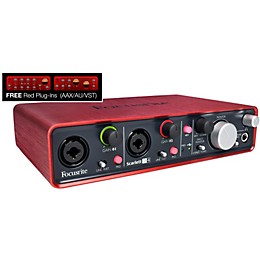
The Focusrite Scarlett 2i4 is a robust 2 in / 4 out USB recording interface that combines affordability, cross-platform operation, a comprehensive feature set and the best audio performance in its class. It's a perfect match for both the musician and the digital DJ - and it comes in an elegant, road-ready anodized aluminum unibody case. The Scarlett 2i4 is the perfect audio interface for musicians and digital DJs and can fully withstand the rigors of the road. Like all Scarlett interfaces, 2i4 is fully compatible with Macintosh® (including Yosemite®) and Windows®, and with the included Red 2 and Red 3 AAX plugins, it’s a perfect partner for Pro Tools.
Ready to make music
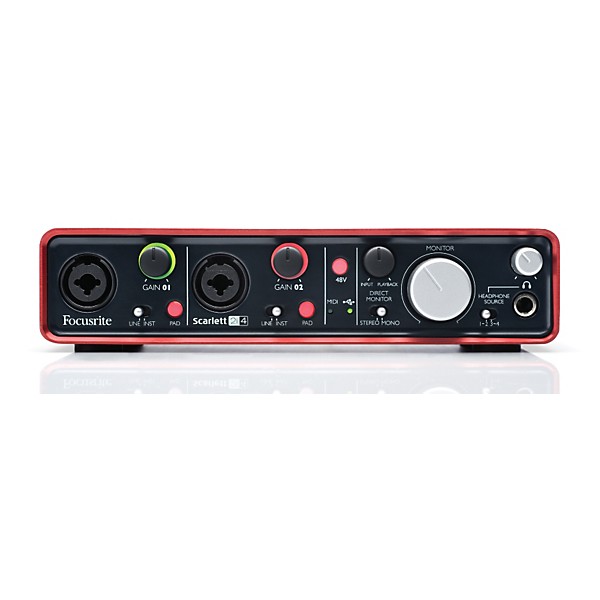
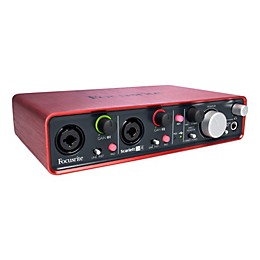
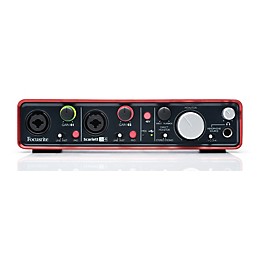
Connect Scarlett 2i4 to your computer and get ready to make music! With the very best in digital audio technology and a great selection of input and output options, the Scarlett 2i4 will capture and play back your sound with superb quality. The front panel has two combo XLR inputs to connect microphones, guitars and line level signals such as keyboards, safe in the knowledge that your sound is in the best possible hands. Use the “PAD” function for high-output guitars or microphones, and use the “DIRECT MONITOR” control for a low-latency mix of input and playback signals.
Checking your levels
Scarlett’s unique “signal halos” let you know that you’ve got the right audio level for recording. Green is good, while red means that your audio is too loud and you need to lower the gain control.
DJ-ready outputs
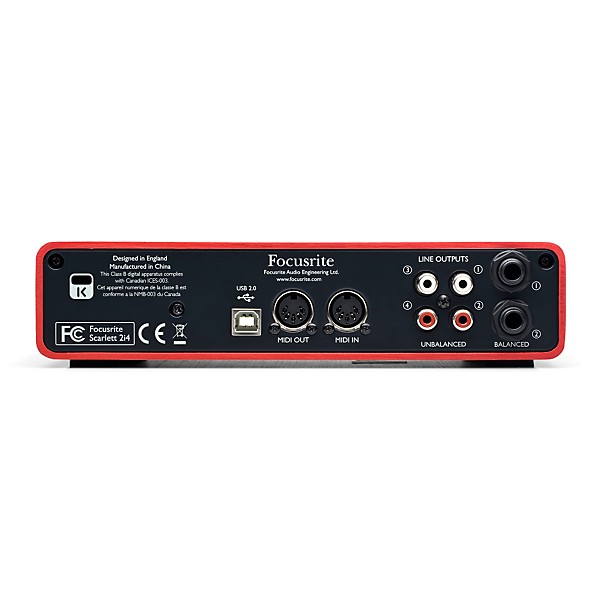
With 4 RCA outputs, a large, tactile main monitor level control and a high-level headphone output with its own volume control – along with pristine audio quality, in a package ready for the road – Scarlett 2i4 is ideal for today's digital performers and laptop-based DJs.
Note: Includes the Focusrite Red 2 and Red 3 Plug-In Suite (AAX/AU/VST) upon registration of interface. Accurately modeled on the classic Red 2 EQ and Red 3 Compressor, the Red plug-ins let you exploit the sound of the hardware originals, conveniently from within Pro Tools (10 and above) and other audio software.
Ready to make music
Connect Scarlett 2i4 to your computer and get ready to make music! With the very best in digital audio technology and a great selection of input and output options, the Scarlett 2i4 will capture and play back your sound with superb quality. The front panel has two combo XLR inputs to connect microphones, guitars and line level signals such as keyboards, safe in the knowledge that your sound is in the best possible hands. Use the “PAD” function for high-output guitars or microphones, and use the “DIRECT MONITOR” control for a low-latency mix of input and playback signals.
Checking your levels
Scarlett’s unique “signal halos” let you know that you’ve got the right audio level for recording. Green is good, while red means that your audio is too loud and you need to lower the gain control.
DJ-ready outputs
With 4 RCA outputs, a large, tactile main monitor level control and a high-level headphone output with its own volume control – along with pristine audio quality, in a package ready for the road – Scarlett 2i4 is ideal for today's digital performers and laptop-based DJs.
Note: Includes the Focusrite Red 2 and Red 3 Plug-In Suite (AAX/AU/VST) upon registration of interface. Accurately modeled on the classic Red 2 EQ and Red 3 Compressor, the Red plug-ins let you exploit the sound of the hardware originals, conveniently from within Pro Tools (10 and above) and other audio software.
Features
Audio Quality
- Max bit depth: 24-bit
- Max sampling rate: 96kHz
- Total inputs: 2
- Mic preamps: 2
- XLR/TRS combo jacks: 2
- XLR only jacks: 0
- 1/4" only jacks: 0
- S/PDIF in: 0
- ADAT/optical in: 0
- RCA in: 0
- Total outputs: 4
- XLR out: 0
- 1/4" out: 2 (TRS balanced)
- S/PDIF out: 0
- ADAT/optical out: 0
- RCA out: 4
- Computer connection: USB 2.0
- MIDI I/O: 5-pin In/Out
- Headphone output(s): 1
- Word-clock I/O: Not applicable
- Platform compatibility: Mac & Windows
- Phantom power: Yes
- Direct monitoring: Yes
- Onboard DSP: No
- Metering: Halo LEDs
- Display: No
- Latency control: No
- Monitor control: Yes
- Headphone control: Yes
- Width: 8.3" (210mm)
- Height: 1.9" (48mm)
- Depth: 5.5" (140mm)
- Weight: 2 lb.
- Construction: Unibody metal case
- Rack-mountable: No
- Included software: Ableton Live Lite, Novation Bass Station, Focusrite Scarlett Suite
Specs
Mic
Frequency Response 20Hz - 20kHz +/- 0.1 dB
THD+N < 0.002% (minimum gain, -1dBFS input with 22Hz/22kHz bandpass filter)
Equivalent Input Noise (EIN) < -120dB: measured at 55dB of gain with 150Î termination (20Hz/22kHz bandpass filter)
Gain Range +10dB to +55dB (0dB to +45dB when pad is engaged)
Max Input Level +3.5dBu
Line
Frequency Response 20Hz - 20kHz +/- 0.1dB
THD+N < 0.01% (˜A' weighted measured with +16dB input gain -1dBFS at output and 22Hz/22kHz bandpass filter)
Noise -90 dBu (22 Hz/22KHz bandpass filter)
Signal to Noise Ratio > 100dB
Gain Range -10dB to +35dB (-20dB to +25dB when pad is engaged)
Max Input Level +26dBu (at 1% THD+N)
Instrument
Frequency Response 20Hz - 20kHz +/- 0.1dB
THD+N 0.0025% (˜A' weighted measured with 16dB input gain, -1dBFS at output and 22Hz/22kHz bandpass filter)
Noise -87dBu (22Hz/22kHz bandpass filter)
Gain Range +10dB to +55dB (0dB to +45dB when pad is engaged)
Max Input Level +3dBu (+13dBu pad in)
Analogue Output Performance
Nominal Output Level
0dBFS = +10dBu, balanced
0dBFS = +5.5bBu, unbalanced
Frequency Response 20Hz - 20kHz +/- 0.2dB
THD+N
< 0.0015%, balanced (-1dBFS input 22Hz/22kHz bandpass filter, un-weighted)
< 0.03 %, unbalanced (0dBFS input 22Hz/22kHz bandpass filter)
Output Impedance < 12Î
Power Output into 32Î 24mW
Digital Performance
Clock sources Internal clock only
A-D Dynamic Range 105dB 'A-weighted' (all inputs). Converter chipset A-D dynamic range 114dB
D-A Dynamic Range 104dB 'A-weighted' (all outputs). Converter chipset D-A dynamic range 114dB
Supported sample rates 44.1 KHz, 48 KHz, 88.2 KHz, 96 KHz
Crosstalk
Input to Input Better than 90dB
Output to Output Better than 90dB
Input to Output Better than 85dB
Input Metering
Ring LED lit Green Signal present (-24 dBFS)
Ring LED lit Red Signal overload (0dBFS), peak held for approximately 1 second
Weight and Dimensions
Height 48 mm
Width 210 mm
Depth 140 mm
Weight 890 g
Frequency Response 20Hz - 20kHz +/- 0.1 dB
THD+N < 0.002% (minimum gain, -1dBFS input with 22Hz/22kHz bandpass filter)
Equivalent Input Noise (EIN) < -120dB: measured at 55dB of gain with 150Î termination (20Hz/22kHz bandpass filter)
Gain Range +10dB to +55dB (0dB to +45dB when pad is engaged)
Max Input Level +3.5dBu
Line
Frequency Response 20Hz - 20kHz +/- 0.1dB
THD+N < 0.01% (˜A' weighted measured with +16dB input gain -1dBFS at output and 22Hz/22kHz bandpass filter)
Noise -90 dBu (22 Hz/22KHz bandpass filter)
Signal to Noise Ratio > 100dB
Gain Range -10dB to +35dB (-20dB to +25dB when pad is engaged)
Max Input Level +26dBu (at 1% THD+N)
Instrument
Frequency Response 20Hz - 20kHz +/- 0.1dB
THD+N 0.0025% (˜A' weighted measured with 16dB input gain, -1dBFS at output and 22Hz/22kHz bandpass filter)
Noise -87dBu (22Hz/22kHz bandpass filter)
Gain Range +10dB to +55dB (0dB to +45dB when pad is engaged)
Max Input Level +3dBu (+13dBu pad in)
Analogue Output Performance
Nominal Output Level
0dBFS = +10dBu, balanced
0dBFS = +5.5bBu, unbalanced
Frequency Response 20Hz - 20kHz +/- 0.2dB
THD+N
< 0.0015%, balanced (-1dBFS input 22Hz/22kHz bandpass filter, un-weighted)
< 0.03 %, unbalanced (0dBFS input 22Hz/22kHz bandpass filter)
Output Impedance < 12Î
Power Output into 32Î 24mW
Digital Performance
Clock sources Internal clock only
A-D Dynamic Range 105dB 'A-weighted' (all inputs). Converter chipset A-D dynamic range 114dB
D-A Dynamic Range 104dB 'A-weighted' (all outputs). Converter chipset D-A dynamic range 114dB
Supported sample rates 44.1 KHz, 48 KHz, 88.2 KHz, 96 KHz
Crosstalk
Input to Input Better than 90dB
Output to Output Better than 90dB
Input to Output Better than 85dB
Input Metering
Ring LED lit Green Signal present (-24 dBFS)
Ring LED lit Red Signal overload (0dBFS), peak held for approximately 1 second
Weight and Dimensions
Height 48 mm
Width 210 mm
Depth 140 mm
Weight 890 g
Reviews
3.63
16 Reviews
75%
of respondents would recommend this to a friend
Most Liked Positive Review
4
Easy to use. Sounds great.
I write this review from an intermediate/expert POV. I've been working in DAWs for about 5 years, and I have a few years experience running live sound at clubs/bars and recording my band. I own an MBox Mini2 and an AudioBox 2x2. The Focusrite sounds way cleaner; virtually noiseless compared to the others. The 2i4 supports up to 96k, which sounds fabulous. If your CPU can handle higher sampling rates, it does make a difference: even if only sound snobs can hear it! I was a bit concerned BEFORE I bought the 2i4 about some of the reviews about latency issues and configuration... Just read some Youtube comments on pro audio stuff. Anyway, the unit installed very easily. Works great in both Reason and Ableton. In terms of latency, it has significantly less than my other interfaces, 5 ms to be exact with normal buffering in Reason and a staggering 1 ms in Ableton. I sent some signals to my KP3 and back into Ableton and it sounded boss; latency unnoticeable. There's no DVD that comes with it, you gotta download everything, which is sweet. Not another disc to add to my 25 other software DVDs. Included was the option to download Ableton Live Lite 8, Novation Bass Station VST, a set of Focusrite VSTs, and 800 MB worth of Loopmasters Samples. I already own Ableton Suite 8 so that didn't benefit me, but for people who might want the full version of Ableton later, owning the Lite version gets you cheaper upgrades. The Novation Bass Station is sweet/simple, although I work mostly in the Komplete 8 synths and Reason's stuff. The Focusrite plugs include a gate, compressor, eq and reverb, which were better than I expected. For you newbs out there, VSTs can't be used in Reason. But you're not excluded in the extras...The Loopmaster Samples are actually really HQ, and it came with a decent Refill for Reason users (in addition to the useable WAV library). The only negative I have about the 2i4, which hasn't yet been a problem is that the XLR inputs and especially the phantom power buttons are pretty cheap. The unit rattles when you move it from the buttons being so loose. The chassis itself is rugged/built tough. So pack it up carefully if you're gonna take it on the road. Looks good, sounds good, great features/extras, and even though I haven't had to use it, Focusrite has really good tech support, unlike AVID or Propellerhead. Rock on!
VS
Most Liked Negative Review
2
Hoping third time is a charm
Purchase a 2i4 after hearing reviews about the sound quality. Yes, there were issues noted with the early USB drivers but that was resolved with the updated drivers. What I did not expect was to pick up the first unit only to have to return it due to a difference in L/R volume going to the headphones. No sound at all at low levels that seemed to eventually balance out as the volume was increased. This was verified using several audio tracks as well as a mono frequency sweep track. That is not acceptable especially since there is no way to know that the volume is truly equal or merely sounds "close". The first unit was returned and another new 2i4 was checked at the store for headphone L/R balance. The new unit seemed to work fine with the headphones and was taken home. Only after hooking up a pair of powered monitor speakers to the balanced outputs did this one reveal that it too had its own L/R balance problem. This was verified once again using several audio tracks and the mono frequency sweep. The speakers and cables were switched to verify it was a problem with the 2i4 itself. Two different 2i4s, two different problems. Guitar Center is being very helpful and they are ordering another one and I will be testing the third 2i4 completely before leaving the store this time. The feature/price ratio on the 2i4 is very good. The overall sound quality is excellent and the bundled software is nice but to fail to accurately reproduce the music volume is what makes an otherwise 5 star product get rated a 2.
Filters
Best Uses
- Home Studio2
- Professional Recording2
- Amateur Recording1
Cons
- Unreliable1
- Short usb cable1
- Written Document Incomplt1
Describe Yourself
- Experienced2
- Professional Musician2
Pros
- Durable3
- Good Audio3
- Compact2
- Easy To Use2
- Lightweight2
Reviewed by 16 customers
I can connect via the RCA outputs from Scarlett 2i4 to pedal
submitted9 years ago
byuser
fromrussia
Hi guys! Help to understand " I can connect via the RCA outputs from Scarlett 2i4 to pedal BOSS re20? And from the boss to send sound to Scarlett 2i4 on Inputs 1 & 2 - "Combo" I'm going to sound from the computer to process re20 and again bring to map and record. please who knows what! Thank you!
Great bang for buck
Verified Buyer
submitted9 years ago
bySteve
fromundisclosed
Great for home recording and entry-level DJing. Highly recommended.
Needs more power than the laptop USB has
Verified Buyer
submitted9 years ago
byRon Peynado
fromMercedes, TX
Had to buy additional $50 powered USB hub to make it work with my laptop, which was plugged in to the wall
NOPE
submitted10 years ago
byMr F
fromDFW, TX
Plugged into my late 2012 iMac, every time after I put my computer to sleep, this thing needs to be unplugged and plugged back in for it to function, whether thru my DAW or just playing audio in general. Never had this issue with my previous Presonus Audiobox (therefore it's NOT an issue with my computer) so I'm returning this and going back to the Audiobox for now. Sure it sounds pretty good and the features are decent for the price but I shouldn't have this problem.
Did not operate properly
Verified Buyer
submitted10 years ago
byRobert
fromundisclosed
did not operate
Very Pleased After Using For Six Months
submitted10 years ago
byG in NH
fromNew Hampshire
I have been using my Scarlett 2i4 for about 6 months now. I needed to get a new interface when my old computer had died, and the new machine did not have space for Firewire or PCI inputs. I was a little concerned about using USB 2.0 for recording, but decided to try the Focusrite based on my very good experience with the iTrack Solo for my iPad. As an aside, I also demoed some other brands too, just to make sure. I should not have worried. The Scarlett has performed perfectly. The drivers are very stable. (I am using Sonar Platinum on a Windows 8 machine with an i7 and 16gb of RAM) This was a big deal for me, since I did find other the interfaces I tested to be very glitchy. I know that there are a lot of variables in that equation, so the behavior of the others may not be their fault, but I don't want to be hunting issues down, I just want to plug and play, so to speak. The Focusrite device did just that. With regards to the sound of the interface, I find it to be transparent, which is what I was looking for. I don't want it coloring my signal, I have plug-ins for that. I am also usually tracking through a mixer into the Scarlett, so I rely on the mixer any pre-amp needs. The build quality is excellent; I don't need it to be portable, but I would have no fear taking this on the road. It's very sturdy and the knobs are great. It's very flexible as far as monitoring, headphones, inputs, etc. It's just a great device. I also needed to reach out to the Focusrite support team for some questions. I used their e-mail system, and had a response within 1 day. This is far superior to what I have experienced with other companies. They were knowledgeable and dealt with my questions quickly and accurately. In short, I am happy with the decision I made, and would make it again. In case you were wondering, I do voice-over work professionally, and also music (more hobbyist/semi-pro there, i.e., I have a distribution agreement, not a full-on record deal)
Q&A
Have a question about this product? Our expert Gear Advisers have the answers.
No results but…
You can be the first to ask a new question.
It may be Answered within 48 hours.
Be the first to know about exclusive offers, tips and more.

866-498-7882 English
877-687-5402 Español