

StudioMonitorsMixing


Pro Gear Advisers
•866-498-7882
Guitars
Guitars
Amps & Effects
Amps & Effects
Used & Vintage
Keyboards & MIDI
Keyboards & MIDI
Drums
Drums
DJ Equipment
DJ Equipment
Basses
Basses
Recording
Recording
Live Sound
Live Sound
Accessories
Accessories
Mics & Wireless
Mics & Wireless
Music Software
Music Software
Lighting
Lighting
- Popular Brands
Band & Orchestra
Band & Orchestra
Platinum Gear
Deals

Description
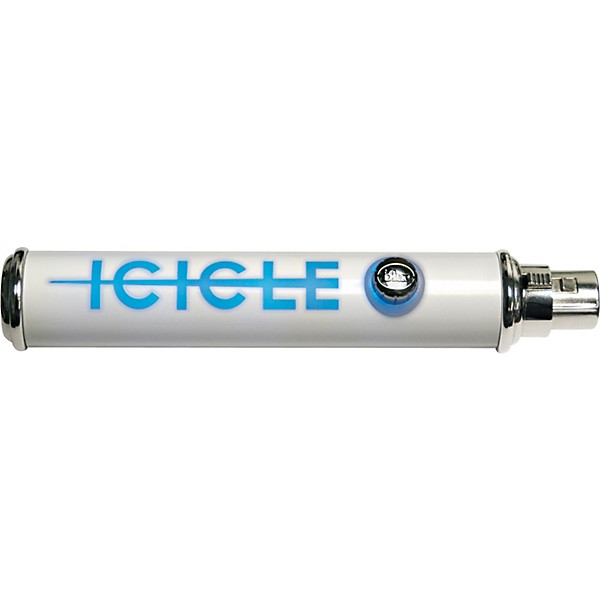
The Icicle XLR to USB Converter/Mic Preamp lets you easily connect your favorite microphone directly to your Mac or PC. The Blue Icicle performs dual functions as an XLR to USB adapter and a studio-quality microphone preamp. It features an analog gain control and also provides 48V phantom power for condenser microphones. The Icicle converter and preamp is the quick-and-easy way to perform digital recording, podcasting, and voice messaging. Includes 6ft. USB cable
Features
- Works with Mac or PC computers
- No Special Drivers Required
- Studio Quality USB microphone preamp
- Supplies 48V phantom power for . condenser microphones
- Phantom power active light
- Fully balanced low noise analog front end
- Analog gain control
Specs
- Sample/Word: 44.1K/16 bit
- Power Consumption: 200mA (from USB bus)
- System Requirements:
- Macintosh: Mac OSX with USB 1.0 or 2.0 and 64 MB RAM (minimum)
- Windows: XP Home Edition, Professional or Vista with USB 1.0 or 2.0 and 64 MB RAM (minimum) (Not compatible with Windows 7)
Reviews
3.76
17 Reviews
80%
of respondents would recommend this to a friend
Most Liked Positive Review
5
Awsome usb/preamp
This works really well as a preamp/connection for usb from your mic to your computer.I have made a few songs already and i have had no probs just had to set everything up and now i have basically a plug in play mic when ever i need it i just plug it in to my usb port and im good 2 go.
VS
Most Liked Negative Review
2
A simple, easy-to-use device with one major flaw
The Blue Icicle is a great-looking and great-performing device and despite what other reviews have mentioned, it works fine with Win 7. Simply plug it into your USB, and your computer will recognize it. Then open your recording software of choice, and you'll be all set. This device has one very major flaw though. Because you'll have to monitor dubs through your computer, you CANNOT multitrack / dub with this unit. Due to the latency, your overdubs will always come with a half-second or so delay. This unit is great if you plan to make simple one-track recordings, such as podcasts, but if you plan on using it to multitrack music, forget about it. Impossible.
Filters
Best Uses
- Amateur Recording5
- Home Studio5
- Pro Audio / DJ / Mixing2
- Outdoor Events / Games1
Cons
- Missing Cable1
- Poor Sound Quality1
- Pricey / Poor Value1
- Unreliable1
- latency1
Describe Yourself
- Novice4
- Experienced1
Pros
- Lightweight5
- Easy To Use4
- Good Audio4
- Compact3
- Versatile2
Reviewed by 17 customers
Great device, but missing USB cable.
submitted6 years ago
byTablaProfundo
fromImperial County, CA.
Allows digital recording with a variety of instruments and pedals via XLR and preamp to USB without additional software. Would give 5 Stars but item arrived by mail without USB/Device cable. However, I have one from a Blue Yeti USB microphone that is compatible with the ICICLE.
Pretty good!
submitted7 years ago
byC08pal
fromNew Hampshire
On the package it doesn't say it works with Windows 10, but it does! It does take a bit to do that, thought - I had to replug it in several times to get Windows to recognize it. After that, I had to go into the control panel, click on voice recognition (the one with the microphone symbol), and set it up. After that it worked really well!
Great product
Verified Buyer
submitted7 years ago
byjohn
fromUndisclosed
this product is perfect for linking a Dayton microphone to my laptop to use TruRTA for in-car frequency response
Latency
submitted8 years ago
byAvichi
fromrockford il
When I connect this to the mic directly and than to the computer I get a bad latency when I record I have tried every trick and tip to cover it up and nothing is working, I even bought a superior xlr cord and connected them that way and all I got was white noise and a bit of latency.
Works with my Samsung Chromebook II
submitted8 years ago
bypiper
fromNew Brighton, MN
I used the Twisted Wave online editor, and it records just great with my Chromebook II. I have a standard flute, and it sounds great through three octaves. To configure the mike in the Chromebook, click on the time in the lower left corner, then the arrow to the right of the speaker volume adjustment. Then audio adjustments appear. Then you can select the input audio device.
Simple, stupid, but reliable
submitted10 years ago
byJoe
fromSan Jose, Ca
I actually wanted to use my XLR mics for Skype. I have a Presonus Audiobox USB, and it's not very stable. It has a tendency to drop out. This device is quite stable One thing you have to watch out for is the Online Windows Driver Update. It will download the wrong one. An online tip suggested disconnecting your PC from the Internet to make sure the right driver is loaded. Once that's done, I didn't have to disconnect the PC from the Internet. After that, it's nice and stable. It's quite simple and doesn't have a 48V shut off button, but overall it works. Unplugging the USB from the back of the unit and plugging it back in didn't give me any troubles. I do use an XLR cable with it, and I do prefer it this way.
Q&A
Have a question about this product? Our expert Gear Advisers have the answers.
submitted5 years ago
asked byGeo
fromCA
Is it compatiblewith windows 10?
This item would be compatible with Windows 10.submitted6 years ago
asked byJason
fromElkhart, IN
Will this product work with iOS devices
It works with a Mac.
Be the first to know about exclusive offers, tips and more.

866-498-7882 English
877-687-5402 Español