


StudioMonitorsMixing


Pro Gear Advisers
•866-498-7882
Guitars
Guitars
Amps & Effects
Amps & Effects
Used & Vintage
Keyboards & MIDI
Keyboards & MIDI
Drums
Drums
DJ Equipment
DJ Equipment
Basses
Basses
Recording
Recording
Live Sound
Live Sound
Accessories
Accessories
Mics & Wireless
Mics & Wireless
Music Software
Music Software
Lighting
Lighting
- Popular Brands
Band & Orchestra
Band & Orchestra
Platinum Gear
Deals
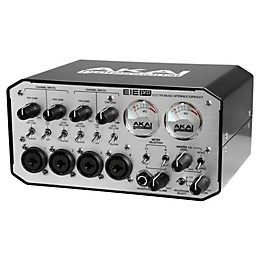
Akai Professional EIE PRO 24-bit Audio/MIDI Interface with USB Hub
$249.00

Need Help?

Description
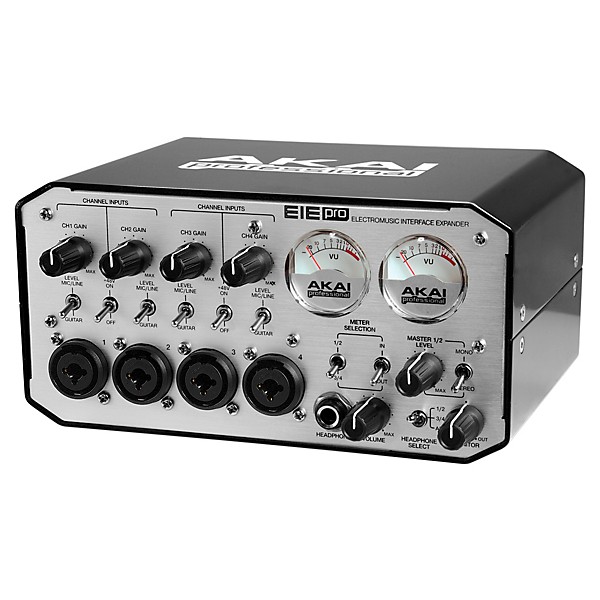
The Akai EIE PRO (Electromusic Interface Expander) I/O is a tabletop USB audio interface perfectly tailored for your project and portable studio setups. This four-in, four-out (4x4) device enables you on Mac and PC-based systems to record at 24-bit audio resolution at sample rates of 44.1kHz, 48kHz, and 96kHz into virtually any DAW, recording or performance software. The EIE PRO I/O also houses three convenient USB inputs, in addition to its main USB port, enabling you to connect controllers, hard drives or any other peripheral when native ports on a computer may be limited. The compact recording interface contains high-quality components including nickel-plated input jacks, analog-style VU meters and a rugged aluminum casing for a powerful, professional, portable audio solution.
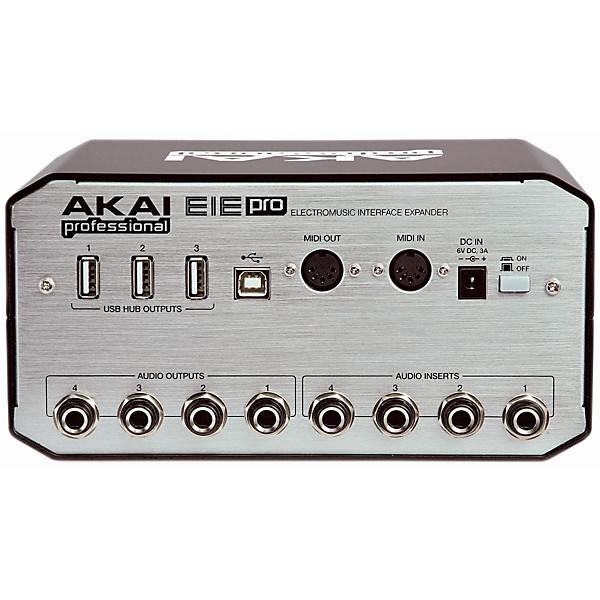
Each channel of the EIE PRO I/O has an XLR/TRS combo jack, dedicated sturdy, gain-pots and Mic/Line/Guitar switches. The EIE PRO I/O features four discrete-design preamplifiers with 48V phantom power for use with virtually any microphone. Individual 1/4" Nickel-plated jacks found on the back of EIE PRO I/O provide you with channel inserts for processing audio signals externally. You can monitor sessions on multiple sets of studio monitors using the four 1/4" balanced outputs, which are also Nickel-plated. Both pairs of outputs can be monitored visually with the high-quality, analog VU meters providing classic features with modern style. For remote tracking and alternative playback, the EIE PRO I/O has a 1/4" TRS headphone output. High quality analog-to-digital and digital-to-analog converters ensure that every detail of your session or performance gets captured and played back faithfully.
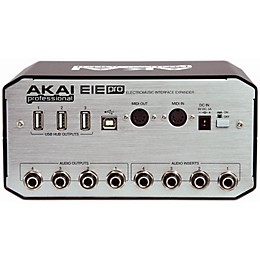
The EIE PRO I/O sends and receives four audio channels on a single USB cable for simple, universal interface to a computer. The three additional USB ports allow EIE PRO I/O to function as a hub as well, bridging other MIDI controllers and hard-drives to the computer. The USB interface is class compliant for plug-and-play operation with Mac OS X and Windows XP, Vista and 7. The EIE PRO I/O features traditional MIDI In and Out jacks for playing and controlling software with keyboard and pad controllers, workstations, and other MIDI-compatible instruments.
Each channel of the EIE PRO I/O has an XLR/TRS combo jack, dedicated sturdy, gain-pots and Mic/Line/Guitar switches. The EIE PRO I/O features four discrete-design preamplifiers with 48V phantom power for use with virtually any microphone. Individual 1/4" Nickel-plated jacks found on the back of EIE PRO I/O provide you with channel inserts for processing audio signals externally. You can monitor sessions on multiple sets of studio monitors using the four 1/4" balanced outputs, which are also Nickel-plated. Both pairs of outputs can be monitored visually with the high-quality, analog VU meters providing classic features with modern style. For remote tracking and alternative playback, the EIE PRO I/O has a 1/4" TRS headphone output. High quality analog-to-digital and digital-to-analog converters ensure that every detail of your session or performance gets captured and played back faithfully.
The EIE PRO I/O sends and receives four audio channels on a single USB cable for simple, universal interface to a computer. The three additional USB ports allow EIE PRO I/O to function as a hub as well, bridging other MIDI controllers and hard-drives to the computer. The USB interface is class compliant for plug-and-play operation with Mac OS X and Windows XP, Vista and 7. The EIE PRO I/O features traditional MIDI In and Out jacks for playing and controlling software with keyboard and pad controllers, workstations, and other MIDI-compatible instruments.
Features
- USB audio interface with up to 24-bit recording resolution supporting all standard sample rates (44.1kHz/48kHz/88.2kHz/96kHz)
- Four XLR-1/4" combo jacks with phantom power and gain control
- Four nickel-plated 1/4" outputs for two separate monitoring systems
- Two classic, high-quality VU level meters with switchable sources
- Three additional USB ports for connecting other devices through to a computer
- Four 1/4" channel inserts for processing audio signals externally
- 5 Pin DIN MIDI Interface
- Headphone output with switchable source and direct monitoring dial
- Tabletop, solid construction with a great-looking, classic design
- Includes power cable, quick start guide
Specs
USB AUDIO INTERFACE
- Sampling Rates: 44.1kHz, 48kHz, 88.2kHz, 96kHz
- Resolution: 24-bit
- Interface: USB 2.0
- Frequency Response: 20Hz to 21kHz (+/-0.05dB)
- Dynamic Range (@-60dB input): 96dB, A-weighted
- S/N: 96dB, A-weighted
- THD+N: 0.001% @ 1kHz / -0.1dBFS
- Crosstalk: 93dB @ 1kHz / -0.1dBFS
- Pre-amp THD+N: 0.018%
- Mic gain (MIC): +9dB to + 51.5dB
- Mic impedance: 6.3K?
- Line gain: -10.5dB to +41dB
- Line impedance: 55K?
- Guitar gain: +1.6dB to 53.1dB
- Guitar impedance: 102K?
- Input sensitivity: 0dBFS @ +6dBV
- Input impedance: 10K?
- Output level: +6dBV @ 0dBFS
- Frequency Response: 20Hz to 20kHz (+/-0.25dB)
- Dynamic Range (@-60dB input): 98dB, A-weighted
- S/N: -100dB, A-weighted
- THD+N: 0.006% @ 1kHz/0dBFS
- Crosstalk: 97dB @ 1kHz/0dBFS
- Unclipped output power: 10mW @ 1kHz
- Frequency Response: 20Hz to 20kHz (+0.25dB)
- S/N: -100dB, A-weighted
- THD+N: 0.007% @ 1kHz / 0dBFS
- Crosstalk: 95dB @ 1kHz / 0dBFS
- Unclipped output power: 3.4 mW @ 1kHz
- Frequency Response: 20Hz to 20kHz (+0.25dB)
- S/N: -100dB, A-weighted
- THD+N: 0.003% @ 1kHz / 0dBFS
- Crosstalk: 95dB @ 1kHz / 0dBFS
Reviews
3.4
5 Reviews
0%
of respondents would recommend this to a friend
Reviewed by 5 customers
Great Interface for the Money
submitted12 years ago
byChristopher Ingalsbe
fromEmmaus, PA
I got this interface a few weeks ago and have been using it regularly for home recording ever since. My experiences with the product so far have been nothing but positive. The specifications for the EIE Pro seem almost too good to be true upon first glance. The maximum bit depth and sample rate capabilities are definitely on the professional end of the market, there are 4 hybrid connectors for easy connection of multiple microphones and quarter inch cable inputs, and the unit looks and feels very solid and high-quality. This interface seems like a great deal when you see the specifications, beautiful design and modest price tag, but how does it hold up hands-on? From my experience so far, it can produce some great results. The audio quality is clean and unadulterated when using any sample rate or bit depth setting. The latency is much better than I expected when running it through my Macbook Pro. I use Logic Pro 9 and I have been using the second smallest buffer setting with no artifacts or distortion. The face of the EIE Pro is easy to navigate and set up for any common recording application and the driver seems to work without a hitch. I really enjoy the mixing dial component for mixing signals going into and out of the computer through the headphone output. The EIE Pro is perfect for my recording needs, but it does have some limitations to its greatness. To start off with, the VU meters can be much harder to monitor than an LED strip. This isn't a huge annoyance because you can monitor input levels in most DAWs, and the VU meters do alert you of clipping with a cool flash of red, but LED strips to gauge signal strength would have been preferable for me. Another minor annoyance is that phantom power is paired off into the first and last two channels. You cannot switch phantom power for an individual input. Similarly, the VU meters must be assigned to the first two or second two inputs. However, all three of these minor annoyances I have with the unit are easily explained by Akai wanting to make a compact and affordable product. I can't complain too much about that. All of these features work flawlessly. Overall the Akai EIE Pro is a great buy for the money. I can't say with any certainty that it would function adequately in a professional environment, but I can't think of a reason why it would not. This unit seems to be designed more for home studio recording because of its price and manufacturer. I can testify that it works more than adequately for that.
Amazing Interface
submitted12 years ago
byJames Combs
fromMichigan
Have had this for a year no problem's whatsoever. I am a Pro at what I do (producer/engineer/Musician 20 years) and I get GREAT quality recordings every time. Most times its not the interface its the producer/engineer..
Terrible Interface
submitted12 years ago
byIsaac Jarman
fromMt. Pleasant, MI
I first hooked the interface up, installed the drivers and software, and was greeted to a raunchy hiss when I first plugged my headphones in. After their tech support laboriously (after spending maybe three hours on the phone) directed me to install the updated firmware, which I did, the unit worked fine for about a month - until I updated my Mac to OS Mavericks. Four months have passed since Mavericks has been released, and Akai has yet to release a working driver. There are hundreds of people on their tech support website complaining, and there has been no help. Buy a Focusrite Scarlett, if you are looking for an interface within this price range. Do not buy this product.
Does NOT work with Mac - new IOS -- Maverick!!!
submitted12 years ago
byRobert Kyser
fromAustin, Texas
AS of October 31, 2013 this IO will not even be recognized by IOS 10.9 Maverick. DO NOT BUY until this is fixed. I bought a brick at the moment.
hard ware
submitted13 years ago
bynoah montena
fromSyracuse, NY
I think the EIE Pro is my new favorite laptop interface. There are a lot of them out there these days, in a variety of configurations, and they all have their place. the Tascam US-144 or Scarlett 2i2, for instance, are high quality, dual analog input converters which are bus-powered, not needing to plug in to anything but your laptop, which is handy for truly portable recording. The MOTU Ultralite, or the newer 4pre, or even the insane Track16, are great for highend A/D converters, multiple I/O, hybrid USB/Firewire connectivity, and software-based mixer desk controls with massive DSP channel strip capabilities. And then there are the bigger but compact rackmount interfaces like the Mackie Onyx Blackbird, or any number of Tascam, Focusrite, M-Audio, Presonus, or MOTU units, which have oodles of I/O, and a satisfying 120V rocker on/off switch. But what do you do when your laptop only has two USB ports? One of them hosts your interface, the other has your MIDI controller or a mouse. Where do you plug in your iLok for all that awesome software your i5-equipped, 750GB lapjob is capable of running now? The EIE series from Akai has that covered. In addition to 4 analog combo-jack pres, 4 balanced 1/4" outputs, a headphone jack, 4 insert points, and a pair of 5-pin DIN MIDI sockets, the EIE I/O (hee hee) and EIE Pro (wait, that's not funny) both have a three port USB 2.0 hub built in. Yes. On top of that, these little beasts are built like gear out of a WWII bomber cockpit, with heavy guage sheetmetal housings, analog VU meters, and lots of solid little toggle switches. The fact that a compact portable like this has 4 preamps for two and a half Benjamins is reason enough to buy it, but the integral USB hub really sets it apart from the other boxes out there. The only caution I would offer is that the driver is made by the same company which makes Tascam's drivers (Polytec from Germany), and I have not had 100% compatibility with every computer I've tried installing their drivers on. Acer laptops and netbooks in particular seem to have problems. My Lenovo and Mac laptops seem to be just fine, however.
- Previous
- 1
- Next
Q&A
Have a question about this product? Our expert Gear Advisers have the answers.
No results but…
You can be the first to ask a new question.
It may be Answered within 48 hours.
Be the first to know about exclusive offers, tips and more.

866-498-7882 English
877-687-5402 Español