
Gear SpecialistBundlingMusician


Pro Gear Advisers
•866-498-7882
Guitars
Guitars
Amps & Effects
Amps & Effects
Used & Vintage
Keyboards & MIDI
Keyboards & MIDI
Drums
Drums
DJ Equipment
DJ Equipment
Basses
Basses
Recording
Recording
Live Sound
Live Sound
Accessories
Accessories
Mics & Wireless
Mics & Wireless
Music Software
Music Software
Lighting
Lighting
- Popular Brands
Band & Orchestra
Band & Orchestra
Platinum Gear
Deals

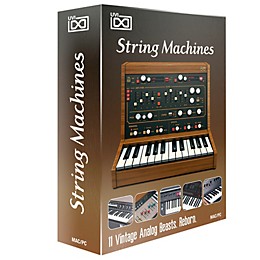
UVI String Machines 11 Analog String Synths Software Download
$99.00

Save on orders $199+ and get expert advice from a Gear Adviser
Need Help?
Description
Back in the 70's, leading keyboard designers around the world attempted to reproduce orchestral string sounds through analog synthesis. The results were far from their original intent but were in no way failures. Used on countless cult records and engrained in our collective memory to this day, these 'String Machines' bore an analog soul on their own.
UVI spent countless hours working to faithfully capture these analog souls and present them in an accessible, expressive, fully editable digital tool. So was born String Machines; a hybrid instrument, forged with the analog imprint of the 11 most musical string synthesizers ever built. Thousands of samples, painstaking recorded with the very best analog and digital gear available, combined with a deep knowledge of analog modeling and advanced signal processing; UVI applied everything they've learned in order to bring you this comprehensive instrument.
UVI String Machines is your doorway to a grand collection of analog gems from some of the most esteemed synth pioneers of our time.
UVI spent countless hours working to faithfully capture these analog souls and present them in an accessible, expressive, fully editable digital tool. So was born String Machines; a hybrid instrument, forged with the analog imprint of the 11 most musical string synthesizers ever built. Thousands of samples, painstaking recorded with the very best analog and digital gear available, combined with a deep knowledge of analog modeling and advanced signal processing; UVI applied everything they've learned in order to bring you this comprehensive instrument.
UVI String Machines is your doorway to a grand collection of analog gems from some of the most esteemed synth pioneers of our time.
Features
- Size : 1.28 GB library
- Collection : Vintage String Machines
- Content : 15 instruments, 16 presets, 2,794 samples
- Sample Resolution : 44.1 kHz. Recording at 96 kHz.
Specs
Formats
- Stand-alone, VST, RTAS, AAX, Audio Unit
- Mac OS X version 10.5.8 or later (64-bit | 32-bit), Mac Intel processor, 2 GB of RAM
- Windows 7 or Vista SP2 or later (64-bit | 32-bit), Core Duo or faster processor, 2 GB of RAM
- 1.28 GB available disk space
- Hrd drive : 7200 rpm recommended or Solid State Drive (SSD)
- An iLok account and an iLok smart key (version 1 or 2), which must be purchased separately
- The free UVI Workstation or MOTU MachFive 3 (latest versions)
- 1. After receiving your product go to www.uvi.net to register :
- log in to your account
- from the Account menu, go to My Account ‰« Product Registration
- enter your Serial Number and iLok User ID
- 2. Log into your iLok account and download your new license to an iLok dongle
- 3. Make sure you have the latest version of UVI Workstation or MOTU MachFive 3 installed
- 4. Install the UFS library :
- create a directory on your system called UFS Sound Banks and place your UFS files in it
- launch UVI Workstation or MachFive 3
- go to Preferences ‰« Sound Banks and add the UFS Sound Banks directory OR use one of the default folders listed
Reviews
Be the first to review the Product
Q&A
Have a question about this product? Our expert Gear Advisers have the answers.
No results but…
You can be the first to ask a new question.
It may be Answered within 48 hours.
Be the first to know about exclusive offers, tips and more.

866-498-7882 English
877-687-5402 Español